Among the various genres of photography, portrait photography can be one of the most demanding ones. Clients who demand the best portraits usually have high expectations and hence it is a pressure on the photographer to produce stellar and immaculate images to please the customers.
Thankfully, with the plethora of software options that we have in the market, creating a perfect portrait is no longer a far-fetched dream.
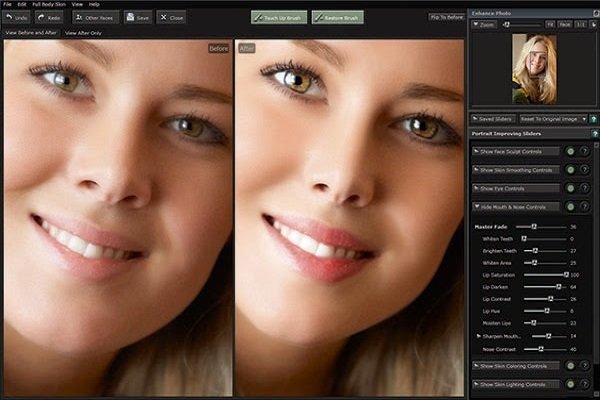
While there are many who prefer outsourcing the task of image retouching to people with greater efficiency, owning Portrait Pro can also be a good alternative.
The 18th version of this software will ensure you enhanced efficiency and complete control. So, if you’re a photographer who is interested in clicking good portraits, don’t make any decision before you read this review of Portrait Pro.
Portrait Pro – How does it work?
Portrait Pro, as a software program, comes in three varied versions – Standard ($45), Studio ($70) and Studio Max ($140). In case you are a photographer who shoots in RAW and wishes to utilize this plug-in, you will require any of the two Studio versions.
Apart from the RAW compatibility and the batch mode, all the features that we’re going to discuss here are there in all the three versions of the software.
As you grasp the navigation of the program, you’ll find the software to be pretty intuitive. They have pop-up tool tips that are immensely useful as they give you the basic details regarding the software.
If you click the question mark that you find in the Controls panel, the link will direct you to the user manual section. Hence, all your doubts will be solved.
You have to download the PDF user manual from the website’s support section for help. Due to the abundance of features of Portrait Pro, you may even tend to overlook a few.
Hence, it is advised that you take a closer look at the reference section of the manual to know the options that are there in every section.
Anthropics brought forth several vital updates in Portrait Pro 18 and this included the ability to add logos to images. The Artificial Intelligence capacities have also been improved.
The software will use advanced AI to create a mask of facial features like lips, nose, eyes, hairline, eyebrows and skin. With the help of these options, you can rectify different areas of the face through sliders. However, you have to begin with by choosing whether the subject is a male, female or a child.
Manual Adjustments done right with Portrait Pro
To start off with a base preset, you are also allowed to make certain adjustments to any facial feature that you want to. In case the photo is a full-body shot, you are allowed to make adjustments to the skin that is visible and the part of Portrait Pro’s selection.
When we say full-body adjustments, we also mean slimming down. The controls can be categorized into 9 sections like.
- Face Sculpt
- Skin Lighting and Coloring.
- Skin Smoothing
- Eye
- Makeup
- Mouth and Nose
- Picture
- Hair
- Background.
With each and every heading, there are too many categories and sub-categories from which you may choose with ease.
4 Reasons why you should add Portrait Pro to your workflow
For all those who are wondering why exactly you should add Portrait Pro to your workflow to make your work better, here are the four biggest reasons that every portrait and wedding photographer should consider.
You’ll get expert results each time
Did you waste more than an hour in Photoshop on one portrait, trying the Puppet Warp tool or the liquefy tool only to realize that nothing’s working according to your needs?
A dedicated and controlled environment like Portrait Pro offers tools that help you take off the guesswork out of which tip to use and makes sure that all your retouches are professional. There are times when all you may need is basic skin smoothing and at other instances, you may only need to whiten the eyes or teeth.
Workflow speed and simplicity
The ultimate question how many hours would you like to spend in editing photos? Though the editorial, commercial or fashion photographers might just have few retouching jobs, wedding and portrait photographers usually find themselves buried under print orders.
If you’ve been in business for 5 to 10 years, you will receive more than hundred print orders all at once. Now if you don’t want to compromise the final product, use Portrait Pro. You can edit 1 or 2 test images and if you think they’re fine, the software will automatically apply those edits to all the selected images. This saves all your time.
Alter lighting effects in post production
Did you ever dream of shooting in simple-light location and still be able to add a touch of Rembrandt or Paramount lighting during post-production? Or may be a catchlight? All these can be done with the help of Portrait Pro as it leverages its facial feature recognition.
You are allowed to apply a realistic and noticeable adjustment to the directionality of your lighting. If you have enough time, you can also try utilizing the best light while clicking the photo through your camera.
Safe and exact proportion reshaping
This wedding and portrait photography studio is expert in portraits and weddings and hence it photographs real brides as against models. Would you ever want to show a client that a portrait has been retouched? It is actually awkward to tell your client that his nose was too big and hence needed to be fixed!
The reason you should trust Portrait Pro is because of its Reshaping feature that ensures that all the proportions are reshaped accurately. Don’t let your clients see the ‘before/after’ versions of the images unless they coax you to show.
So, whether you’re a portrait or a wedding or a commercial fashion photographer, it’s your main task to make your client look good. Handling all the retouching jobs will seem to be a pipe dream but when you have the right tools at hand, things get easier. Portrait Pro can let you retouch your editing game and help you save money and time.