Quick answer: PortraitPro is a dedicated portrait retouching program for Windows and Mac from Anthropics. It detects faces and features automatically and lets you adjust skin, eyes, mouth, face shape, hair and lighting with sliders. As of October 2026, the current version is PortraitPro 24, sold in three editions; the vendor’s store listed PortraitPro 24 at $65.95, Studio at $99.95 and Studio Max at $199.95. You need Studio or Studio Max for RAW files, and Studio Max for automatic batch processing.
What PortraitPro is
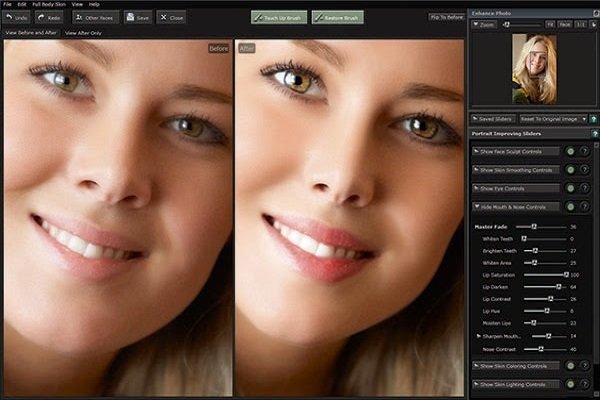
PortraitPro (formerly marketed as Portrait Professional) is software built only for retouching portraits. Instead of asking you to paint masks by hand, as you would in Adobe Photoshop, it uses AI to find the face, recognise individual features and apply retouching through sliders. It is aimed at portrait, wedding and event photographers who edit many faces, and at enthusiasts who want natural-looking results without advanced retouching skills.
When we first reviewed it, the current release was PortraitPro 18. In October 2026, the vendor’s website lists PortraitPro 24.
Editions and pricing
PortraitPro is sold per version, with paid upgrade paths from earlier versions and between editions. These prices appeared on the vendor’s PortraitPro store page in October 2026, shown as 50% download discounts on higher list prices:
| Edition | Price shown | What the extra money buys |
|---|---|---|
| PortraitPro 24 | $65.95 | Core retouching tools |
| PortraitPro Studio 24 | $99.95 | RAW processing, a Smart Filter for working from Photoshop, and support for different colour spaces |
| PortraitPro Studio Max 24 | $199.95 | Everything in Studio, plus automatic batch mode |
The store also listed discounted upgrades for owners of earlier versions and lower editions, and a “No Quibble Guarantee” offering a full refund if you are not satisfied. A free trial download is available. Prices are shown in dollars on the vendor’s store; check the store for your currency and the current offer.
An earlier version of this article quoted $45 for Standard, $70 for Studio and $140 for Studio Max. Those were version 18 prices and are out of date.
How PortraitPro works
- Open a photo. PortraitPro detects faces automatically, along with each person’s gender and approximate age, to choose a suitable starting point. Older versions asked you to pick male, female or child yourself.
- Let the AI map the face. It identifies and masks facial features, skin, hair, objects and background, so adjustments land in the right place.
- Start from a preset. Automatic retouching gives a base look you can make stronger or subtler.
- Fine-tune with sliders. Adjust individual features and areas until the result looks natural.
- Export or return to your editor. Studio editions can also work from Photoshop through the Smart Filter.
Pop-up tooltips explain controls as you go, and the vendor publishes a user manual. Because there are so many controls, the reference section of the manual is worth reading to find options you might otherwise miss.
Retouching controls
In the version we first reviewed (PortraitPro 18), the controls were grouped into nine sections: Face Sculpt, Skin Lighting and Colouring, Skin Smoothing, Eyes, Makeup, Mouth and Nose, Picture, Hair and Background. Each has its own sub-controls, and skin adjustments can extend to visible skin on full-body shots.
The vendor’s PortraitPro 24 page documents these AI-based tools:
- ClearSkin 5 skin smoothing, which the vendor says keeps the subject’s existing skin texture.
- Inpaint Mouth & Teeth, which uses generative AI to improve a smile.
- Reduce Reflections in Glasses.
- Face Recovery for blurry faces.
- Automatic detection and masking of facial features, skin, hair, objects and backgrounds.
Why photographers use PortraitPro
Consistent results without guesswork
Liquify and Puppet Warp in Photoshop can take a long time to get right on a single portrait. PortraitPro’s guided controls make common jobs, such as light skin smoothing, brightening eyes or whitening teeth, quicker and more predictable.
Speed on large jobs
Wedding and portrait photographers often have hundreds of images to deliver. Studio Max’s automatic batch mode is designed for that: you set up the retouching and apply it across many photos. The batch mode is not in the standard or Studio editions.
Relighting after the shoot
Because PortraitPro recognises the shape of the face, it can change the apparent direction and quality of light, or add a catchlight to the eyes, after the photo is taken. Getting the light right in camera is still better, but this helps with photos taken in flat or awkward light.
Natural-looking reshaping
Face Sculpt adjustments are designed to change proportions subtly. Use them with care and with your subject’s consent; heavy reshaping can make people look unlike themselves.
Things to consider
- It is a specialist tool. PortraitPro retouches portraits; you still need a general editor or raw developer for everything else, such as Adobe Lightroom or ON1 Photo RAW, which has its own face-aware portrait tools.
- Choose the edition carefully. If you shoot RAW or work from Photoshop, the base edition will not be enough.
- Retouching ethics. Some publications and competitions restrict retouching; check their rules before submitting edited portraits.
For other options, see our list of photo editing software.
Frequently asked questions
Is PortraitPro a subscription?
The vendor sells PortraitPro by version, with upgrade pricing for owners of earlier versions, rather than as a monthly plan on its store page. Check the store for the current licence terms before you buy.
Which PortraitPro edition do I need for RAW files?
Studio or Studio Max. The vendor says RAW processing is exclusive to those two editions.
Does PortraitPro work with Photoshop or Lightroom?
The Studio and Studio Max editions include a Smart Filter for a Photoshop workflow, according to the vendor. Check the vendor’s site for current Lightroom integration details.
Does PortraitPro run on Mac?
Yes. The vendor lists PortraitPro for Windows and Mac.
Is there a free trial?
Yes. The vendor offers a free trial download of PortraitPro.
Checked in October 2026 against the vendor’s PortraitPro 24 product page and PortraitPro store page. We have not tested PortraitPro ourselves; prices change often, so confirm on the vendor’s website before you buy.