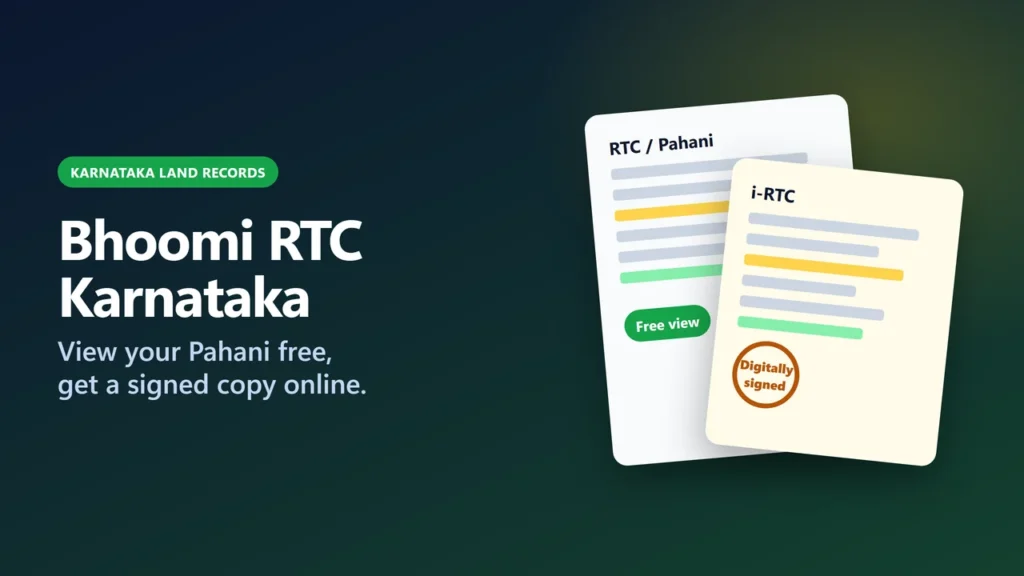
You can view any Bhoomi RTC Karnataka record (the Pahani) for free: open landrecords.karnataka.gov.in, choose View RTC and MR, then pick the district, taluk, hobli and village, type the survey number and click Fetch details. For a digitally signed copy (i-RTC), use rtc.karnataka.gov.in: the page says you can print the original RTC by paying ₹10 per RTC, and since 23 June 2025 every account needs eKYC and a password plus an OTP to log in.
RTC stands for Record of Rights, Tenancy and Crops. It is the village land record kept by Karnataka’s Revenue Department through the Bhoomi system. This guide explains each field on the form, the difference between the free view and the signed copy, what the record does and does not prove under the Karnataka Land Revenue Act, how to follow a mutation, and where to go if an entry is wrong. We checked every page on 17 November 2026.
Key takeaways
- Free view: landrecords.karnataka.gov.in → View RTC and MR (Current Year and Old Year tabs). We saw no CAPTCHA or registration on the blank form (we did not click Fetch details).
- Signed copy: rtc.karnataka.gov.in (i-RTC). The page says ₹10 per RTC; an older Bhoomi page still says Rs 15.
- i-RTC accounts need eKYC, and login uses a password plus an OTP to your registered mobile, from 23 June 2025.
- bhoomi.karnataka.gov.in only forwards to the landrecords.karnataka.gov.in hub, and rtc.karnataka.gov.in forwards to its i-RTC login page. Ignore look-alike sites.
- The law presumes RTC entries are true until the contrary is proved (section 133). It is a revenue record, and ownership disputes go to civil courts.
- Paid but could not print? The Missed i-RTC page reissues it from your order number, but only once.
Which official address does what
Most confusion comes from the number of Bhoomi addresses. On 17 November 2026, bhoomi.karnataka.gov.in simply forwarded to landrecords.karnataka.gov.in, and rtc.karnataka.gov.in forwarded to its i-Wallet login page. The Revenue Department’s hub at landrecords.karnataka.gov.in lists the services below (names as shown on the site).
| What you want | Service name on the site | Address (type it, don’t search) | Cost / login |
|---|---|---|---|
| See the current or an old RTC | View RTC and MR | landrecords.karnataka.gov.in/Service2 | Free, no login |
| Download a digitally signed RTC | Pahani online | i-RTC (I – RTC wallet) | rtc.karnataka.gov.in/Service78 | ₹10 per RTC; eKYC + password + OTP |
| Reprint a paid i-RTC that did not print | Missed i-RTC | landrecords.karnataka.gov.in/service37/MissedRTC.aspx | Order number; once only |
| Read the mutation register (MR) | MR (Mutation Extract) | MR tab on the View RTC page | No fee shown |
| Track a pending mutation | Mutation Status / Village wise pendency | Mutation Status tab; landrecords.karnataka.gov.in/service40 | No fee shown |
| Check that a printed RTC is genuine | RTC xml verification | landrecords.karnataka.gov.in/service5 | No fee shown; needs the reference number on the RTC |
| Get SMS alerts on a survey number | Citizen registration / eChawadi | landrecords.karnataka.gov.in/service4; rdservices.karnataka.gov.in/echawadi | No fee shown |
| Village and lake maps | Revenue Maps | landrecords.karnataka.gov.in/service3 | No fee shown |
Before you start: the details you need
The free view finds land by survey number, not by owner name. Keep these ready, ideally from an old RTC, a sale deed or a tax receipt:
| Field | What it means |
|---|---|
| District, taluk, hobli, village | The administrative chain. A hobli is a group of villages within a taluk. The district list had 32 entries on 17 November 2026, including both Ramanagara and Bengaluru South. |
| Survey number | The land parcel’s number in the village. The page code limits the box to digits. |
| Surnoc | The letter part of a survey number, if it has one (the help page’s Kannada text asks you to select the letter part of the survey number; translation ours). |
| Hissa number | The sub-number created when land is divided. The help page’s example: survey number 20 becomes 20/1, 20/2 and 20/3. |
| Period | A new period is created whenever a mutation (change of owner details) happens, so you can view the present or an older RTC. |
If you only know the owner’s name, the hub’s separate View RTC Information service searches by survey number, owner or registration number and date. Its page code shows a CAPTCHA gate, and we did not go past it.
How to view your RTC (Pahani) for free
On 17 November 2026 we opened this form in Chrome and saw the fields below, but we did not choose a district, type a survey number or click Fetch details, because the result shows a real person’s land record. The order in which the lists fill comes from the page code and the department’s help page, and the last step is from the help page.
- Open landrecords.karnataka.gov.in and click View RTC and MR (or go straight to landrecords.karnataka.gov.in/Service2). The page header reads “Bhoomi Online | Land Records | View”. Use the ಕನ್ನಡ / English buttons to switch language.
- Stay on Current Year for today’s record, or click Old Year for earlier years.
- Choose the District, then Taluk, Hobli and Village. Each list fills only after you pick the one before it.
- Type the Survey Number and click the blue Go button.
- Choose the Surnoc, Hissa No and Period. The help page also mentions choosing a year.
- Click Fetch details. According to the help page, the RTC details then appear, and a View button opens the full RTC.

The department’s help page (it carries no date) still says first-time users must register a name and e-mail and type a CAPTCHA. That step was not on the form we saw, and there was no CAPTCHA before the Fetch details button. We can’t say whether one appears after it.
How to get the digitally signed RTC (i-RTC)
The signed copy comes from the i-Wallet site at rtc.karnataka.gov.in. We opened its login page on 17 November 2026 but did not create an account, log in or pay, so the steps after login below are not something we saw.
- Open rtc.karnataka.gov.in (or click the green “Click here to get the original digitally signed RTC and MR” button on the View RTC page).
- First time: click Create Account. The notice on the page says eKYC verification is compulsory for all users of the i-RTC application, from 23 June 2025. We did not see which eKYC method it uses.
- Log in with your user ID, password and the CAPTCHA, then enter the OTP sent to your registered mobile number (the second factor).
- Select the land and pay (we did not see this screen). The page says “You can print original RTC ONLINE by paying ₹ 10 per RTC”.
- Download or print the RTC straight away.
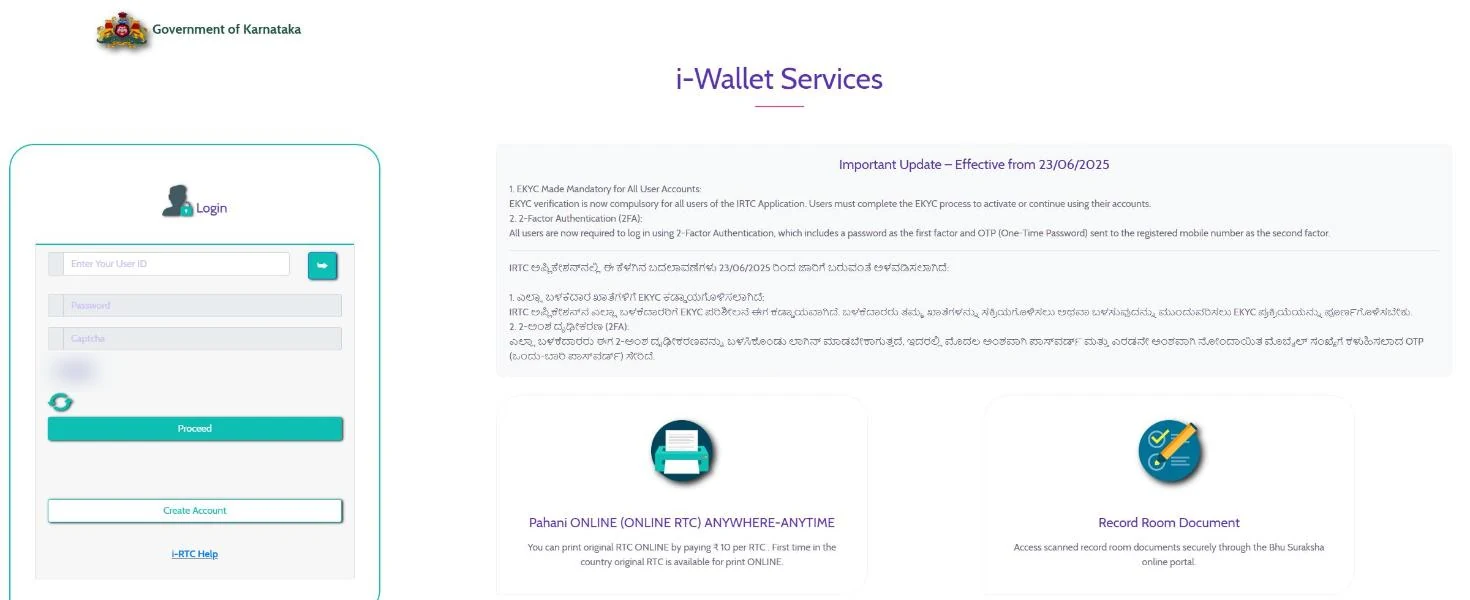
Fee: ₹10 or Rs 15?
The i-RTC page itself says ₹10 per RTC. Older Bhoomi pages, last reviewed in 2019 and 2021, still say Rs 15. We found no government order on the fee. Go by the amount shown before you pay.
Paid, but the RTC did not print
Use the Missed i-RTC page (landrecords.karnataka.gov.in/service37/MissedRTC.aspx). Enter your order number with the IRTC prefix and click Get i-RTC. The page warns that you can get a missed i-RTC and print it only once, so save or print it as soon as it opens.
Is there still a no-login option?
The hub still links an older “i- RTC” form that says it allows printing “without any login” and asks for a name and mobile number. The 23 June 2025 notice says all users must now log in with two factors. We did not test whether the old guest form still completes a payment, so plan on creating an account.
How to read an RTC
A 2025 land-records evaluation draft, hosted on a government server, describes Karnataka’s RTC as having 13 columns. This is a summary of that list, not the Revenue Department’s own form notes. Before you rely on any single entry, ask the taluk office or a lawyer.
| Column | What it records |
|---|---|
| 1–2 | Survey number and hissa (sub) number |
| 3 | Total area in acres and guntas (40 guntas = 1 acre), including kharab land (private and government) |
| 4–5 | Assessment (land revenue) rate and soil category |
| 6–8 | Patta owner (for example government), number of trees, sources of irrigation |
| 9 | Owners’ names, the extent of their shares and the khata number |
| 10 | Mutation details: year and reason |
| 11 | Bank loans, mortgages and court cases on the parcel |
| 12–13 | Year, cultivators’ names and season; crops and the area sown |
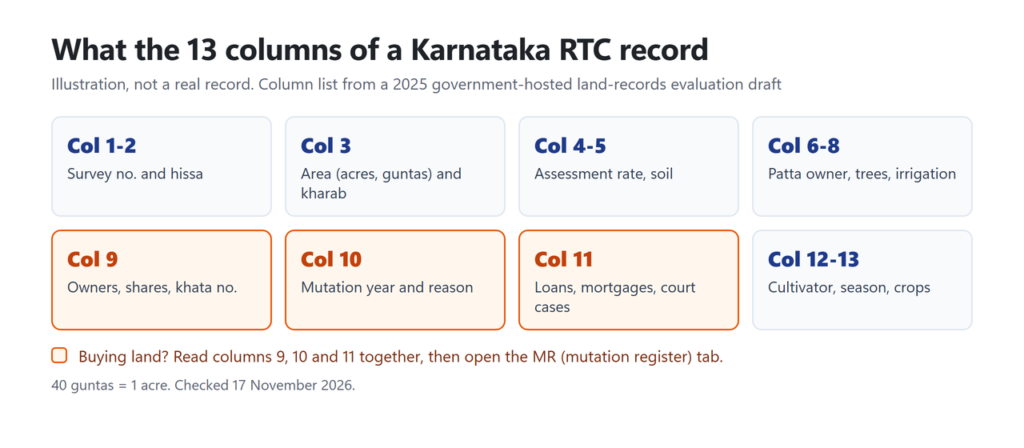
Buying land? Read columns 9, 10 and 11 together, then open the MR tab to see the mutation entries behind any recent change of owner. Village-wise pendency shows mutations still in process. On eChawadi, the View RTC page says you can register as an interested party in ongoing transactions and get SMS updates. Revenue court cases are listed separately at rccms.karnataka.gov.in.
What an RTC proves, and what it does not
Section 133 of the Karnataka Land Revenue Act, 1964 says: “An entry in the Record of Rights and a certified entry in the Register of Mutations [or in the patta book] shall be presumed to be true until the contrary is proved or a new entry is lawfully substituted therefor.”
So the RTC carries a legal presumption, but someone can rebut it. Section 135 bars suits against the government to change an entry. Instead, a person in possession of a right who is aggrieved by an entry can file a civil suit for a declaration against anyone who denies, or is interested in denying, their title, and the record is then amended to match the court’s declaration. Section 134 says certified copies of entries are given by “prescribed officers”. Section 132 requires a certified copy to be annexed to a suit or application about the land.
Mutation: how ownership changes reach the RTC
Under section 128, anyone who acquires a right in land by inheritance, partition, purchase, gift, lease or otherwise must report it to the village’s prescribed officer within three months. If the right comes from a registered document you are exempt, because the registering office reports it. Section 129 then requires:
- an entry in the Register of Mutations;
- a copy posted in the village chavadi, and written notice to everyone the records show as interested;
- objections recorded in a Register of Disputed Cases and decided;
- the entry certified before it is moved into the RTC.
A government-hosted 2025 evaluation draft, using Sakala data accessed in June 2024, gives these limits: registered mutations have a 7-day notice period and a 32-working-day Sakala timeline; unregistered ones (inheritance and partition) have a 15-day notice period and 40 working days; some changes without notice, such as mortgages, are auto-mutated within 5 days. These are limits for officials, not guaranteed times. The same draft says objections had to be raised in person at the taluk office or Nadakacheri, as there was no online objection system then.
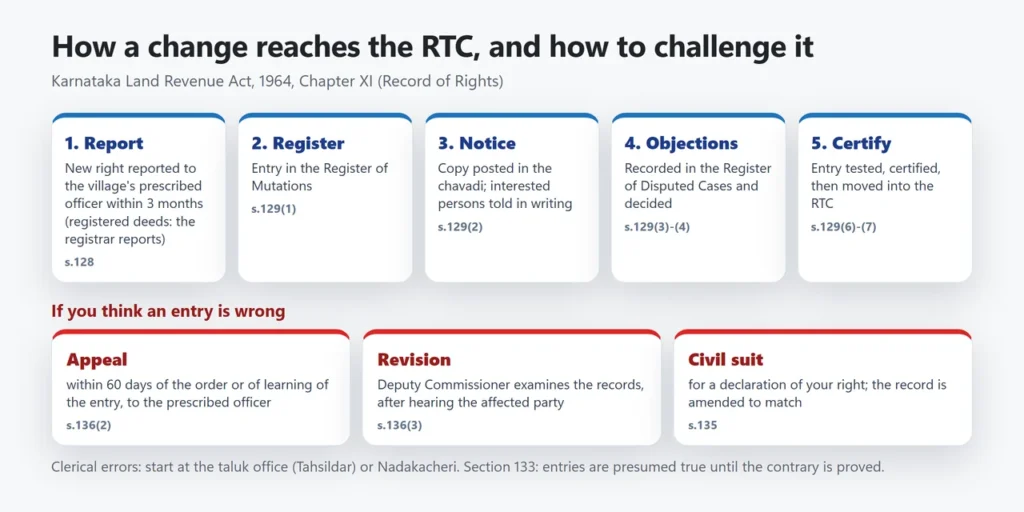
To track yours, use the Mutation Status tab (district, taluk, hobli, village, survey number, surnoc and hissa). The hub also lists “Bhoomi online mutation services”, where it says citizens can apply for a khata change online. We did not explore that flow.
If the RTC has a mistake
The Act sets out these routes. Which one fits depends on the kind of error:
- During a mutation: object while the notice is posted; the objection goes into the Register of Disputed Cases (section 129).
- After an entry is certified: appeal within 60 days of being told of the order or of learning of the certified entry, to the officer the state has prescribed (section 136(2)). We did not read the rules that name this officer, so ask at the taluk office.
- Revision: the Deputy Commissioner can call for and examine records, on their own motion or on an application, and must hear the affected party first (section 136(3)).
- Title disputes: a civil suit for a declaration; the record is then amended to match (section 135).
For clerical errors, such as a misspelt name or a wrong area, start at the taluk office (Tahsildar) or your Nadakacheri with the documents that show the correct entry. We found no official page giving a form or fee for this, so ask there. The 2025 draft says the Tahsildar resolves disputes over unregistered mutations within a maximum of 45 days, and civil courts handle disputes over registered ones.
Other official Bhoomi tools worth knowing
- RTC xml verification (service5): type the reference number printed on an RTC to check that the data is genuine. Useful when someone hands you a printout.
- Khata Extract (service64): view the khata extract by khata number.
- Survey Document: view survey documents such as the tippan, atlas and pakka book, or request copies for a fee.
- RTC with sketch [Beta] and Survey Sketch: land details on a map.
- Dishaank: a GPS map app by the Karnataka State Remote Sensing Applications Centre, linked from the hub. Its store listing says it shows survey numbers, boundaries and RTC information on a map. We did not test how accurate it is.
Common problems and fixes
| Problem | What to try |
|---|---|
| Taluk or village list stays empty | Pick the district again and wait; each list loads only after the one above it. The list shows both Ramanagara and Bengaluru South; check which one your village is under. |
| Survey number not accepted | The page code limits the box to digits. Choose the letter part (surnoc) and the hissa from their own lists. |
| Several periods listed | Each mutation creates a new period. Choose the latest for today’s record, or an older one for history. |
| i-RTC login fails | Since 23 June 2025 you need a completed eKYC and the OTP to your registered mobile. Check that the mobile number on the account is current. |
| Paid but no RTC | Missed i-RTC page with the order number (one reprint only). |
| Village or survey number not in the list | Try the Old Year tab for older records, or ask the taluk office which village and survey number the land is recorded under. |
| Entry looks wrong | Check the MR tab for the latest mutation, then go to the taluk office or Nadakacheri (see above). |
Bhoomi Monitoring Cell, SSLR Building, K.R. Circle, Bengaluru 560001, lists bhoomi@karnataka.gov.in and 080-22113255 (plus 8277864065, 8277864067 and 8277864068) on its hub. An older 2019 page gives calling hours of 10:00 am to 5:30 pm.
Is viewing the RTC on Bhoomi free?
Yes. View RTC and MR at landrecords.karnataka.gov.in needs no login or payment. Only the digitally signed i-RTC is paid: ₹10 per RTC on the i-RTC page on 17 November 2026.
Do I need a CAPTCHA or registration to view an RTC?
We saw none on the blank View RTC form on 17 November 2026 (we did not click Fetch details), though the department’s undated help page describes a name, e-mail and CAPTCHA step. The separate owner-wise search, View RTC Information, opens behind a CAPTCHA according to its page code.
Can I search a Karnataka RTC by owner name?
Not on the free View RTC form, which works by survey number. The hub’s View RTC Information service searches by survey number, owner, or registration number and date; according to its page code, it opens behind a CAPTCHA.
Why does the i-RTC site ask for eKYC and an OTP?
The site’s notice says that from 23 June 2025 eKYC is compulsory for all i-RTC users, and that login uses two factors: your password and an OTP sent to your registered mobile number.
Is the RTC a title deed?
No. It is a revenue record. Section 133 of the Karnataka Land Revenue Act presumes its entries are true until the contrary is proved, and ownership disputes are settled through a civil suit (section 135), after which the record is amended.
How do I check if a printed RTC is genuine?
Use RTC xml verification on landrecords.karnataka.gov.in (service5). Enter the reference number printed on the RTC to see the data held for it.
Land records in other states
Handling family land outside Karnataka? Our guides cover AnyROR Gujarat (7/12 and 8A), Meebhoomi in Andhra Pradesh, Telangana’s Bhu Bharati, E-Rekha Kerala, Bhulekh Odisha and MP Bhulekh. Tamil Nadu, Karnataka’s neighbour to the south, is covered in our guide to Patta Chitta online in Tamil Nadu.
Checked on 17 November 2026 against the Revenue Department’s Bhoomi pages on landrecords.karnataka.gov.in (View RTC and MR and its help page, the service hub, Missed i-RTC, mutation, verification and maps pages) and rtc.karnataka.gov.in; the Karnataka Land Revenue Act, 1964 as published by the Department of Parliamentary Affairs and Legislation; a 2025 government-hosted evaluation draft on the quality of Karnataka’s land records; and the Dishaank store listing. We did not view a real record, log in or pay.