To check Chhattisgarh land records on Bhuiyan (Bhuiyan CG) online, open bhuiyan.cg.nic.in, go to भूमि संबंधित जानकारी → खसरा विवरण (Khasra details), pick your district, tehsil and village, then search by khasra number (खसरा वार) or by owner name (नाम वार) and press विवरण देखें. The page shows the plot’s area, holder and type of tenure, with links to its map, its P-II khasra (digitally signed where the patwari has signed it) and its crop details. Viewing records and maps on Bhuiyan is free.
Bhuiyan is the Chhattisgarh Revenue and Disaster Management Department’s land-records portal, built and run by NIC Chhattisgarh. This guide walks through the current screens (checked on the live portal on 5 November 2026), explains the terms you will see, and covers signed copies, maps, mutation status and the common errors.
Key takeaways
- Bhuiyan lists all 33 districts, including the newer ones such as Sakti and Sarangarh-Bilaigarh.
- You do not choose the RI circle on the khasra form. It fills in by itself after you pick the village.
- Name search only works in Hindi (Unicode), and you can type just part of the name.
- P-II is split into Khand-1 (the plot record, digitally signed for most plots) and Khand-2 (crop details).
- If no signed copy exists, apply through the portal; the department’s 2017 instructions say it is ready within seven days.
- The department’s site is revenue.cg.nic.in. The address revenue.cg.gov.in, quoted in some guides, does not work.
Words you will see on Bhuiyan
The portal is mostly in Hindi. These are the terms that matter, with their meaning under the Chhattisgarh Land Revenue Code, 1959 where the Code defines them.
| Term | What it means |
|---|---|
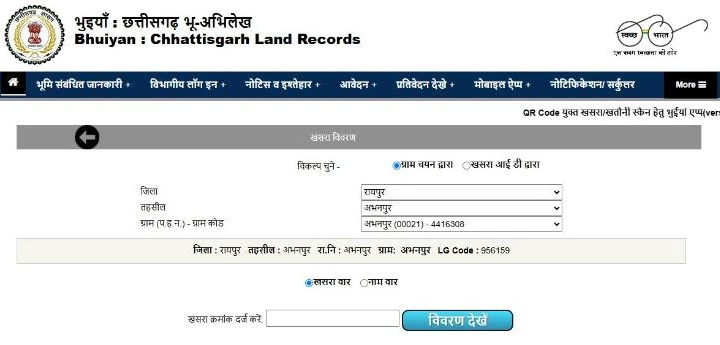
| Khasra (खसरा) | The village field book. Each plot has a khasra (survey or plot) number in it. |
| P-II khasra (पी-II खसरा) | The plot-wise record. Khand-1 holds the plot details; Khand-2 holds the crop details for the year. |
| B-1 khatauni (बी-I खतौनी) | The holder-wise account: all the khasras one Bhumiswami holds in the village. |
| Bhumiswami (भूमिस्वामी) | The class of landholder recorded as owner in the record of rights. (For land in neighbouring Madhya Pradesh, see our MP Bhulekh guide.) |
| Patwari halka (प.ह.न.) | The patwari circle number. The patwari keeps and corrects the records for those villages. |
| RI circle (रा.नि.) | The Revenue Inspector circle that groups several patwari halkas. |
| Bhu-Naksha (भू-नक्शा) | The village field map showing plot boundaries by number. |
| Namantaran (नामांतरण) | Mutation: changing the recorded holder after a sale, inheritance or gift. |
| Diversion (व्यपवर्तन) | Permission to use farm land for another purpose, such as housing. |
How to check a khasra on Bhuiyan, step by step
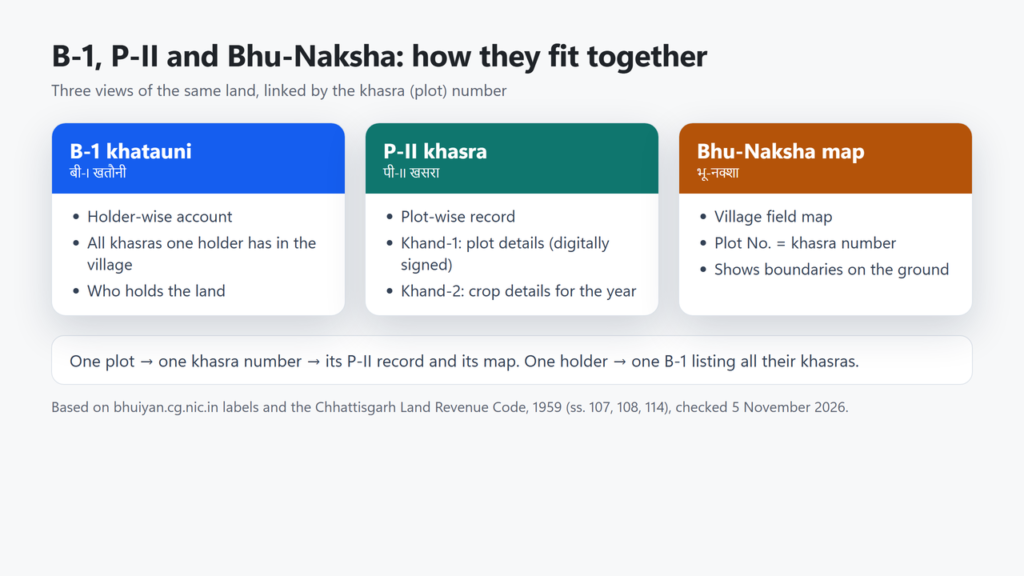
- Open bhuiyan.cg.nic.in. In the top menu, tap or hover over भूमि संबंधित जानकारी and choose खसरा विवरण. The item B1/PII प्राप्त करें opens the same form.
- Under विकल्प चुने, keep ग्राम चयन द्वारा (by village). If you know the khasra ID (it is shown at the top of a result page), choose खसरा आई डी द्वारा and enter the digits.
- Pick जिला (district), then तहसील (tehsil), then ग्राम (प.ह.न.) – ग्राम कोड (village). Wait a moment after each choice; the next list loads from the server.
- Check the strip that appears below the dropdowns. It confirms the district, tehsil, RI circle, village and the village’s LG code.
- Choose खसरा वार and type the khasra number in खसरा क्रमांक दर्ज करें (suggestions appear as you type), or choose नाम वार to search by name.
- Press विवरण देखें (View details).
What the result page shows
We checked the result page using a government-owned plot (Abhanpur village, Raipur), so no private owner’s details appear in the screenshot. The page has these sections:
- सामान्य जानकारी (general information): khasra ID, khasra number and area in hectares, irrigated and unirrigated area, other khasras in the same account, area in square feet, and the tenure (धारणाधिकार).
- Links marked देखें to the map (नक्शा देखें), a change log, property tax details, earlier registrations, electricity connections, CERSAI entries (security interests, such as mortgages, registered with CERSAI) and civil court cases linked to the plot.
- रिपोर्ट (reports): the digitally signed P-II Khand-1 with its document number, and PDF downloads of P-II Khand-2 crop details for this year and the previous year.
- भूस्वामी की जानकारी (holder details) and crop-area figures.
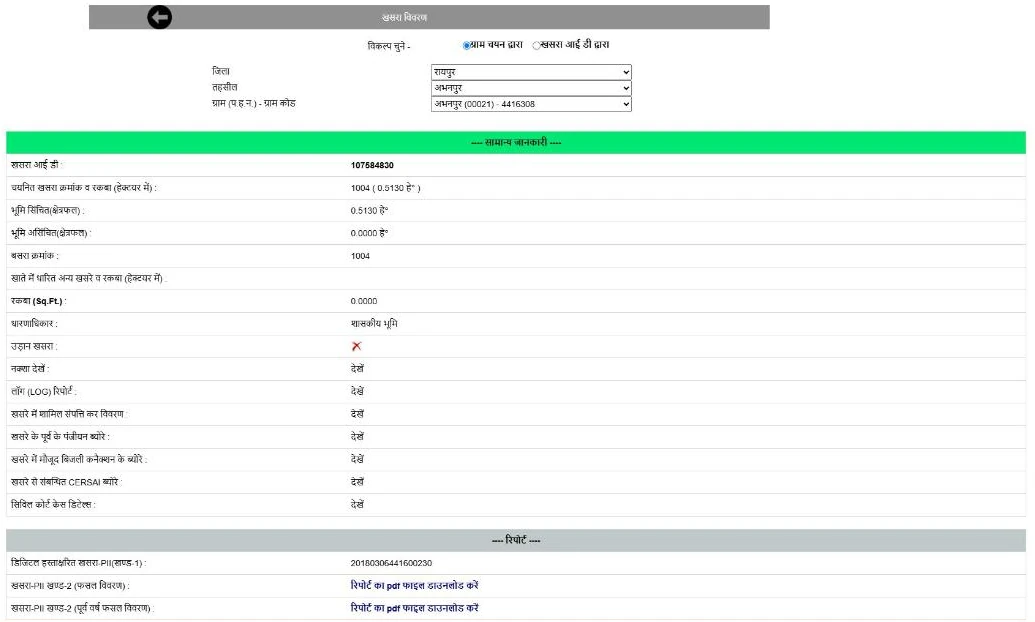
Our test plot was government land, and its result page showed no B-1 line. For a privately held plot we did not open a record, so we have not checked where the B-1 khatauni link appears.
Digitally signed B-1 and P-II copies
Patwaris sign khasra records digitally, so you can usually download a signed copy straight from the result page. The portal’s counter on 5 November 2026 showed about 24.07 million of 25.49 million khasras with a digital signature, roughly 94%.
- If a signed copy is shown: download it from the रिपोर्ट section and note the document number.
- If it is not available: use आवेदन → डिजिटल हस्ताक्षरित B-I/P-II आवेदन. The department’s instructions ask for district, tehsil, village, khasra number, your name, mobile and email, and issue an application number that you must keep. They say the signed copy can be collected within seven days, and that if the record has an error the patwari corrects it before signing. Those instructions date from 2017, so the current wait may differ.
- To download later: भूमि संबंधित जानकारी → B1/PII डॉक्यूमेंट आईडी से प्राप्त करें, enter the document number (दस्तावेज़ क्रमांक) shown on a signed report and the captcha, then press Download. If you applied for a copy, the 2017 instructions say you collect it using your application number, so keep both numbers.
- To check a QR code on a printed khasra or khatauni, the portal says to scan it with the official Bhuiyan app (published on Google Play by the National Informatics Centre).
The Get Land details in other languages option shows a machine transliteration into Odia, Bengali, Marathi, Gujarati, Tamil and other Indian languages, but not English. The department warns that the transliteration can contain errors, so rely on the Hindi record.
See the plot on Bhu-Naksha
Use नक्शा देखें on the result page, or open bhunaksha.cg.nic.in directly. There you choose district, tehsil, RI circle (here you do pick it) and village, then type the plot number in the Plot No. box or click the plot on the map. Plot numbers on the field map are the same survey numbers used in the khasra, which is how you match the record to the ground. You can switch the background to Google or Bing maps. Online khasra and map viewing is listed as free on the portal’s fee page.
If the boundary on the ground is in dispute, apply for demarcation (सीमांकन) through the revenue court portal, with a challan and copies of the khasra, B-1 and map uploaded. If the map itself looks wrong, for example a missing subdivision, ask the patwari or tehsil office. We found no separate online map-correction service on the portal.
Track or apply for mutation (namantaran)
Chhattisgarh moved mutation online in July 2020. The Land Revenue Code (section 110, as amended in 2022) requires the patwari to record every reported change on the online e-Namantaran portal, and the tehsildar to issue notices and publish them on the department’s website.
- Check status: भूमि संबंधित जानकारी → नामांतरण की वर्तमान स्थिति. Search by registration number, application number, current holder, proposed holder or khasra number.
- Print the mutation register entry: नामांतरण पंजी की नक़ल, by district, tehsil, village, year and registration or khasra number.
- Apply for mutation or a record correction: आवेदन → नामांतरण हेतु आवेदन opens the Citizen Facility Portal (revenue.cg.nic.in/citizenrequest). You sign up with your name, address, a user ID and password, and your mobile number (verified by OTP), then upload documents. A 2020 department circular confirms citizens can apply for mutation or record correction (अभिलेख दुरुस्ती) themselves and track it online.
- Public notices for pending mutations appear under नोटिस व इश्तेहार.
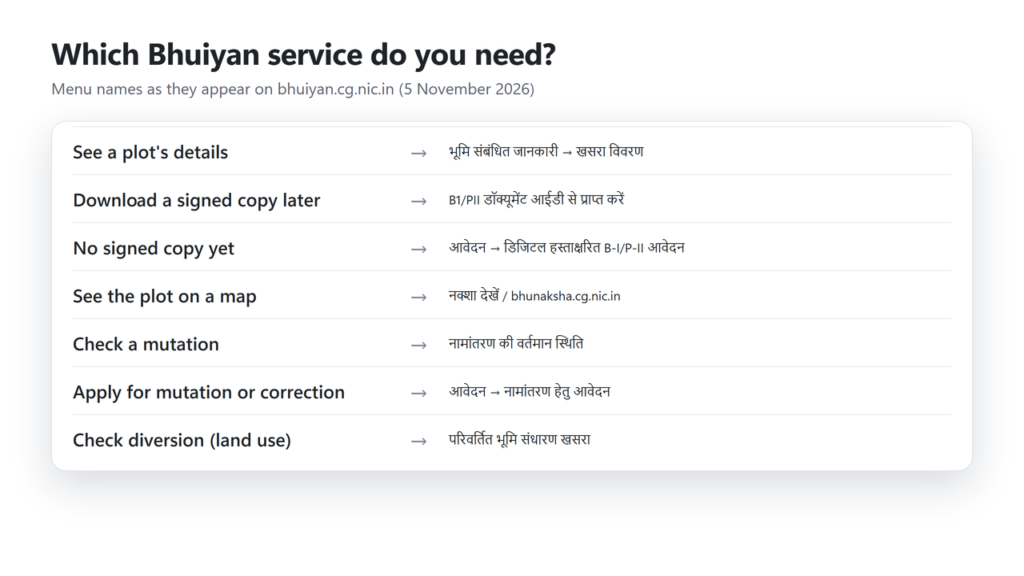
For diversion, the परिवर्तित भूमि संधारण खसरा tile opens the diversion sheet (revenue.cg.nic.in/diversion). Note that some guides wrongly describe this tile as the mutation service.
Common problems and fixes
| Problem | What to do |
|---|---|
| The page will not load or shows an error | The servers are busy at times; on our check one beta page returned an error and another timed out. Retry later, use the main (non-Beta) B1/PII page, or the Bhuiyan app. |
| Name search finds nothing | Type part of the name in Hindi Unicode, not English. Try the khasra number instead. |
| You do not know the khasra number | Search by name, use the number suggestions in the khasra box, or find the plot on Bhu-Naksha. |
| The record has not changed after a registry | Check mutation status by registration number. If nothing has started, apply for mutation on the Citizen Facility Portal or contact the tehsil office. |
| Wrong name spelling or area | Apply for record correction (अभिलेख दुरुस्ती) online, or ask the patwari. The Code provides for correcting clerical errors and wrong entries. |
| The diversion sheet shows a technical problem | Email lrhelpdesk.cg@gov.in, the address the diversion page gives for technical help. |
For other issues, the Commissioner of Land Records, Chhattisgarh (Indravati Bhawan, Nava Raipur) lists the email clr-cg@nic.in on the portal’s contact page. We found no toll-free helpline on the Bhuiyan pages we checked.
Frequently asked questions
Is it free to check land records on Bhuiyan?
Yes. The portal’s fee page lists online khasra and map availability as free.
Can I search Bhuiyan by owner name in English?
No. Name search needs Hindi Unicode text. You can type only part of the name.
What is the difference between B-1 and P-II?
B-1 (khatauni) is holder-wise and lists all the plots a holder has in the village. P-II (khasra) is plot-wise; Khand-1 has the plot details and Khand-2 the crop details.
How do I get a digitally signed copy?
Download it from the result page if it is shown. If not, apply under Digital signed B-I/P-II application. The department’s 2017 instructions say it is ready within seven days and that you collect it with your application number. Keep the document number for downloading again later.
Can I check mutation status online?
Yes. Use Current mutation status under Land-related information and search by registration number, application number, current or proposed holder, or khasra number.
Is there a Bhuiyan mobile app?
Yes. The Bhuiyan app on Google Play is published by the National Informatics Centre. The portal also uses it to scan QR codes on printed copies.
Related state guides
If you own land elsewhere, see our guides to MP Bhulekh, Bhulekh Odisha, Jharbhoomi in Jharkhand, UP Bhulekh, AnyROR in Gujarat and Telangana land records.
Checked on 5 November 2026 on bhuiyan.cg.nic.in, revenue.cg.nic.in and bhunaksha.cg.nic.in, against the department’s circulars 2193/2020, 2740/2020 and 5073/2022, its instructions for digitally signed copies, the Chhattisgarh Land Revenue Code, 1959 (consolidated copy) and the Bhuiyan app’s Google Play listing.