To lock your Aadhaar biometrics, go to the myAadhaar portal (myaadhaar.uidai.gov.in), choose Lock / Unlock Biometrics under Keep Aadhaar Secure, log in with your Aadhaar number and the OTP sent to your registered mobile, tick the consent box and press Lock Biometrics. You can also do it in UIDAI’s new Aadhaar app, which offers a one-click lock. Once locked, nobody can use your fingerprints, iris or face to authenticate with your Aadhaar, but OTP logins keep working.
To use your fingerprint again, for a bank’s fingerprint scanner or an AePS cash withdrawal, unlock for a short time (myAadhaar’s button says 10 minutes) and the lock comes back on its own. If you want it off for good, choose Unlock Biometrics Permanently. This guide explains each step, what the lock does and does not block, and what to do if something goes wrong.
Key takeaways
- You need a mobile number registered with Aadhaar. You do not need a Virtual ID (VID) for the biometric lock.
- The lock blocks fingerprint, iris and face authentication. OTP and demographic authentication still work.
- A temporary unlock re-locks by itself. A permanent unlock stays off until you lock again.
- A blocked attempt fails with UIDAI error code 330 (“biometrics locked by Aadhaar number holder”).
- The biometric lock is not the same as the Aadhaar number lock, which needs a VID.
- Old guides point to resident.uidai.gov.in and the mAadhaar app. That site no longer loads and the mAadhaar Android app is gone from Google Play.
What the Aadhaar biometric lock does
Aadhaar records three kinds of biometrics: your fingerprints, both irises and a photo of your face. Banks, ration shops, telecom companies and other agencies can ask UIDAI to confirm you are who you say you are by matching one of them. Read our guide on how Aadhaar authentication works for the full picture.
The biometric lock switches off that matching for your Aadhaar. UIDAI’s FAQ says that while it is on, “any entity by any means cannot perform biometric based Aadhaar authentication”. It protects you if someone has a copy of your fingerprint, such as a cloned fingerprint made for fraud. myAadhaar lists the risks it guards against: unauthorised cash withdrawals, e-KYC misuse on apps, fake SIM or account activation, and fraudulent benefit claims.
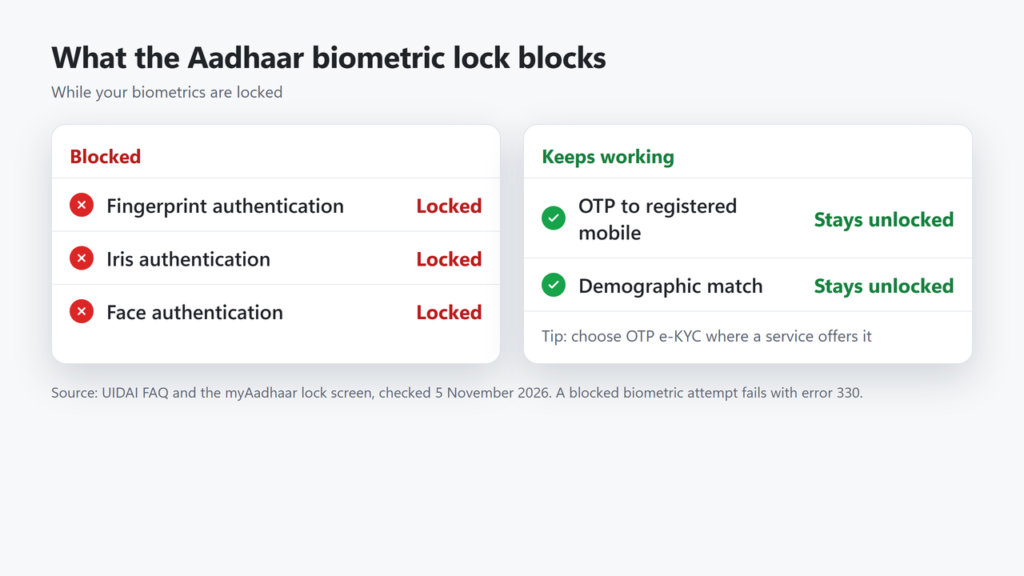
| Type of authentication | When biometrics are locked |
|---|---|
| Fingerprint | Blocked |
| Iris scan | Blocked |
| Face authentication | Blocked |
| OTP to your registered mobile | Still works |
| Demographic (name, date of birth, gender, address match) | Still works |
Before you start
- A registered mobile number. UIDAI says it is mandatory, because you log in with an OTP. If your number is not linked, visit an Aadhaar enrolment or update centre or an Aadhaar Seva Kendra to add it. You cannot add a mobile number for the first time in the Aadhaar app. You can find an Aadhaar centre near you.
- Your 12-digit Aadhaar number. The biometric lock screen has no Virtual ID field, so a VID is not needed here. (The separate Aadhaar number lock does need one; see the comparison below.)
- For the app: Android 9 or later or iOS 16 or later, the SIM registered with your Aadhaar in the same phone, an internet connection, and developer mode turned off. UIDAI says the app cannot be used outside India.
UIDAI lists no charge for the biometric lock, and the online flow has no payment step.
How to lock Aadhaar biometrics on myAadhaar
These labels come from the live myAadhaar portal on 5 November 2026. The portal is being redesigned, so colours and positions may change. When we checked on 5 November 2026, myAadhaar showed the new layout on one visit and an older classic layout on another, so both are covered below.
- Open myaadhaar.uidai.gov.in in a browser. Type the address yourself rather than following a link from an SMS or a search ad.
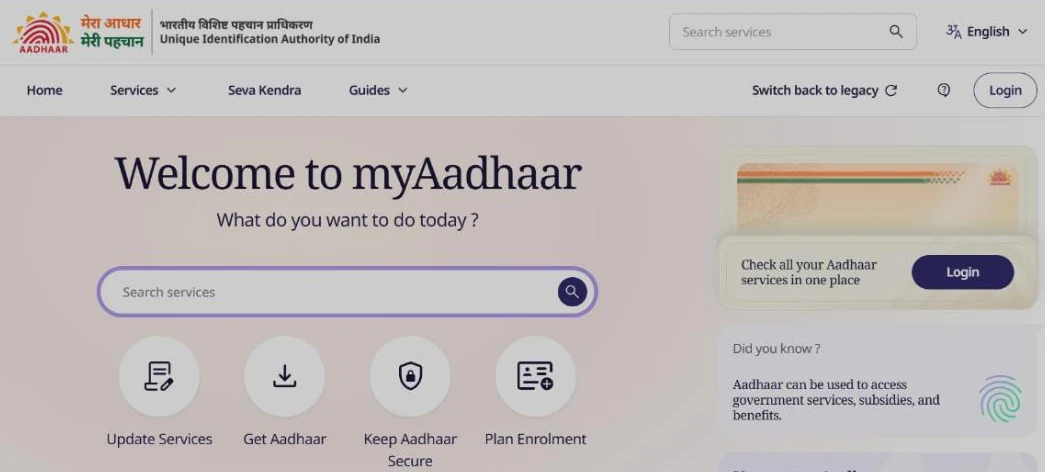
- On the new layout (“Welcome to myAadhaar” with four round tiles), choose Keep Aadhaar Secure, then Lock / Unlock Biometrics. If you see the classic layout instead (a banner says the new myAadhaar portal has arrived), press Experience Now to open the new layout and continue from there. Do not use the classic home page’s Lock / Unlock Aadhaar card: that is the different Aadhaar number lock explained below.
- Under I want to: select the Lock Biometrics tab and press Login to Lock Biometrics.
- Log in with your Aadhaar number and the OTP sent to your registered mobile. The UIDAI login page also offers face authentication by scanning a QR code with the Aadhaar app.
- Read the panel When Biometrics will be Locked. It shows fingerprints, face and iris as locked, and demographic and OTP authentication as “Stays Unlocked”.
- Tick the consent box: “I understand that locking my biometrics enhances security, and I will NOT be able to use fingerprints, face or iris authentication until I unlock it again.”
- Press Lock Biometrics. The button stays greyed out until the box is ticked.
- Check the result: after you log in, your myAadhaar dashboard shows Biometrics Status as Locked or Unlocked.
Locking in the Aadhaar app
UIDAI dedicated a new Aadhaar app to the nation on 28 January 2026. UIDAI’s current FAQs name only its website and this app for the lock, and the old mAadhaar Android listing is no longer on Google Play. UIDAI’s app FAQ says it “provides a one-click biometric lock/unlock facility”. You register once (language, Aadhaar number, the SIM linked to your Aadhaar, face authentication, then a 6-digit PIN) and the lock option sits among the app’s services.
UIDAI has not published a step-by-step menu path for the lock in the app, and we did not install it for this guide, so we are not giving one. If you cannot find the option, use the myAadhaar website, which works in any browser.
How to unlock: temporary or permanent
When your biometrics are locked, open the same Lock / Unlock Biometrics service, select the Unlock Biometrics tab under I want to: and press Login to Unlock Biometrics. After you log in and tick the consent box (“I understand after unlocking I will be able to use fingerprints, face or iris authentication”), you get two buttons:
| Option on myAadhaar | What happens | Use it when |
|---|---|---|
| Unlock Biometrics for 10 minutes | Biometrics work for a short time, then lock again on their own | You need one fingerprint or face check, such as a bank KYC visit or an AePS withdrawal |
| Unlock Biometrics Permanently | The lock stays off “Until Next Time You Lock” | You use fingerprint services often and prefer not to unlock each time |
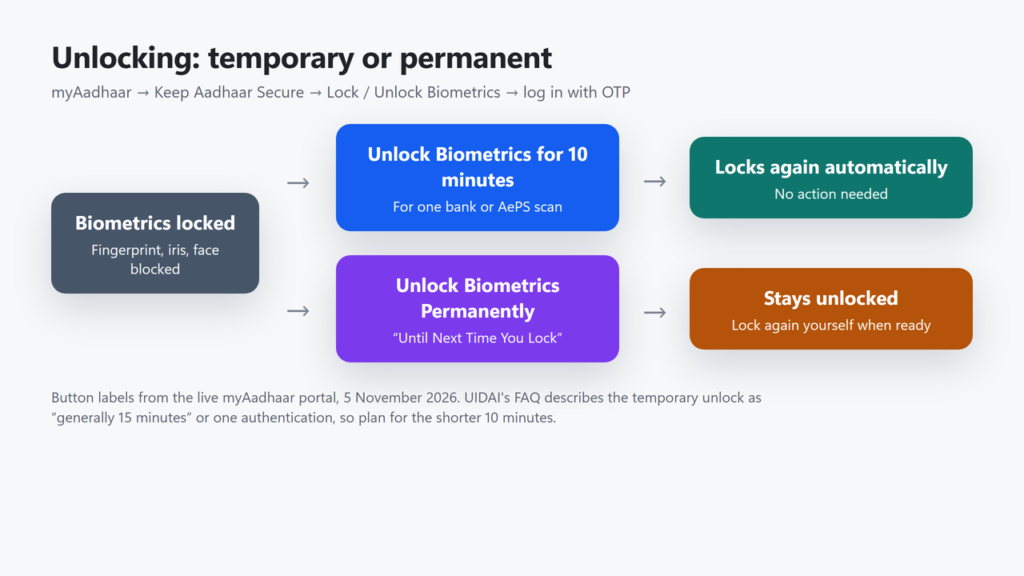
Both camps in older articles were half right. A temporary unlock cannot be stretched into a permanent one, but UIDAI does offer a separate permanent option (its FAQ calls it disabling the locking system). You can lock and unlock as many times as you need.
Biometric lock vs Aadhaar number lock
myAadhaar has a second, stronger service called Lock / Unlock Aadhaar. People mix the two up, and some guides tell you to enter a VID to unlock biometrics, which the biometric screen does not ask for.
| Biometric lock | Aadhaar (number) lock | |
|---|---|---|
| What it blocks | Fingerprint, iris and face | All authentication using your Aadhaar number |
| OTP with your Aadhaar number | Still works | Blocked |
| Virtual ID needed? | No | Yes, a 16-digit VID before you lock |
| How you unlock | Log in with Aadhaar number + OTP | Enter your VID + OTP |
| SMS option (to 1947) | None published by UIDAI | GETOTP, then LOCKUID or UNLOCKUID |
| Ends automatically? | Temporary unlock re-locks itself | No automatic expiry |
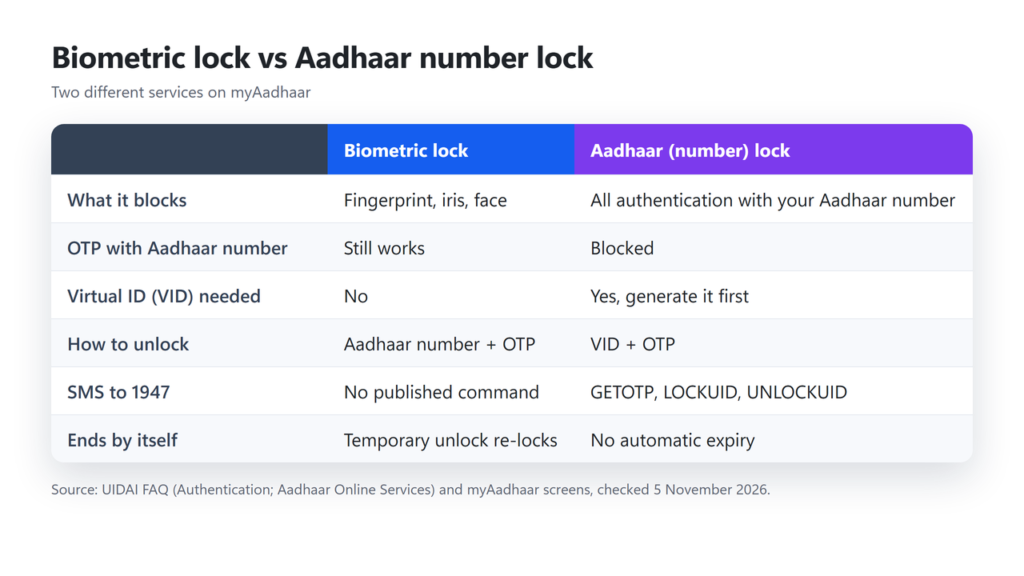
For most people the biometric lock is the better choice: it closes the fingerprint-fraud route while leaving OTP services working. If you do use the Aadhaar number lock, save your VID somewhere safe first. myAadhaar warns that no retrieval is possible after locking, although UIDAI’s FAQ says a VID can be retrieved by SMS. UIDAI’s own pages also disagree on whether the VID keeps working while the number is locked, so do not rely on it. Our guide to e-Aadhaar, masked Aadhaar and the Virtual ID explains what a VID is.
What happens when a service needs your fingerprint
If a bank, shop or operator tries a fingerprint, iris or face check while your biometrics are locked, the request fails. UIDAI’s Authentication API specification lists the reason as error 330: “Biometrics locked by Aadhaar number holder.” The message on the operator’s screen depends on their software, so ask them for the error code if it is not clear.
- AePS cash withdrawals and Aadhaar Pay use your fingerprint, so unlock for 10 minutes first. See our guides to how AePS works at a banking correspondent and Aadhaar Pay.
- Bank or app e-KYC: UIDAI says biometric e-KYC is affected, but you can choose OTP-based e-KYC instead, or unlock for a short time. More in our guide to Aadhaar e-KYC.
- Ration shops, SIM shops and updates at an Aadhaar centre: UIDAI has not published how the lock affects each of these. If they use a fingerprint or face scan, expect to unlock first. Before a biometric update at a centre, ask the operator or call 1947.
Check your authentication history for misuse
The lock prevents future misuse. To see past use, open Authentication History on myAadhaar (or in the Aadhaar app) with your Aadhaar number or VID and an OTP. It covers the last six months, 50 records at a time. Each record shows the type (such as fingerprint or OTP), the date and time, the agency’s name and whether it succeeded. You can download it as a PDF; the password follows the same rule as the e-Aadhaar PDF password (first four letters of your name in capitals plus your birth year).
If you see something you did not do, UIDAI advises three steps: lock your biometrics (or your Aadhaar), contact the agency named in the record, and report it to UIDAI on 1947 or at help@uidai.gov.in. You can also file a complaint with UIDAI through the Grievance and Feedback section of myAadhaar.
Common problems and fixes
| Problem | What to do |
|---|---|
| The guide you followed sends you to resident.uidai.gov.in | That site no longer loads. Use myaadhaar.uidai.gov.in or the Aadhaar app. |
| You cannot find mAadhaar on Google Play | Its Android listing is gone. Use UIDAI’s new Aadhaar app or the myAadhaar website instead. |
| No OTP arrives | The OTP only goes to the mobile number registered with Aadhaar. If you changed numbers, update it at an Aadhaar centre first. |
| Fingerprint fails at the bank even after unlocking | The temporary unlock may have ended: it lasts a short time or a single authentication, so one failed scan can use it up. Unlock again just before the next scan, or use OTP e-KYC if the bank allows it. |
| A shop says “error 330” | Your biometrics are locked. Unlock for 10 minutes, then retry. |
| The app will not open or register | Check Android 9+/iOS 16+, the Aadhaar-linked SIM in the phone, and that developer mode is off. Or use the website. |
Frequently asked questions
Is locking Aadhaar biometrics free?
UIDAI lists no charge for it, and the online lock and unlock flow on myAadhaar has no payment step.
Do I need a Virtual ID to lock my biometrics?
No. The biometric lock uses your Aadhaar number and an OTP. A VID is needed only for the separate Aadhaar number lock.
Will OTP-based services stop working?
No. UIDAI says biometric locking does not affect OTP-based authentication, and demographic authentication also stays unlocked.
How long does a temporary unlock last?
The myAadhaar button says 10 minutes. UIDAI’s FAQ describes a limited duration, generally 15 minutes, or one authentication. After that the biometrics lock again automatically.
Can I switch the lock off permanently?
Yes. When your biometrics are locked, myAadhaar offers Unlock Biometrics Permanently, which keeps them unlocked until you choose to lock them again.
Can I lock biometrics without a registered mobile number?
No. A registered mobile number is mandatory. Add one at an Aadhaar enrolment or update centre or an Aadhaar Seva Kendra first.
Does the lock stop someone using my face for authentication?
Yes. UIDAI’s current FAQ says the lock covers fingerprint, iris and face authentication.
The short version
If you rarely use fingerprint services, lock your biometrics today: it takes a couple of minutes on myAadhaar with your registered mobile. Keep OTP for everyday use, unlock for 10 minutes when a bank or AePS counter needs your fingerprint, and check your authentication history every few months.
Checked on 5 November 2026 against UIDAI’s FAQ pages (Aadhaar Online Services, Authentication and Aadhaar App), the live myAadhaar lock screens, UIDAI’s Aadhaar Authentication API Specification v2.5 (Revision 1, January 2022) and the Press Information Bureau release of 28 January 2026.