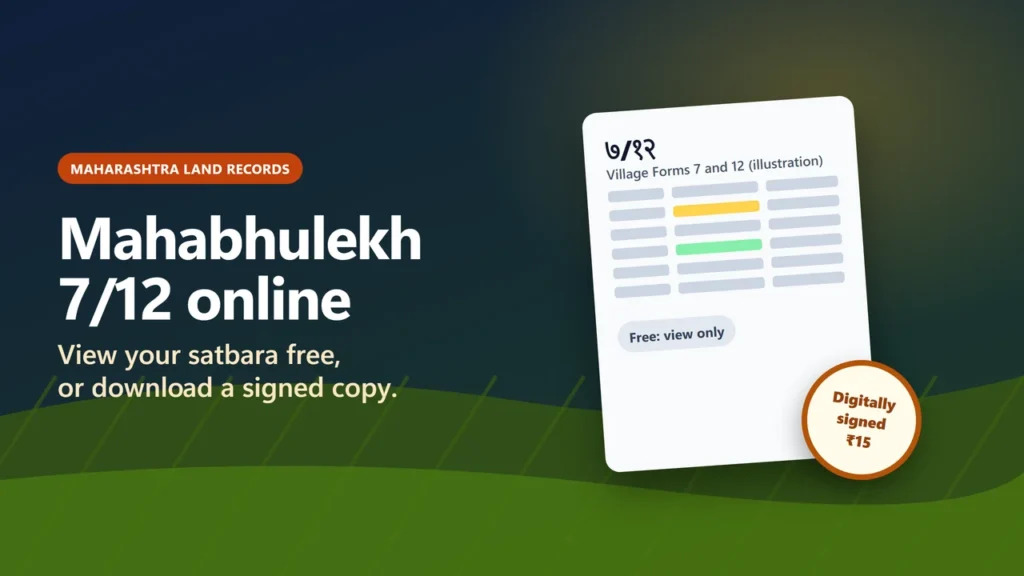
To check a Mahabhulekh 7/12 online (the Maharashtra satbara) for free, open bhulekh.mahabhumi.gov.in (the page is titled “Mahabhulekh v2.0”), choose 7/12, then pick the district, taluka and village, search by survey or gat number or by name, and fill in the mobile number, output language and captcha. That free copy is for viewing only: the Revenue Department says it cannot be used for any government or legal purpose.
For a bank, court or government office, download a digitally signed 7/12 from digitalsatbara.mahabhumi.gov.in/dslr. The department’s FAQ puts the fee at ₹15 per copy for a signed 7/12, 8A or mutation extract, and says signed copies are valid for all legal and government work. This guide explains both routes, the 8A, how to verify a signed copy and how to fix a wrong entry, using the department’s own pages as we read them on 20 November 2026.
eDefines is not a government website. The only official sources are the Maharashtra Revenue Department portals named below.
Key takeaways
- Free view: bhulekh.mahabhumi.gov.in. Today’s form has one district list (no division step), a required mobile field and a captcha.
- The free 7/12 and 8A on Bhulekh can “only be viewed” (department FAQ). They are not valid for official or legal use.
- Signed copy: digitalsatbara.mahabhumi.gov.in/dslr, ₹15 per copy for a 7/12, 8A or mutation extract, paid from a prepaid wallet that is not refundable.
- A signed 7/12 needs no Talathi signature or stamp, says the department, and it is valid under a Revenue and Forest Department circular of 23 November 2020.
- Anyone can check a signed copy on the portal’s Verify 7/12 page with the verification number printed in the PDF. No login is needed.
- To fix a mismatch with the old handwritten 7/12, apply to the Talathi online through e-Hakk. Aapli Chawadi says no fee is required for mutation.
What the 7/12 and 8A show
The 7/12 is Maharashtra’s basic record of rights for a piece of agricultural land. Its name joins two village forms: Village Form 7 and Village Form 12. The department’s FAQ describes the computerised 7/12 as the online version of the extract that once came handwritten from the village revenue officer (Talathi), showing who holds the land and what crops it carries. For the downloadable signed copy, it adds that Form 7 is digitally signed and the Form 12 data is self-attested.
The 8A is the khata: in the department’s words, the Village Form 8A that records all of a farmer’s agricultural land in that village. So the 7/12 is per survey or gat number, and the 8A is per account holder.
What the record proves is set by the Maharashtra Land Revenue Code, 1966. Section 157 says an entry in the record of rights “shall be presumed to be true until the contrary is proved or a new entry is lawfully substituted therefor”. It is a strong starting point, but the law lets it be challenged.
Which official site does what
Many guides call everything “Mahabhulekh”, but the department runs several sites. Some well-known addresses only redirect: mahabhumi.gov.in forwards to its service hub, and the bare digitalsatbara.mahabhumi.gov.in forwards to the signed-copy login. The old division pages, such as bhulekh.mahabhumi.gov.in/Pune/Home.aspx, no longer work: they returned errors when we checked on 20 November 2026.
| Site | What it is for | Cost |
|---|---|---|
| bhulekh.mahabhumi.gov.in | View the 7/12, 8A, property card or K-Prat (viewing only) | Free |
| digitalsatbara. | Download digitally signed 7/12, 8A, property card, K-Prat and maps; verify signed copies | ₹15 per signed 7/12, 8A or mutation extract (FAQ) |
| digitalsatbara. | Aapli Chawadi: village notice board for mutation and survey notices | Free |
| aapleabhilekh. | e-Records: old scanned records, including mutations from before 2016 | Not stated (login needed) |
| mahabhumi.gov.in/ | Service hub: tiles for the paid service, e-Hakk, ePsit, e-Mojani, and a free view-only tile called महाभूमी स्टॅक (LandStack; we did not check its content) | Free |
How to view your 7/12 free on Mahabhulekh
- Open bhulekh.mahabhumi.gov.in. Check that the page header says “BHUMI ABHILEKH, Government of Maharashtra, Revenue Department”.
- The first question asks whether you know your 11-digit Property UID number. If you don’t, leave it on “नाही (No)”.
- Under “Select Record of Right”, choose ७/१२ (7/12). The other choices are 8A, Property Card and K-Prat.
- Choose the district from one list. Older guides tell you to pick a division (Pune, Konkan and so on) first; that step is gone. The list we saw had 35 districts, including मुंबई उपनगर (Mumbai Suburban) but not Mumbai City; for Mumbai city, the hub lists a separate ePsit Mumbai tile for mutation applications.
- Choose the taluka, then the village.
- Pick the search type: survey/gat number or name. For a number, a small list asks whether it is a plain सर्वे नंबर or an अक्षरी सर्वे नंबर (a survey number with letters); choose the one that matches yours. Then type the first part in the “Survey Number (Part 1)” box, press शोध (Search), then pick the full number from the “Survey Number” list.
- Enter a mobile number. The form marks it as required. We did not test whether an OTP is sent to it.
- Choose the language for the extract. Marathi is the default, and the list includes English and Hindi.
- Type the captcha and press Submit.
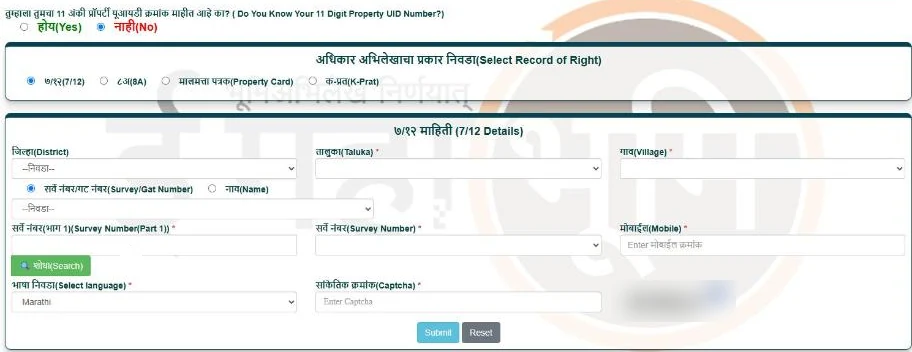
Two notices on the page matter. It says the Bhulekh site is available only in Marathi and that third-party transliteration tools are not expected: the labels are in Marathi, and the language list on the form chooses the extract’s language instead (we did not see an extract in any language). And its footer says the information shown “cannot be used for any government or legal purpose”.
Viewing the 8A, property card or K-Prat
Choose the record type in step 3 and the form changes. We did not open those versions of the free form. The portal’s help guide (May 2023) says the signed 8A is found with the khata number, and the property card with the region, district, office, village and CTS number, so keep those numbers ready.
Free 7/12 or digitally signed 7/12: which one you need
| Free view (Bhulekh) | Digitally signed copy (DSLR) | |
|---|---|---|
| Where | bhulekh. | digitalsatbara. |
| Cost | Free | ₹15 per copy for a 7/12, 8A or mutation extract |
| Login | No login (mobile number and captcha) | Regular login or OTP login |
| Official use | No: “केवळ पाहता येतील” (can only be viewed) | Yes: “can be used for all official and legal purposes” |
| Talathi stamp | Not applicable | Not needed, says the department |
| Check it | Not applicable | Verify 7/12 page, with the verification number in the PDF |
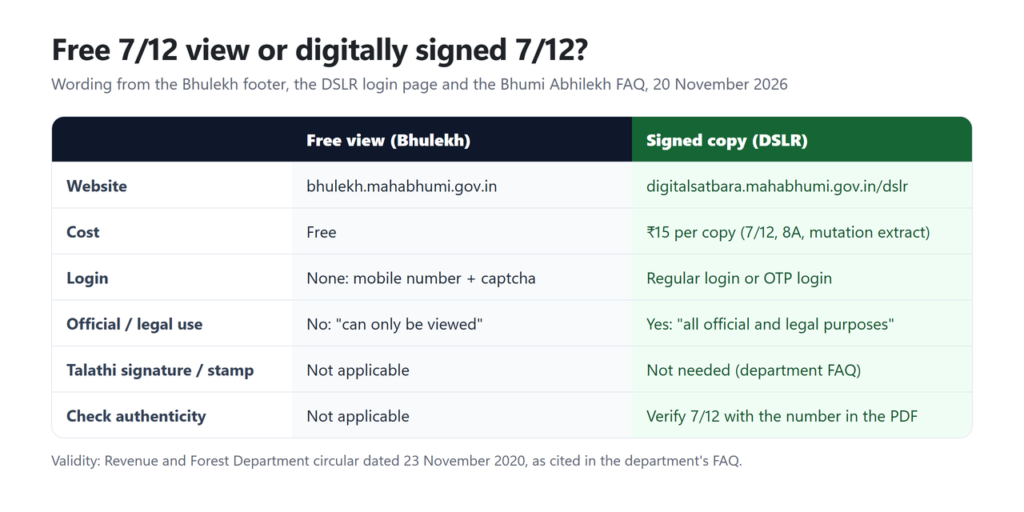
The legal basis the department gives is a Revenue and Forest Department circular, No. जमीन-२०२०/प्र.क्र.३१/ज-१अ dated 23 November 2020, under which the digital 7/12 “will remain valid” for all legal and government or semi-government work. We read the FAQ that cites it, not the circular itself.
How to download a digitally signed 7/12
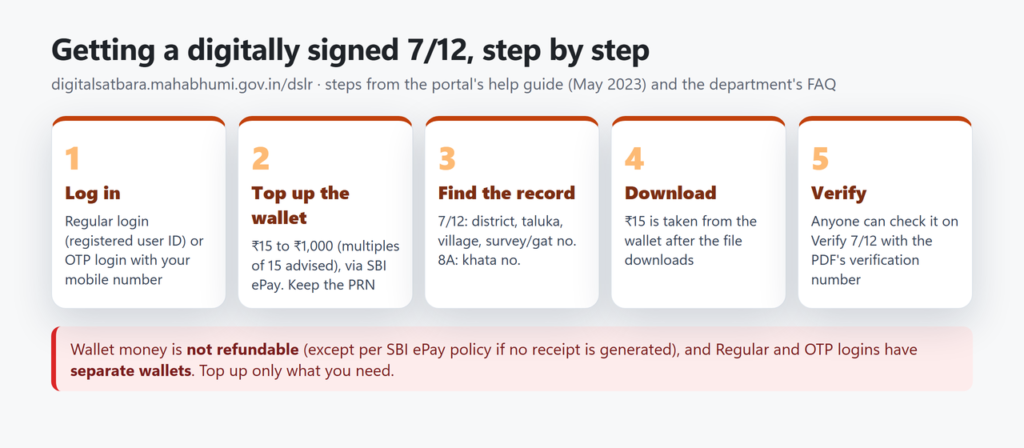
- Open digitalsatbara.mahabhumi.gov.in/dslr.
- Log in. Regular Login needs a user ID made through New User Registration (fields include name, mobile number, date of birth, login ID, password, a secret question and a captcha). OTP Based Login asks for a mobile number, a captcha and the OTP. The 2023 help guide says it needs no registration, but the department’s FAQ says to enter your “registered” mobile number, so if the OTP does not arrive, register first.
- Add money to the wallet with Make Online Payment. The help guide asks for an amount between ₹15 and ₹1,000 and advises multiples of 15. Payment goes through SBI ePay. Note the PRN (payment reference number) on the receipt.
- For a 7/12, select the district, taluka and village, search the survey or gat number, select it and press Download. For an 8A, enter the khata number instead.
- The fee is taken from the wallet after the file downloads, the help guide says. Payment History shows what each payment was used for.
The help guide (2023) said there was “currently” no fee for the property card, while the department’s undated FAQ (read on 20 November 2026) lists the ₹15 fee only for the 7/12, 8A and mutation extract. Check the wallet balance before and after a property-card download if the cost matters to you.
How to verify a signed 7/12
A bank or buyer can check a signed copy without logging in. On the DSLR login page, press Verify 7/12 (there are also Verify 8A, Verify Ferfar, Verify Property card and Verify eRecords buttons). Enter the verification number printed in the signed PDF and submit. The help guide says the portal then gives a verification copy, which is “only for verification purpose”. Compare it with the copy you were handed.
While reading a signed 7/12, the FAQ explains three marks: the khata number is printed before the occupant’s name, mutation numbers appear in brackets next to the name, and rejected mutation numbers are shown in red, slanting bold type.
Wrong entry or a pending mutation: what to do
If the online 7/12 does not match the old handwritten one (for example the total area, the unit of area, an account holder’s name or an account holder’s area), the Bhulekh page says you can apply to the Talathi online through e-Hakk: on bhumiabhilekh.maharashtra.gov.in, open the “Mutation ७/१२” option, register and log in as described there, and upload the old handwritten 7/12 with the application. The mahabhumi hub’s “ई हक्क” tile opens the e-Hakk login at pdeigr.maharashtra.gov.in; the hub lists e-Hakk for mutation applications in rural areas, and ePsit for urban areas and Mumbai city. We did not open either login.
For changes in ownership (mutation, or ferfar):
- Report it. Section 149 of the Land Revenue Code says anyone who acquires a right in land must report it to the Talathi within three months. A person who acquired it under a registered document or with the Collector’s permission is exempt from this duty.
- Notices are public. Section 150(2) of the Code has the Talathi post each mutation entry in the village chavdi; online, mutation notices for each village appear on Aapli Chawadi, the department’s digital notice board.
- Time limits. Aapli Chawadi gives a notified timeline of 30 days for an undisputed mutation and 365 days for a disputed one, under the Maharashtra Right to Public Services Act, 2015. The FAQ adds that an undisputed entry is “expected” to reach the 7/12 in 25 days. These are limits for officials, not guarantees.
- Cost. The Aapli Chawadi notice says: “No fee is required for Mutation”. It does not mention correction requests.
- Status. For pending mutations, the FAQ points to the SatBara page under Aapli Chawadi (digitalsatbara.mahabhumi.gov.in, then aaplichawdi, SatBara, SatBarainfo). Separately, the department describes a mutation-status facility searched by registered document number or mutation number. We did not open either.
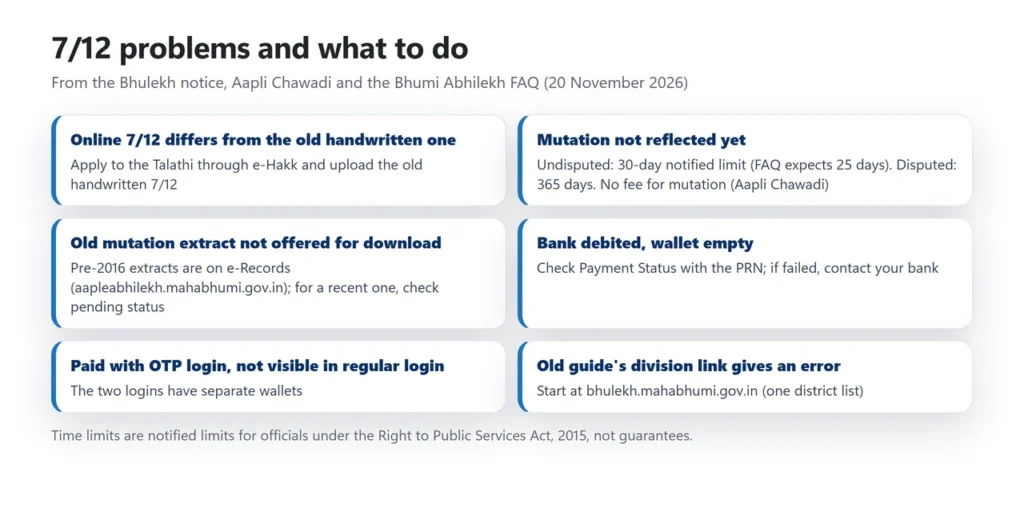
Common problems and fixes
| Problem | What to do |
|---|---|
| An old guide’s division link (for example /Pune/Home.aspx) gives an error | Start from bhulekh.mahabhumi.gov.in, which now has one district list. |
| Text appears only in Marathi | Use the form’s language list for the extract; the site says third-party transliteration tools are not expected. |
| An old mutation extract (ferfar) is not offered for download | The FAQ says online mutations began in 2016: later extracts are on the digital 7/12 site, older ones on e-Records (aapleabhilekh.mahabhumi.gov.in), and some talukas are still being added. A recent mutation not yet on your 7/12? Check its pending status instead. |
| Money left your bank but the wallet shows nothing | Use Check Payment Status with the PRN from Payment Status. If the transaction failed, contact your bank, as the portal advises. |
| Money added under OTP login is not visible after a regular login | The two logins have separate wallets; log in the way you paid. |
| An office refused the free Bhulekh copy | Expected: the free copy is for viewing only. Download the signed copy (₹15); if it is questioned, the department cites its 23 November 2020 circular. |
Help: the Settlement Commissioner and Director of Land Records office in Pune lists 020-26050006 and dlrmah.mah@nic.in in the Bhulekh footer, and the hub shows a helpline, 020-25712712. For payment failures the portal asks you to contact your bank.
Land in another state? Gujarat also uses the 7/12 and 8A names (see the AnyROR guide for Gujarat); for other portals see Bhoomi RTC in Karnataka, patta chitta in Tamil Nadu, MP Bhulekh, UP Bhulekh or Meebhoomi in Andhra Pradesh.
Is the Maharashtra 7/12 free online?
Yes, to view. Bhulekh (bhulekh.mahabhumi.gov.in) shows the 7/12 and 8A free, but the department says those can only be viewed and are not valid for official or legal use. A digitally signed copy costs ₹15 per copy.
Is a digitally signed 7/12 valid without the Talathi’s signature?
Yes, according to the department’s FAQ: Village Form 7 is digitally signed and Form 12 data is self-attested, so no signature or stamp is needed. It cites a Revenue and Forest Department circular of 23 November 2020 for its validity in legal and government work.
How do I check whether a signed 7/12 is genuine?
Use the Verify 7/12 page on digitalsatbara.mahabhumi.gov.in. Enter the verification number printed in the PDF. No login is needed.
What is the 8A extract?
The 8A is the khata: the village form that lists all of one holder’s agricultural land in that village. The signed 8A is found with the khata number.
Can I get the 7/12 in English or Hindi?
The Bhulekh form lets you pick the extract’s language, with Marathi as the default and English and Hindi among the options. The department says all 7/12 records have been converted into 23 languages. We did not see an extract in another language ourselves.
How long does a mutation take to show on the 7/12?
The notified limit is 30 days for an undisputed mutation and 365 days for a disputed one (Right to Public Services Act, 2015). The department’s FAQ says an undisputed entry is expected to take effect in 25 days. The Aapli Chawadi notice says no fee is required for mutation.
Summary
Use Bhulekh to look up a 7/12 or 8A free, and the DSLR portal when you need a copy the department says is valid for all official and legal purposes: it costs ₹15 per copy, carries a verification number and needs no Talathi stamp. Keep the survey or gat number, khata number and a mobile number ready, top up the wallet only as much as you need, and use e-Hakk for corrections.
Sources checked on 20 November 2026: the Maharashtra Revenue Department’s Bhulekh page (Mahabhulekh v2.0), the digitally signed 7/12 portal (login, verification, registration and payment-status pages, and its help guide of May 2023), Aapli Chawadi, e-Records, the mahabhumi service hub, and the Bhumi Abhilekh department’s FAQ and IT-projects page; the Maharashtra Land Revenue Code, 1966 (sections 149, 150 and 157, consolidated text with amendments to 2018). No one’s land record was opened, and no payment was made.