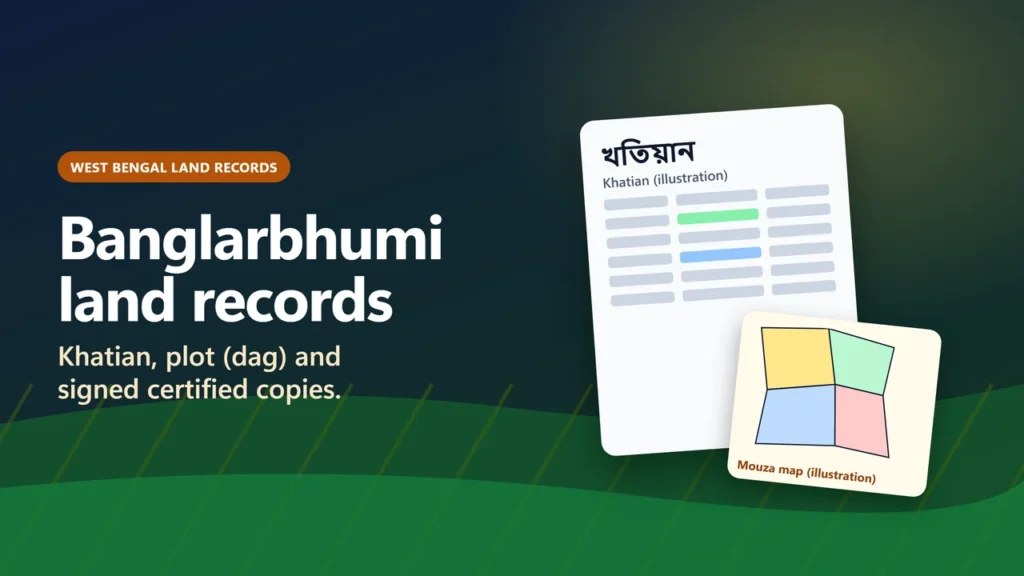
To check Banglarbhumi land records online, open banglarbhumi.gov.in, sign in as a citizen (or sign up first with a mobile number), and choose Know Your Property. The portal’s Help page says you then pick the district, block and mouza and search by khatian number or plot (dag) number. The West Bengal Land and Land Reforms Department says this lookup is “completely free of cost”.
For a bank, court or office, order a digitally signed certified copy of the record of rights (ROR), plot information or plot map from the portal’s Service Delivery menu and pay through GRIPS, the state’s payment gateway. This guide shows which parts of the portal need a sign-in, what the colours and codes on the screen mean, how RS and LR plot numbers differ, and how mutation and corrections work. It is based on the department’s own pages and other official sources as we read them on 21 November 2026.
eDefines is not a government website. The only official site named here is banglarbhumi.gov.in, run by the Land and Land Reforms and Refugee Relief and Rehabilitation Department, Government of West Bengal.
Key takeaways
- Start at banglarbhumi.gov.in and use the menu. Its inner pages only open from that menu, so saved deep links usually fail.
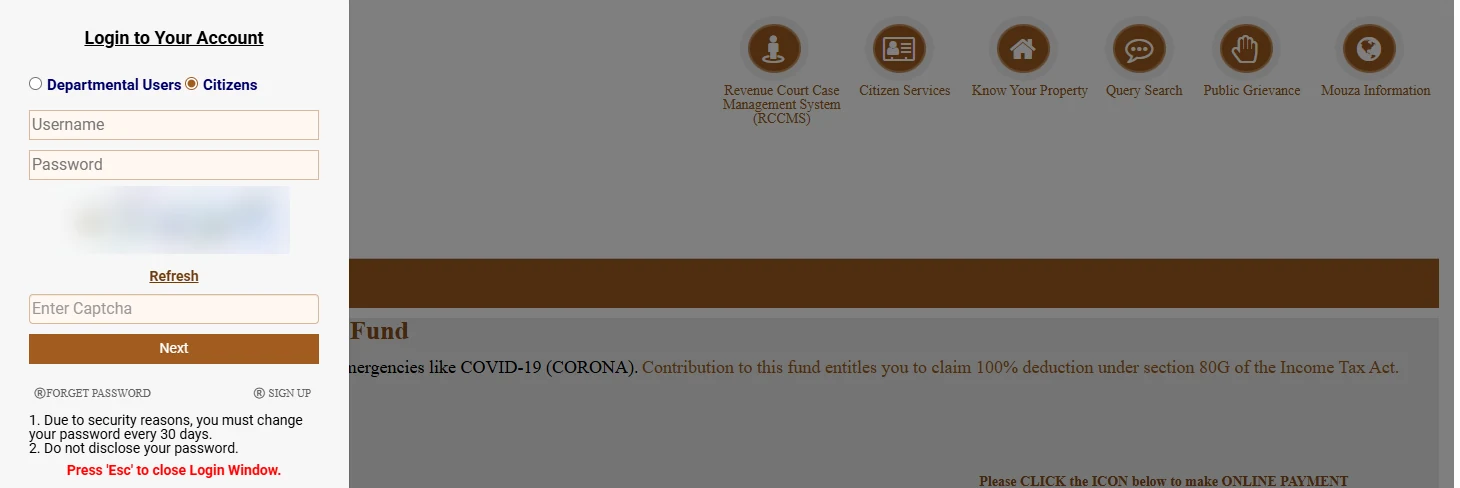
- Know Your Property is free, but on 21 November 2026 clicking it opened a citizen sign-in box. The portal’s page code shows the same sign-in check for RS-LR information, mutation status and certified-copy requests.
- Query Search, Help and the grievance form opened without signing in.
- In the district, block and mouza lists, green means live central data, blue means legacy data and black means no data (portal help page).
- Sabek dag is the RS (old) plot number; hal dag is the LR (current) plot number, in the portal’s own labels.
- The portal’s page text says “Manual copy of ROR has been made legally invalid.” Use a computerised certified copy: signed online, or from the block’s BL&LRO office.
What Banglarbhumi is and what it offers
Banglarbhumi is West Bengal’s online land records portal. It was designed, developed and hosted by the National Informatics Centre (NIC), West Bengal State Unit, with contents from the Land and Land Reforms department. The department’s history page says computerisation began as a pilot in Burdwan district in 1989-90, that all finally published records were computerised by 2007-08, and that a centrally managed system went live in 2014.
The department lists these services as online for citizens:
- Know Your Property: land record information, free of cost
- Plot maps
- Online status of mutation cases, mutation notices, and mutation status by registered deed number
- RS-LR plot information “and vice versa”
- Online application for mutation and conversion
- Digitally signed certified copies of record-of-rights and maps
- A search for plots involved in litigation in revenue courts
The portal’s terms-of-use text (in its page code) says its content “should not be construed as a statement of law or used for any legal purposes”. Treat what you see on screen as a check, and use a certified copy when a document has to count.
Which services need a sign-in
We clicked through the portal in Chrome on 21 November 2026 without signing in, and read the menu’s page code. In the code, each item marked “sign-in” below first checks whether anyone is logged in and, if not, opens the login box instead of the service.
| Service (portal label) | Sign-in needed? | What you use it for |
|---|---|---|
| Know Your Property | Yes (login box opened when we clicked it) | See khatian and plot information |
| RS-LR Information | Yes | Convert an old RS plot number to the LR number, or back |
| Mutation Application, Mutation Status, Mutation Plot Khatian Status | Yes | Apply for mutation and follow it |
| Conversion Application, Conversion Status | Yes | Change of land classification (use) |
| ROR Request, Plot Info. Request, Plot Map Request, Mouza Map Request | Yes | Order certified copies |
| Signed ROR/PI/PLM Copy(s) | Yes | Download the digitally signed copies you paid for |
| Mobile Number update Against Khatian | Yes | Link a mobile number to a khatian |
| Query Search | No | Asks for a query number, year and captcha; the portal does not say which applications get a query number |
| Grievance Application | No (the form opened for us) | Complaints: record correction, mutation, conversion |
| Grievance Status | No (page code) | Follow up a grievance |
| Land Revenue (Khajna) Application, No Due Certificate, Warish Application | Yes | Pay land revenue (khajna), get a no-dues certificate, record heirs |
| Help, Citizen Centric Services | No | Instructions and the service list |
How to create a citizen account
Click SIGN UP at the top of the home page, or inside the login box. It opens a “Public Registration Form”. We opened the blank form and typed nothing, so the steps after Submit are not described here. These fields carried the red required mark:
- First name, last name and guardian’s name
- Address, police station (P.S), district and PIN code
- User type (the only option shown was “Citizen”)
- Mobile No. (Linked With AADHAR/Bank): a 10-digit number
- Password, confirm password and a captcha code
Middle name, municipality and email address had no required mark, and there was a box for a mobile OTP. We did not check when the OTP is sent. The login box reminds users that “you must change your password every 30 days”, so keep a note of when you set it.
How to check khatian or plot information (Know Your Property)
We did not sign in, so we have not seen the Know Your Property form or a result. The steps below come from the portal’s Help page and the labels in its page code, not from a search we ran ourselves.
- Sign in on banglarbhumi.gov.in as a citizen, then open Know Your Property.
- Choose the district, then the block, then the mouza. Note the colour of each name (see the table below).
- Choose to search by khatian number or by plot (dag) number.
- Type the number using the split box: for 495/1, put 495 before the slash and 1 after it. A number without a slash, such as 49501, goes wholly in the first box.
- Submit and read the result. Check every plot you care about. A “CC” mark means a court case against that plot.
| What you see | What it means (portal Help page) |
|---|---|
| District, block or mouza name in green | “Centrally Co-Located live data” |
| Name in blue | “Legacy Data” |
| Name in black | “No Data available” |
| CC | “Court Case against the Plot of a Khatian” |
| “No Record Found” | The “record is either not available or invalid entry” |
The page code also carries the note “This is live data. This is dynamic reflection and is reflected as and when changes occur.” We could not confirm where it appears on screen. It does mean the information can change, for example after a mutation, so note the date you looked.
We have not seen the result page, so we do not list its columns here. Lists in other guides could not be checked against the portal without signing in.
Khatian, dag, mouza, J.L. number, RS and LR: the terms on the screen
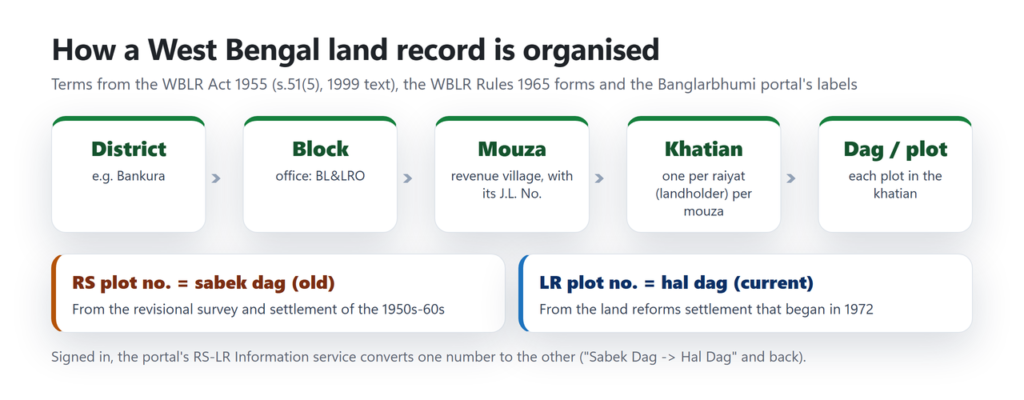
| Term | Meaning | Where it comes from |
|---|---|---|
| Khatian | The record of rights of one raiyat (landholder) for one mouza: “There shall be separate khatian for each raiyat and the khatian shall include all lands held by such raiyat in one mouza.” | West Bengal Land Reforms Act, 1955, s.51(5) (text as modified to 1 January 1999) |
| Dag (plot) | One plot of land. The portal labels “Khatian & Plot Information” as “খতিয়ান ও দাগের তথ্য”, so dag = plot. | Portal labels |
| Mouza (mauza) | The revenue village in which records are kept. A khatian covers one mouza. | WBLR Act s.51(5); WBLR Rules 1965 |
| J.L. No. | The mouza’s jurisdiction list number. The rules’ forms ask for the “Name of village with its J.L. No.” | WBLR Rules 1965, forms |
| RS / sabek dag | Plot numbers from the revisional survey and settlement of the 1950s and 60s. The portal’s “Sabek Dag” = RS plot number. | Portal history pages and RS-LR labels |
| LR / hal dag | Plot numbers from the land reforms settlement that began in 1972. The portal’s “Hal Dag” = LR plot number. | Portal history pages and RS-LR labels |
| ROR | Record of Right. “One-man one-Khatian of a person in respect of a Mauza”, in the portal’s words. | Portal history page |
| BL&LRO | Block Land and Land Reforms Officer: the block-level land office. | Portal administration page |
The portal gives two date ranges for the revisional survey: 1954-1962 in its maps text and 1954-65 in its settlement text. Our suggestion, not the portal’s: if a plot number from an old deed is not found, it may be an RS number. After signing in, RS-LR Information (“Sabek Dag -> Hal Dag”) gives the matching LR number. We could not check which number Know Your Property expects, because its form is behind the sign-in.
How to get a certified copy (ROR, plot information or plot map)
For official use, get a computerised certified copy. The portal’s page text says that with all blocks now online, certified copies of records and plot maps are provided from BL&LRO offices, and that “Manual copy of ROR has been made legally invalid.” It also says computerised records “received legal sanctity in the year 2000” after an amendment to the WBLR Act. We did not read that amendment itself.
These steps need a sign-in, so we have not seen these screens. They come from the portal’s Help page as we read it on 21 November 2026.
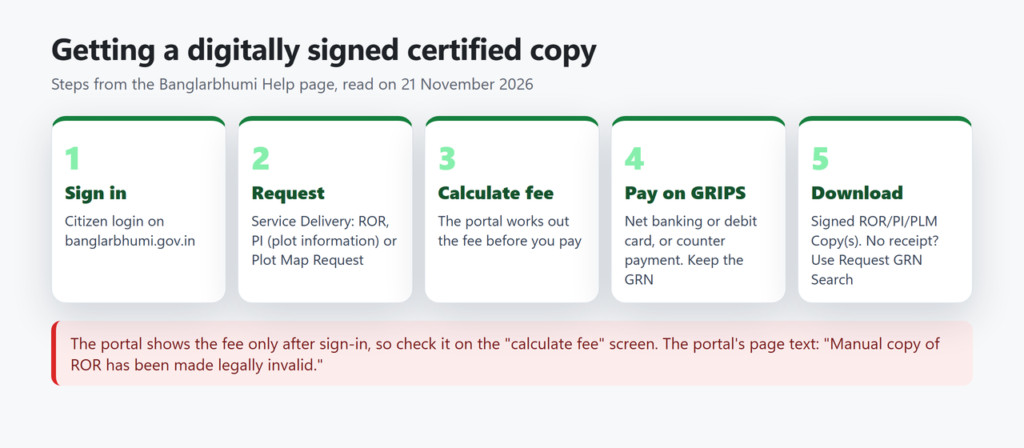
- Sign in, open Service Delivery and choose ROR Request, PI Request (plot information) or Plot Map Request.
- Fill in the details and press calculate fee. The portal works out the fee here.
- Pay through GRIPS: online by net banking or debit card, or by GRIPS counter payment.
- Online payment: the Help page says you get a receipt message straight away. Counter payment, or no response after paying online: use Request GRN Search with your GRN to verify the payment.
- Download the copy from Signed ROR/PI/PLM Copy(s). The portal says signed copies are “Best Viewed in Adobe Acrobat Reader” and that pop-ups must not be blocked.
According to the Paschim Medinipur district portal, a certified ROR or plot information can also be obtained over the counter at the block’s BL&LRO office, or applied for through a Common Service Centre (CSC) or edistrict.wb.gov.in. Mouza and plot maps are sold at the technical section of the district (DL&LRO) office, according to the same district portal (site footer: last updated 4 August 2023). The state portal’s page code puts printed RS and LR map sheets at “Rs. 150/- per sheet” at DL&LRO offices. That text is undated, so confirm it at the office.
Plot information and certified copies of the ROR are notified services under the West Bengal Right to Public Services Act, which sets a stipulated time limit for each notified service. The official RTPS FAQ lists both but does not give the number of days, and says public holidays are not counted in the limit.
Mutation: how to apply and check the status
Mutation updates the record of rights after land changes hands, by transfer (such as a sale) or inheritance. Section 50 of the West Bengal Land Reforms Act, 1955 (in the text as modified to 1 January 1999, the latest we could read) says the prescribed authority shall keep the village record-of-rights up to date, in the prescribed manner, with changes on account of “mutation of names as a result of transfer or inheritance”, partition, exchange and other causes. The state portal wb.gov.in notes: “Mutation does not create ownership by itself, but it records the change in the revenue records.”
Automatic mutation after a registered deed
The department says its system is integrated with registration offices for automated mutation. The Paschim Medinipur district portal (2023) says: “Any land Registered at DSR/ADSR Officer shall be mutated automatically. Applicants have to register their mobile number on https://wbregistration.gov.in to get information.” The department’s procedure for industrial land says the deed is transmitted electronically to the BL&LRO office and there is “no need to file separate mutation petition”. After registering, check the mutation status before you file a fresh application.
Applying online
We did not sign in, so the steps below come from the portal’s Help page, not from an application we filed. The Paschim Medinipur district portal says mutation can also be applied for offline at BL&LRO offices.
- Sign in and go to Online Application → Mutation-Application. Fill in the details and upload documents. Only one PDF is allowed per item, so scan several pages into one file.
- Note the application reference number shown after you submit.
- Pay the fee from Online Application → Fees Payment with the request type and application number.
- Online payment by net banking or debit card registers the Mutation Case No. immediately. After counter payment, or if the online payment does not come back, use Application GRN Search to verify it and register the case.
- Follow the case in Mutation Status. Silpasathi, the state’s single-window portal for businesses, lists these stages in its mutation guide (citizen screens may differ): fees payment pending, fees paid, case registered, hearing, field enquiry (if applicable), case accepted.
The same undated Silpasathi guide lists documents such as the registered deed and chain deeds, the current rent receipt, a legal heir certificate or will where relevant, a death certificate, a court order or probate, and a declaration “with court fee stamp of Rs 10/-“. Upload only what applies to your case.
Mutation fees
The Paschim Medinipur district portal (last updated 2023) gives these processing fees per decimal. We did not find a newer state-wide table, so check the amount the portal calculates before paying.
| Land | Rural area | Municipal area |
|---|---|---|
| Non-agricultural, non-commercial | ₹100 per decimal | ₹150 per decimal |
| Commercial or industrial, up to 10 decimals | ₹500 per decimal | ₹1,500 per decimal |
| Commercial or industrial, above 10 decimals | ₹1,000 per decimal | ₹3,000 per decimal |
The same page says that under notification 2094-LP/5M-33/15 dated 11.06.2018, processing fees for mutation of agricultural land used for agriculture “have been waived subject to self-declaration in the prescribed form”.
Conversion: changing the land’s classification
Conversion means changing the recorded use of land, for example from agricultural to homestead. A 2015 state government note on land conversion (wb.gov.in) says this is regulated by sections 4A to 4D of the WBLR Act, and that an enterprise may apply for conversion after the land is mutated. On the portal, the Help page says the conversion application follows the same steps as mutation.
| Area of land | Who decides |
|---|---|
| Up to 10 decimals | BL&LRO (block) |
| 11 to 99 decimals | SDL&LRO (sub-division) |
| 1 acre and above | DL&LRO (district) |
Fees are charged per decimal and depend on the area and the old and new use. For example, the same district table lists ₹20 per decimal for rural agricultural land converted to homestead for personal use. The portal’s home page also says conversion of land within the purview of the EKWMA Act, 2006 (East Kolkata Wetlands) needs sanction of the competent authority under section 9 of that Act.
Fixing a wrong entry, complaints and contacts
Records are kept and corrected by the revenue officer under the WBLR Act and rule 21 of the WBLR Rules, 1965 (Act text as modified to 1999; Rules copy dated 2008). In the department’s four-tier set-up, the block-level office is the BL&LRO, so that is the office for the block where the land lies.
- Grievance Application (Public Grievance menu): opened for us without sign-in. It asks for district, block, mouza, a petition type (record correction, mutation or conversion), whether a khatian exists, and applicant details. A district page says grievances are lodged “by login”, so the steps may change.
- Grievance Status lets you follow up a grievance. Query Search also opens without sign-in and asks for a query number, year and captcha; the portal does not say which applications get a query number.
- Portal contacts in the footer: Director of Land Records and Survey, 35 Survey Building, Gopal Nagar Road, Kolkata 700027; phone 033-2479-5726; email dlrswb.grievancecell@gmail.com.
Common problems and what to do
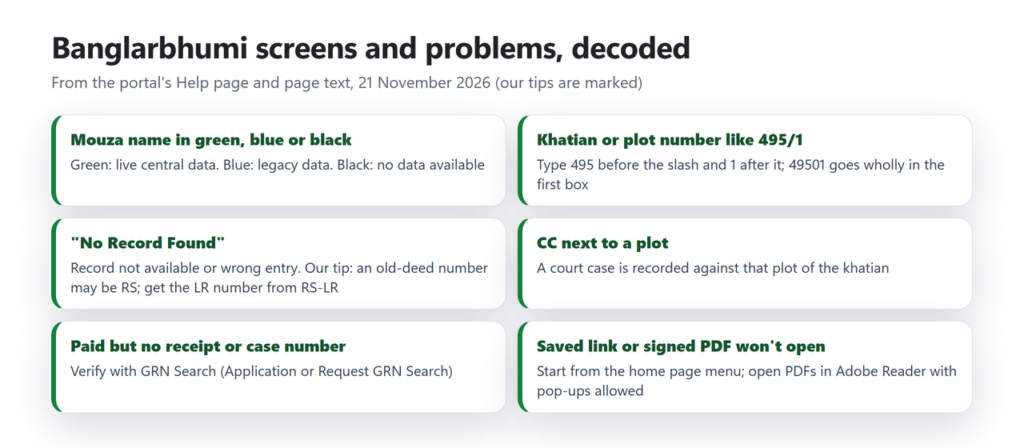
| Problem | What to try |
|---|---|
| A bookmarked Banglarbhumi page shows an error | Start again at banglarbhumi.gov.in and use the menu |
| Know Your Property opens a login box | Sign in as a citizen, or create an account with SIGN UP |
| The mouza name is black | The portal has no data for it. Ask the BL&LRO office |
| “No Record Found” | The Help page says the record is not available or the entry is wrong. Check the district, block and mouza and the split box. Our suggestion: a number from an old deed may be an RS number; RS-LR Information gives the LR number |
| Paid, but no receipt or case number | Use the GRN Search for your request type (Application or Request GRN Search) |
| A plot shows CC | A court case is recorded against the plot. The portal’s RCCMS (Revenue Court Case Management System) tile may help if the case is in a revenue court; the BL&LRO office can tell you more |
| Signed PDF will not open | Allow pop-ups and open it in Adobe Acrobat Reader, as the portal advises |
Is there an official Banglarbhumi app?
The portal’s footer has a Google Play badge, but on 21 November 2026 that Play Store link returned “Not Found”. The portal’s privacy text (in its page code) describes the “Jomir Tathya App” as using location and camera when “an authorized official user performs a field enquiry”, which points to an app for officials. Some store apps with similar names describe themselves as unofficial, and we found no working link to an official citizen app. Use the website, and never enter your login details in a third-party app.
If you also hold land in a neighbouring state, see our guides to Bihar Bhumi, Jharbhoomi in Jharkhand and Odisha Bhulekh. For land-record guides in other states, see Bhoomi RTC in Karnataka, patta chitta in Tamil Nadu and UP Bhulekh.
Frequently asked questions
Is Banglarbhumi free?
The department says Know Your Property gives land record information “completely free of cost”. Certified copies, mutation and conversion carry fees, which the portal calculates before you pay through GRIPS.
Do I need to sign up to see my khatian?
On 21 November 2026, yes: the Know Your Property tile opened a citizen sign-in box. You can create an account from SIGN UP with your details and a mobile number linked with Aadhaar or your bank.
Can I search Banglarbhumi by owner name?
The portal’s Help page describes searching by khatian number or plot number after choosing the district, block and mouza. We did not find a name search in its help text, and we could not see the form without signing in.
Is the online record valid for a bank loan or court?
Use a certified copy. The portal’s page text says manual ROR copies have been made legally invalid, and the portal offers digitally signed ROR, plot information and plot map copies through Service Delivery. Its terms-of-use text says its content should not be used for legal purposes.
What is the difference between RS and LR plot numbers?
RS (sabek dag) numbers come from the revisional settlement of the 1950s and 60s; LR (hal dag) numbers come from the land reforms settlement that began in 1972. The RS-LR Information service converts one to the other.
What does green, blue or black mean in the mouza list?
Green is live data on the central server, blue is legacy data, and black means no data is available, according to the portal’s Help page.
How do I know if my mutation is done?
Sign in and open Mutation Status or Mutation Plot Khatian Status. The department says its system is integrated with registration offices for automated mutation, and the Paschim Medinipur district portal (2023) asks applicants to register their mobile number on wbregistration.gov.in for updates.
Where do I go to correct a mistake in the khatian?
The BL&LRO office of the block where the land lies. You can also file a Grievance Application on the portal with the petition type “record correction”.
Summary
Banglarbhumi lets you check a West Bengal khatian or plot free once you have signed in as a citizen. Note the mouza colour and any CC mark, and if an old deed’s plot number is not found, try RS-LR Information for the LR number. When a document has to count, order a digitally signed certified copy and pay through GRIPS. Keep your GRN for follow-ups, and take corrections to the block’s BL&LRO office.
Sources checked on 21 November 2026: banglarbhumi.gov.in (home page, Help, Citizen Centric Services, Query Search, the login and registration forms, the grievance form and the portal’s translation file); the West Bengal Right to Public Services FAQ; the Silpasathi mutation user guide; wb.gov.in pages on mutation and land conversion (conversion note of 2015); the Paschim Medinipur district portal (last updated 2023); the West Bengal Land Reforms Act, 1955 (text as modified to 1 January 1999) and Rules, 1965. We did not sign in, make a payment or open anyone’s land record.