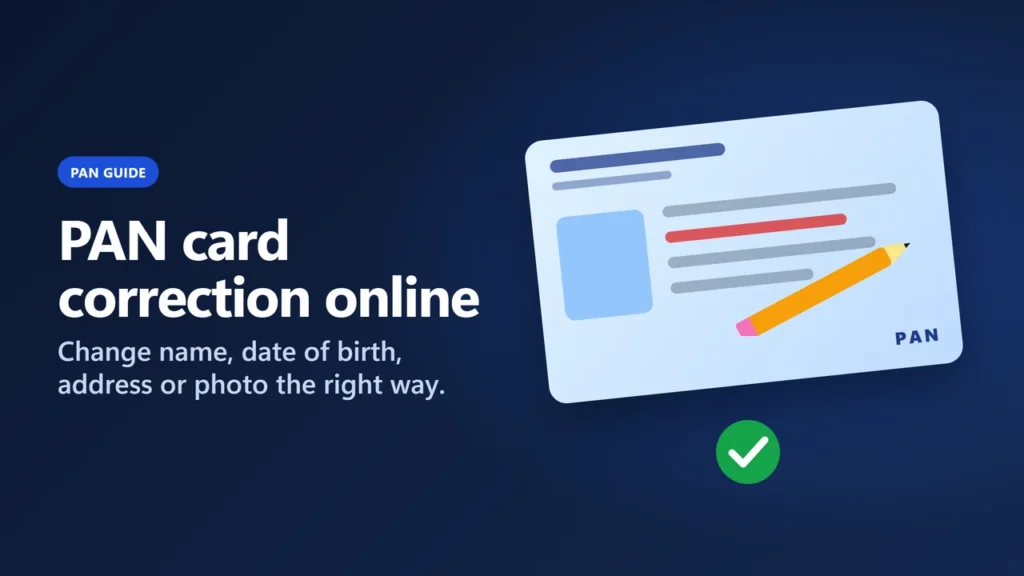
To correct your PAN card online, fill in the change request at Protean (onlineservices.proteantech.in, option “Changes or Correction in existing PAN Data / Reprint of PAN Card”) or at UTIITSL (pan.utiitsl.com, “Change/Correction in PAN Card”), tick the box beside each detail you want changed, add proof, and pay. With the paperless Aadhaar OTP route and a printed card, Protean’s fee is ₹101 including taxes plus ₹5.90 for the e-Sign (₹66 plus ₹5.90 for an e-PAN only), and your PAN number stays the same.
This PAN card correction online guide follows the rules in force since 1 April 2026, when the old Form 49A stopped being accepted for changes and the new PAN CR-01 form took over. It explains which details you can change, which proof each change needs, what each submission mode costs, and how to track the request, using Protean’s, UTIITSL’s and the Income Tax Department’s own pages as we read them on 19 November 2026.
Key takeaways
- Since 1 April 2026, individuals use form PAN CR-01 (“Request For Changes Or Correction in PAN Data”). UTIITSL says old Form 49A and Change Request forms are not accepted after 31 March 2026.
- Both Protean and UTIITSL handle corrections. Fees at Protean: ₹101 paperless or ₹107 if you post documents, with a printed card; ₹66 or ₹72 for an e-PAN only (all including taxes). An e-Sign adds ₹5.90.
- The ₹50 fee you see on some sites is Protean’s reprint-only service, which cannot change any detail.
- Aadhaar is not on the Form No. 93 list of date-of-birth proofs, so it cannot prove a date of birth change. That change needs a document from a competent authority, such as a birth certificate or passport.
- The name as per Aadhaar is printed on the new card. If your Aadhaar name has initials, write the full expanded name in the main name field.
- Your PAN number does not change. Keep the acknowledgement number to track the request.
What changed on 1 April 2026
The Income-tax Act, 2025 and the Income-tax Rules, 2026 replaced the 1961 Act and 1962 Rules from 1 April 2026, and the PAN forms changed with them. UTIITSL’s home page puts it plainly: “Old PAN application forms (Form 49A, Form 49AA and Change Request) will NOT be accepted after 31.03.2026.”
- New form: PAN CR-01 for individuals and PAN CR-02 for everyone else (companies, firms, trusts and so on). Protean’s correction page says the same form applies to citizens and non-citizens.
- New document list: acceptable proofs now come from the Form No. 93 list under Rule 158 of the Income-tax Rules, 2026.
- Aadhaar and date of birth: on the Form No. 93 list of proofs under Rule 158, Aadhaar counts as proof of identity and address, but its row shows a dash in the date-of-birth column, so Aadhaar is not a date-of-birth proof.
- Legal basis: the Income Tax Department lists a CBDT order, F. No. ADG(S)-1/PAN/M/3699/2026 dated 1 April 2026, on forms and procedures for PAN correction under Rule 158(12). The order’s PDF did not open for us, so we rely on the agencies’ pages for the details below.
Which details you can change on PAN CR-01
CR-01 has a tick box in the left margin of each field. You tick only the fields you want changed and fill in every mandatory field, including the ones that stay the same. For a reprint with no changes, Protean says to fill all fields but tick no box, so a box you forget to tick is a change you did not ask for.
| CR-01 field | What it covers | Tick box |
|---|---|---|
| 1A. Name | First, middle and last name, written in full | Yes (one box for 1A and 1B) |
| 1B. Name (as per Aadhaar) | Your name exactly as on Aadhaar; this is the name printed on the card | Shares item 1’s box |
| 2. Gender | Male, female or transgender | Yes |
| 3. Date of birth | Day, month and year | Yes |
| 4. Address | Residence or office, used for communication | Yes |
| 5. Passport number | If you have one | Yes |
| 6. Taxpayer Identification Number | For residents of another country | Yes |
| 7. Contact details | Mobile, email, landline | Yes |
| 8–9. Father’s and mother’s names | Parents’ names | Yes |
| 10. Parent’s name on the card | Father or mother | No (just select) |
| 11. Documents | List of proofs you attach, including a copy of your PAN | No |
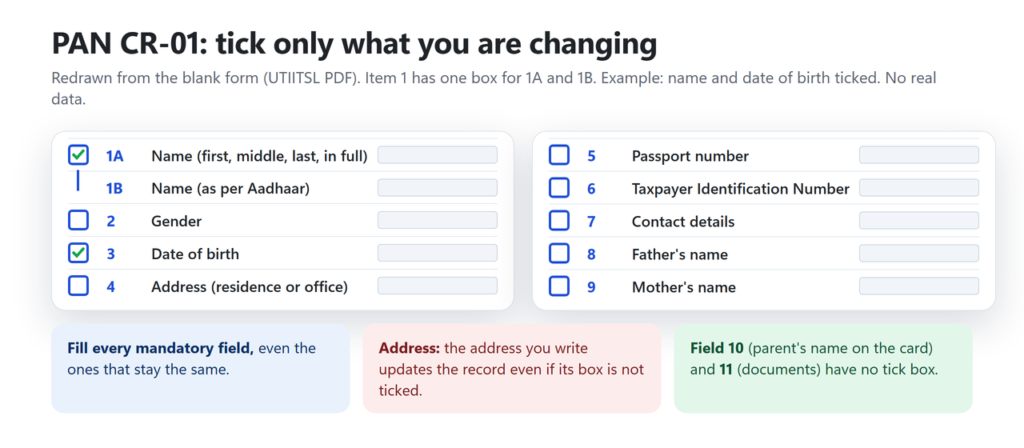
Two things surprise people. First, Protean says the communication address in the Income Tax Department’s records is updated with the address you write on the form even if you did not tick the address box, so always write your current address. Second, CR-01 has no separate tick box for the photo or the signature. The form has photo boxes, and the scanned-document modes ask for photo and signature files, but none of the official pages we read describes a separate “photo only” request. The e-filing portal’s “Update PAN” option (below) lists the photo among the details it takes from Aadhaar.
Choose where to apply
Two agencies process PAN requests for the Income Tax Department: Protean eGov Technologies (formerly NSDL e-Gov) and UTIITSL. Both accept change requests on the same CR-01 form, and UTIITSL shows the same fee amounts as Protean. The e-filing portal is different, as the table shows.
| Where | What to open | Use it for |
|---|---|---|
| Protean | onlineservices.proteantech.in (PAN application page) → application type “Changes or Correction in existing PAN Data / Reprint of PAN Card (No changes in existing PAN Data)” | Any change; four submission modes |
| UTIITSL | pan.utiitsl.com → “Change/Correction in PAN Card” → “Apply for Changes/Correction in PAN Data (CR-01 and CR-02)” | Any change; physical, Aadhaar e-KYC, Aadhaar eSign or DSC |
| UTIITSL address update | pan.utiitsl.com → “Facility for address update in PAN through eKYC mode” | Address only, from Aadhaar or DigiLocker, free of cost; only if Aadhaar is already linked to the PAN |
| Income Tax e-filing portal | incometax.gov.in → Instant e-PAN → “Update PAN” | Updates photo, name, date of birth, mobile, email and address from Aadhaar; the manual does not say who may use it |
The e-filing portal’s own profile page cannot fix PAN details: its manual says “Only Citizenship and Residential statues can be changed” there. UTIITSL also says people who got an Instant e-PAN from the e-filing portal can apply for a change through its eKYC change request. If you have never had a PAN, this is the wrong guide: see how to apply for a PAN card instead.
Choose a submission mode
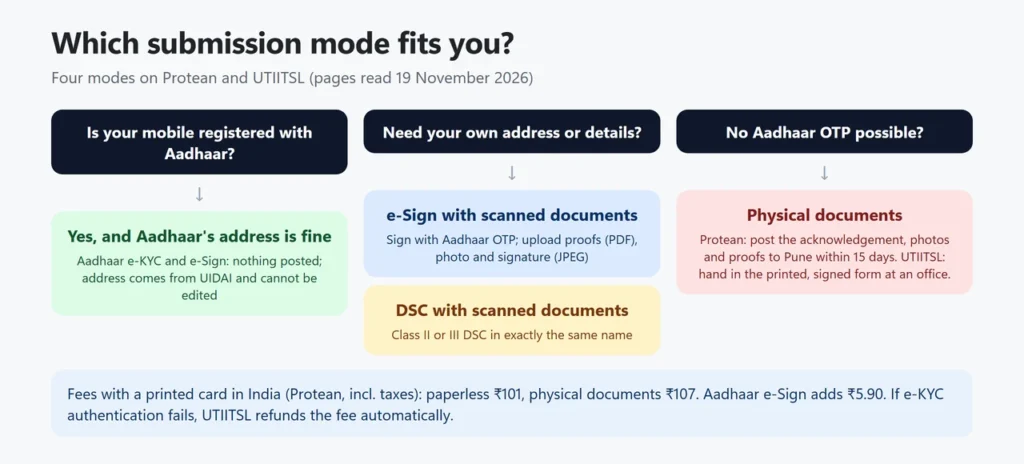
The mode decides how you sign, what you send, and the fee. Protean’s page says you pick one of four options while filling the online form; UTIITSL’s first screen offers physical mode plus three digital options: Aadhaar e-KYC, Aadhaar eSign and a Class II/III DSC.
| Mode | How you sign | What you send | Works when |
|---|---|---|---|
| Aadhaar e-KYC and e-Sign (paperless) | Aadhaar OTP | Nothing by post; details fetched from Aadhaar | Your mobile number is registered with Aadhaar and your details match |
| e-Sign with scanned documents | Aadhaar OTP | Upload proofs as PDF and photo and signature as JPEG/JPG | You need your own address or details, not Aadhaar’s |
| DSC with scanned documents | Class II or III Digital Signature Certificate | Upload scans | You already have a DSC in exactly the same name |
| Physical documents | Sign the printed form or acknowledgement | Post or hand in the papers | Aadhaar OTP is not possible, or you prefer paper |
Documents for each change
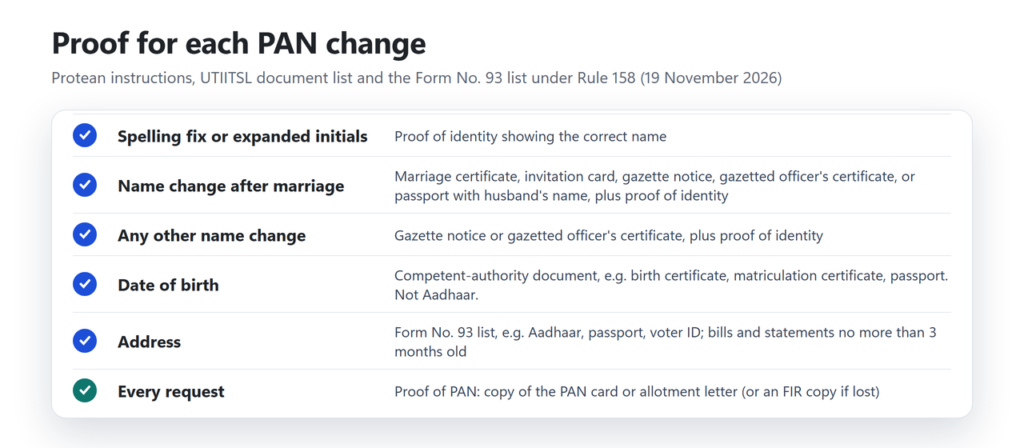
Protean’s instructions separate small fixes from real changes of name. Every request also needs proof of your PAN: a copy of the PAN card or the Income Tax Department’s allotment (intimation) letter. If you have neither, Protean accepts a copy of a police FIR about the lost card, and otherwise processes the request on a “good effort” basis; if Protean then finds a mismatch with the Income Tax Department’s records, the application may not be processed and the fee is forfeited. For the full Form No. 93 list, see our guide to documents required for a PAN card.
| Change | Proof Protean and UTIITSL ask for |
|---|---|
| Spelling fix or expanding initials in your or your father’s name | A proof of identity that shows the correct name |
| Name change after marriage | Marriage certificate, marriage invitation card, gazette publication of the name change, a gazetted officer’s certificate, or a passport showing the husband’s name, plus a proof of identity |
| Any other change of name | Gazette publication of the name change or a gazetted officer’s certificate, plus a proof of identity |
| Change of name by a transgender applicant | Transgender certificate issued by the District Magistrate (listed among proofs of change of name) |
| Date of birth | A document from a competent authority with the correct date (Aadhaar is not accepted as date-of-birth proof) |
| Address | A proof of address from the Form No. 93 list (bills and bank statements no more than 3 months old) |
Date of birth proofs on the Form No. 93 list
The date-of-birth column of the list includes a birth certificate from a municipal authority or the Registrar of Births and Deaths, a matriculation certificate or mark sheet from a recognised board, an Indian passport, a driving licence, a voter ID (elector’s photo identity card), a Central or State Government or PSU photo ID card, a CGHS or ECHS photo card, a pension payment order, a marriage certificate from the Registrar of Marriages, a domicile certificate, and the original of an affidavit sworn before a magistrate. The Aadhaar row has a dash in that column.
Address proofs
Aadhaar, passport, driving licence and voter ID all work as address proof. So do utility bills (electricity, landline or broadband, water, gas), a bank, depository or credit card statement, as long as they are not more than three months old. Protean also accepts an address proof in the name of a spouse, parent or sibling.
The name rules people trip over
- Do not add a title such as Shri, Smt, Dr. or Major to your name.
- If your Aadhaar name has initials, write the expanded name in field 1A and the Aadhaar name in field 1B. UTIITSL’s instructions say the Aadhaar name will be printed on the card.
- A married woman gives her father’s name, not her husband’s, in the father’s name field.
- Your proofs of identity and address must show the same full name as the form.
PAN card correction fees
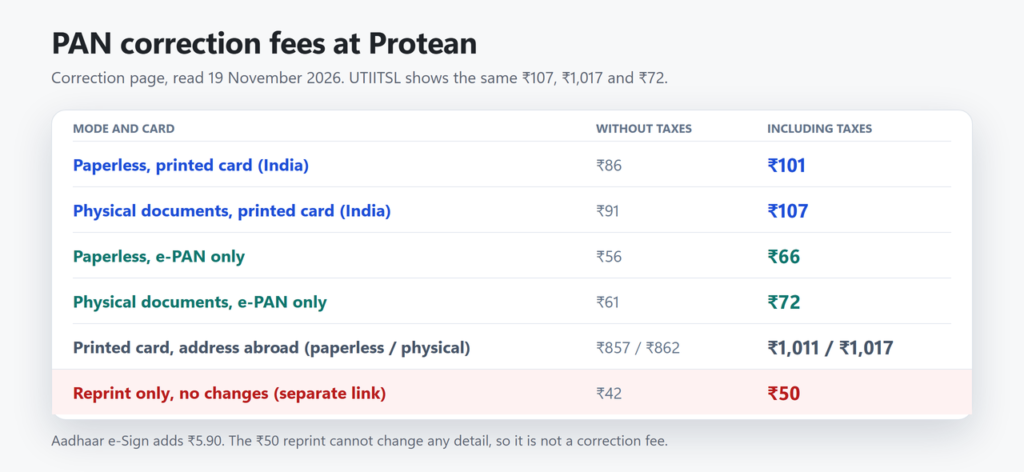
Protean’s correction page lists the fees below; UTIITSL’s home page shows the same ₹107, ₹1,017 and ₹72 figures, and its 2018 fee sheet the same paperless amounts. Card fees depend on where it is posted.
| Mode | Card | Without taxes | Including taxes |
|---|---|---|---|
| Paperless (e-KYC and e-Sign, e-Sign scans or DSC) | Printed card, address in India | ₹86 | ₹101 |
| Paperless | Printed card, address outside India | ₹857 | ₹1,011 |
| Physical documents sent | Printed card, address in India | ₹91 | ₹107 |
| Physical documents sent | Printed card, address outside India | ₹862 | ₹1,017 |
| Paperless | e-PAN only (emailed PDF) | ₹56 | ₹66 |
| Physical documents sent | e-PAN only | ₹61 | ₹72 |
| Reprint only, no changes (separate link) | Printed card, India / abroad | ₹42 / ₹813 | ₹50 / ₹959 |
Two extras: an Aadhaar e-Sign costs ₹5.90 more (UTIITSL states it; Protean’s page code shows the same charge), and paperless applications can be paid only by credit card, debit card or net banking.
How to correct PAN online at Protean
These steps follow Protean’s correction and instructions pages. We opened the blank registration page but did not type any details, request an OTP or submit anything.
- Open onlineservices.proteantech.in/paam/endUserRegisterContact.html. In “Select PAN Application Type”, choose “Changes or Correction in existing PAN Data / Reprint of PAN Card (No changes in existing PAN Data)”.
- Enter your name and date of birth as per Aadhaar (the form’s field hints say to enter them “as per Aadhaar” to avoid authentication failure), your email, mobile number, citizenship and PAN, then submit the registration.
- Note the token number shown on screen. Protean also emails it, and you can resume a half-filled form with it.
- Pick a submission mode, then fill the change request. Fill every mandatory field and tick the box beside each field you want changed.
- Upload or arrange your proofs as the mode requires, and pay the fee.
- For the e-KYC and e-Sign modes, sign with the OTP sent to your Aadhaar-registered mobile number.
- Download the acknowledgement. Protean says it also emails the acknowledgement and payment receipt as PDFs.
If you chose the physical mode
Print the acknowledgement and paste two recent colour photographs in the spaces provided (do not staple or clip them). Sign or put your left thumb impression across the left photo so that part is on the photo and part on the acknowledgement, keep the right photo free of any mark, and post it with your proofs to “Income Tax PAN Services Unit, Protean eGov Technologies Limited, 4th Floor, Sapphire Chambers, Baner Road, Baner, Pune – 411045”. If you quote Aadhaar in the application, also enclose a copy of your Aadhaar allotment letter. Write “APPLICATION FOR PAN — N-” followed by your 15-digit acknowledgement number on the envelope. Protean says the papers should reach it within 15 days of the online application. The photo size differs between Protean’s papers: the CR-01 form asks for 4.5 cm x 3.5 cm, while the online acknowledgement section says 3.5 cm x 2.5 cm, so use the size printed on the sheet you are pasting on. A thumb impression, if used, must be attested by a magistrate, notary, oath commissioner or gazetted officer.
How to correct PAN online at UTIITSL
These steps follow UTIITSL’s change request pages. We opened only the blank first screen and did not fill in or submit anything.
- Open pan.utiitsl.com and choose “Change/Correction in PAN Card”, then “Apply for Changes/Correction in PAN Data (CR-01 and CR-02)”.
- On the first screen, choose “Physical Mode” (you hand in the printed, signed form at a UTIITSL office) or a digital mode: Aadhaar e-KYC, Aadhaar eSign, or a Class II/III DSC.
- Choose “Both physical PAN Card and e-PAN” or “e-PAN only”.
- Fill in CR-01 online, ticking the fields to change, upload proofs (PDF) and photo and signature (JPEG) where asked, then pay.
- Keep the application (coupon) number: UTIITSL’s tracking page asks for it, or for your PAN and date of birth.
Only changing your address, and your Aadhaar is already linked to your PAN? UTIITSL’s separate address update page takes the address from Aadhaar or DigiLocker free of cost, after an OTP to the mobile number and email registered with UIDAI. It shows the fetched address in masked form for you to confirm.
After you apply
- Track it: on Protean’s status page choose “PAN – New / Change Request” and enter the 15-digit acknowledgement number; on UTIITSL’s Track PAN page use the application or coupon number, or your PAN with your date of birth. Our guide on how to check PAN card status walks through both.
- e-PAN: Protean says the e-PAN PDF is sent to the email ID in the application.
- Printed card: printed and sent to your communication address after the Income Tax Department confirms the update.
- Same number: Protean says “A new PAN card bearing the same PAN with updated details will be issued”.
- Time taken: none of the official pages we read gives a processing time, so treat any fixed number of days on other sites as an estimate.
Common problems and fixes
| Problem | What to do |
|---|---|
| No OTP: your mobile is not registered with Aadhaar | Use the physical mode. UTIITSL says the fee is refunded automatically if Aadhaar authentication fails. |
| PAN–Aadhaar linking fails because details differ | Correct one side so name, date of birth and gender match. The e-filing FAQ points you to Protean or UTIITSL for PAN changes; UTIITSL mentions biometric authentication at PAN centres for mismatches. See our PAN–Aadhaar link guide. |
| Only the year of birth is on your record | The e-filing manual says you must first update the full date in Aadhaar before updating PAN from Aadhaar. On CR-01, attach a competent-authority date-of-birth proof. The official pages we read do not explain why the e-filing option takes the date of birth from Aadhaar when Aadhaar is not on the Form No. 93 date-of-birth list. |
| Your details differ from the PAN database but you did not ask to change them | Protean says you will be told about the variance; tick the field and attach proof. |
| You lost the card but nothing has changed | Use Protean’s reprint service (₹50) instead, which works only if your latest PAN application was processed through Protean or the e-filing portal (UTIITSL has its own reprint option); see our duplicate PAN card (reprint) guide. |
| You have two PANs | The Income Tax Department says a person cannot hold more than one PAN, that a penalty of ₹10,000 can be imposed, and that extra PANs should be surrendered at once. |
How do I apply for PAN card correction online on the NSDL (Protean) website?
Open onlineservices.proteantech.in/paam/endUserRegisterContact.html, choose “Changes or Correction in existing PAN Data / Reprint of PAN Card”, register with your PAN, note the token number, fill the change request ticking the fields to change, add proof and pay. NSDL e-Gov is now Protean eGov Technologies.
Is UTIITSL PAN correction different from Protean?
The rules, form (PAN CR-01) and fees are the same. Only the website and menus differ: on pan.utiitsl.com choose “Change/Correction in PAN Card”. UTIITSL also offers a free Aadhaar-based address update if your Aadhaar is linked to your PAN.
What are the PAN card correction fees online?
At Protean, ₹101 including taxes for a paperless request with a printed card in India, or ₹107 if you post documents. An e-PAN only costs ₹66 or ₹72. An Aadhaar e-Sign adds ₹5.90.
Is Form 49A still used for PAN correction?
No. UTIITSL says Form 49A and the old Change Request form are not accepted after 31 March 2026. Individuals use PAN CR-01, which you can download as a blank PDF on UTIITSL’s change request page.
How do I check my PAN card correction status?
Use the 15-digit acknowledgement number on Protean’s “Track your PAN/TAN Application Status” page (type “PAN – New / Change Request”), or the application or coupon number on UTIITSL’s Track PAN page.
How many days does PAN card correction take?
Neither agency’s procedure page gives a processing time. For the physical mode, your documents must reach Protean within 15 days of applying, so post them quickly and track the request with your acknowledgement number.
Can I use Aadhaar to correct my date of birth on PAN?
Not as proof on a CR-01 request. On the Form No. 93 list under the Income-tax Rules, 2026 (in force from 1 April 2026), Aadhaar is accepted for identity and address but not listed as proof of date of birth. Use a birth certificate, matriculation certificate, passport or another document on the Form No. 93 list.
Related PAN guides
New to PAN? Start with what a PAN card is. Lost your card with nothing to change? Read our duplicate PAN card (reprint) guide. For the full list of proofs, see documents required for a PAN card.
Checked on 19 November 2026 against Protean’s PAN correction and instructions pages and its online application page; UTIITSL’s PAN home page, change request pages, the PAN CR-01 form and instructions, and its Form No. 93 document list; the Income Tax Department’s Instant e-PAN and My Profile manuals, its Aadhaar linking FAQ and its page on holding more than one PAN; and the listing of CBDT order F. No. ADG(S)-1/PAN/M/3699/2026. No application was filled in or submitted.