
Quick answer: To track a PAN application, use your 15-digit acknowledgement number on Protean’s status-track page (Protean was formerly NSDL e-Gov), or your application/coupon number or PAN with your date of birth on UTIITSL’s tracking page. For an Instant e-PAN, use “Check Status / Download e-PAN” on incometax.gov.in. To check whether an existing PAN is active, use “Verify your PAN” on the e-filing portal; it needs your PAN, name, date of birth and an OTP to your mobile.

Two different “PAN status” checks
“PAN card status” can mean two things, and they are checked in different places:
| What you want to know | Where to check | What you need |
|---|---|---|
| Where is my new PAN, reprint or correction request? | Protean or UTIITSL tracking page (whichever you applied through) | Acknowledgement number (Protean) or application/coupon number or PAN (UTIITSL), plus date of birth for UTIITSL |
| Has my Instant e-PAN been allotted? | incometax.gov.in, Instant e-PAN, “Check Status / Download e-PAN” | Aadhaar number and OTP |
| Is my existing PAN valid and active? | incometax.gov.in, “Verify your PAN” | PAN, full name, date of birth and a mobile number for OTP |
| Is my PAN linked with Aadhaar? | incometax.gov.in, “Link Aadhaar / View Status” | PAN and Aadhaar number |
A PAN is the 10-character alphanumeric number the Income Tax Department uses to identify taxpayers, such as ABCPE1234F. Our explainer on what a PAN card is breaks down what each character means. An earlier version of this article said PAN was “founded in 1961”; according to the Press Information Bureau (PIB), PAN was introduced in 1972.
Track a Protean (NSDL) PAN application
If you applied on the Protean portal or at a Protean PAN centre, your acknowledgement slip carries a 15-digit acknowledgement number. Protean says status can be checked about three days after you apply.
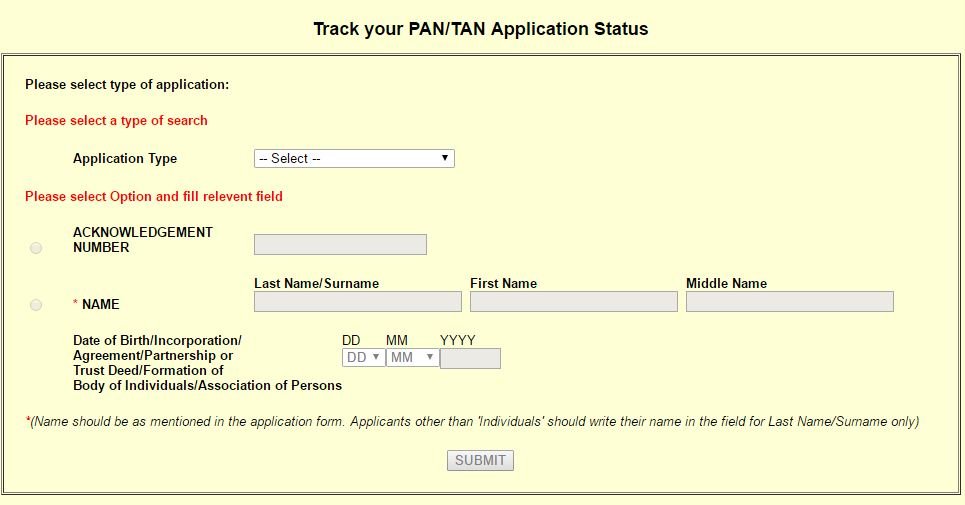
- Open Protean’s PAN/TAN status-track page (linked from the “Know Status of Your Application” option on the Protean PAN portal).
- Under application type, choose PAN – New / Change Request.
- Enter your 15-digit acknowledgement number after the “N-” prefix shown on the page.
- Submit to see your status.
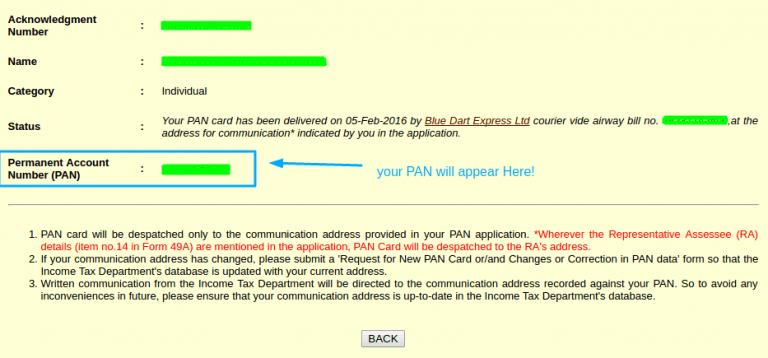
An earlier version of this article said the NSDL page asked for your name and date of birth. The current Protean page asks only for the acknowledgement number.
Protean also gives status through its automated IVR on 080-69708080 and on WhatsApp at 8096078080. Its PAN call centre is 020-27218080.
Track a UTIITSL PAN application
If you applied through UTIITSL, use its tracking page (trackpan.utiitsl.com, linked from “Track PAN Card” on pan.utiitsl.com).
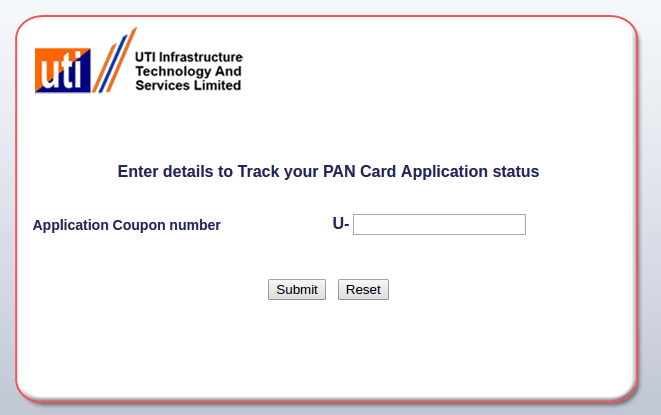
- Enter either your application/coupon number or your PAN.
- Enter your date of birth (or date of incorporation, agreement or formation for a firm, trust or other entity).
- Enter the captcha and search.
An earlier version of this article said only the coupon number was needed. UTIITSL’s current page also asks for a date and accepts PAN instead of the coupon number. UTIITSL’s helpdesk is 033-40802999, from 9 am to 8 pm every day.
Check an Instant e-PAN request
- Go to incometax.gov.in and open Instant e-PAN under Quick Links.
- Choose Check Status / Download e-PAN.
- Enter your 12-digit Aadhaar number and the OTP sent to your Aadhaar-linked mobile.
- If your e-PAN has been allotted, view or download it from the same screen.
Check whether a PAN is active: “Verify your PAN”
The e-filing portal’s pre-login “Verify your PAN” service confirms whether your PAN details are correct and what the PAN’s status is.
- On incometax.gov.in, under Quick Links, choose Verify your PAN (the user manual calls it “Verify PAN Status”).
- Enter your PAN, full name, date of birth and a mobile number you can access, then click Continue.
- Enter the 6-digit OTP sent to that mobile. It is valid for 15 minutes and you get three attempts.
- The portal shows whether the details match and the PAN’s status.
This service only confirms a PAN you already know; it does not look up a PAN from a name. If you have forgotten your own PAN, see legitimate ways to find your own PAN number.
If your PAN shows as inoperative
An individual’s PAN becomes inoperative if it is not linked with Aadhaar, unless the person is in an exempt category such as NRIs, people aged 80 or over, non-citizens, and residents of Assam, Meghalaya, Jammu and Kashmir and Ladakh. To check, use “Link Aadhaar / View Status” on the e-filing portal with your PAN and Aadhaar number. To make an inoperative PAN operative again, pay a ₹1,000 fee through e-Pay Tax and then link it; the e-filing portal’s user manual asks you to wait 4 to 5 working days after payment before submitting the link request. Our guide to linking Aadhaar with PAN and other documents explains the steps.
Common status messages and what to do
- “No record found”: check that you entered the number correctly and that enough time has passed since you applied. Protean suggests waiting about three days.
- Application on hold or under discrepancy: the agency needs a document or clarification. Check your email and SMS, and respond quickly so the application is not rejected.
- PAN allotted or dispatched: download your e-PAN while you wait for the card. If a card does not arrive, contact the agency that processed it; our duplicate PAN card guide covers reprints.
Frequently asked questions
Can I check PAN status by name and date of birth only?
No. Protean tracks applications by acknowledgement number, UTIITSL by application/coupon number or PAN plus date, and the e-filing portal’s “Verify your PAN” needs the PAN itself plus an OTP to your mobile. There is no official service that finds a PAN from a name alone.
How do I know whether I applied through Protean or UTIITSL?
Look at your acknowledgement slip or the confirmation email. A Protean acknowledgement number is 15 digits; UTIITSL issues an application or coupon number.
I lost my acknowledgement number. What now?
Protean’s portal has an option to regenerate the acknowledgement receipt and check online payment status. You can also call the agency’s helpline with your application details.
Is a PAN ever deactivated?
A PAN does not expire, but it can be made inoperative if it is not linked with Aadhaar, and extra PANs held by the same person are cancelled. “Verify your PAN” shows the current status.
This guide was checked in October 2026 against Protean’s status-track and PAN FAQ pages, UTIITSL’s tracking page, and the Income Tax e-filing portal’s user manuals for Verify your PAN, Instant e-PAN and Link Aadhaar. Pages change, so follow the instructions shown on the official site.




1 comment
NSDL PAN CARD STATUS No click in the name option