Quick answer: Trend Micro still sells four home security plans: Antivirus+ Security, Internet Security, Maximum Security and the newer Premium Security Suite. Maximum Security, the suite the original review focused on, covers up to five devices across Windows, Mac, Android, iOS and Chromebook. It includes Pay Guard for online banking, Folder Shield against ransomware, child-safety controls and password tools. Trend Micro is easy to use, but it did not earn a top award in the main independent labs’ 2025 consumer tests, so compare it carefully with rivals.
This review was first written in 2020 and lightly updated in 2023. In October 2026 we rechecked every feature against Trend Micro’s own product pages and help centre, removed claims we could not trace, and added dated independent test results and company history. We have not tested the software ourselves.
Trend Micro at a glance
- Company: Trend Micro Incorporated, a cybersecurity company listed on the Tokyo Stock Exchange. It was founded in 1988.
- Recent change: In March 2026, Trend Micro renamed its enterprise security business TrendAI. Its home products are still sold under the Trend Micro name.
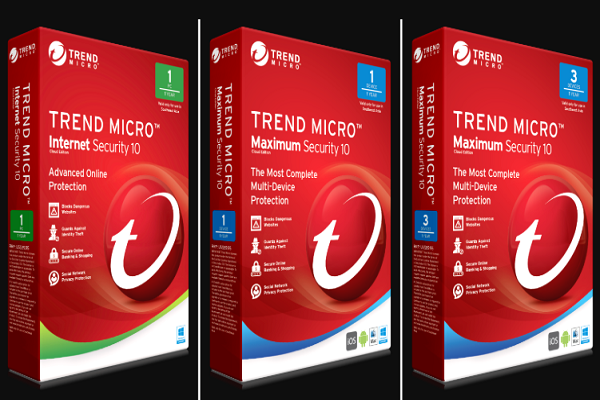
- Home plans (October 2026): Antivirus+ Security (Windows PC and Mac), Internet Security (up to 3 PCs on Windows, Mac and Chromebook), Maximum Security (up to 5 devices) and Premium Security Suite (up to 10 devices, including a VPN and identity fraud insurance). Trend Micro also sells standalone apps such as ScamCheck for phones, ID Protection and Trend Micro VPN.
Ease of use
The original review praised Trend Micro’s simple dashboard: a large scan circle in the middle that changes colour with your computer’s status, one click for a quick scan, and a menu for full or custom scans. Trend Micro’s help centre still organises features into tabs such as Device and Privacy, which makes them easy to find.
Protection features
Trend Micro’s Maximum Security page lists these protections:
- Ransomware protection, including Folder Shield, which protects chosen local folders and cloud-synced folders such as Dropbox, Google Drive and OneDrive.
- Web threat protection, which blocks dangerous websites and flags phishing emails and scam sites.
- Pay Guard, a protected browser for online banking and shopping that checks that financial sites are genuine.
- Identity monitoring, which alerts you if your personal data appears in leaks, including on the dark web.
- Password tools to create and manage complex passwords.
- Mobile security for Android and iOS devices covered by the plan.
Privacy tools
The privacy features the original review described are still in Trend Micro’s help centre, though which plan includes them varies:
- Privacy Scanner checks privacy settings on social networks such as Facebook, X and LinkedIn, and in the Chrome and Firefox browsers. It is reached through the Privacy tab.
- Data Theft Prevention blocks attempts to send information you have marked as sensitive, such as part of a card number or a password, through a web page, email or instant message. You set it up under Privacy and protect the settings with a password. Trend Micro’s comparison table lists it in Internet Security, Maximum Security and Premium Security, but not in Antivirus+ Security.
The original article also mentioned “Social Networking Protection”, which warned about risky links on social sites. Trend Micro’s current product page describes this more generally as securing privacy on social media.
Secure Erase
Deleting a file normally leaves data that recovery tools can bring back. Secure Erase permanently deletes a chosen file or folder so it cannot be recovered. It offers quick and permanent erase options, and it has to be activated before use. Trend Micro’s help notes that if you share threat information with Trend Micro, the names of securely erased files may be included. The original review said you could right-click a folder and choose “Delete with Secure Erase”. Check your version, as menus change.
Parental controls
Maximum Security includes child-safety tools that set time and content limits. The original review explained that parents could choose which websites children may visit by age, set allowed browsing hours for each day, and set total daily time limits for weekdays and weekends. Trend Micro’s current page describes these features more briefly, so check the help centre for the exact options in your version.
Mute Mode
Mute Mode holds back less important pop-ups so they do not interrupt games, films or presentations. You turn it on from the Device tab. It runs for a set time; when that ends, Trend Micro says scheduled scans and alerts resume, and you can extend Mute Mode by two hours from the settings. A July 2025 update reduced the Mute Mode pop-ups shown when you leave full-screen mode.
Independent test results
- AV-Comparatives, Consumer Summary Report 2025 (published 14 January 2026): Trend Micro Internet Security was one of 19 products in the year-long consumer test series. It was not among the seven vendors that received a Top-Rated award.
- AV-TEST Awards for the 2025 test year: Trend Micro was not among the consumer award winners.
Not winning an award does not mean a product failed. It does mean other vendors scored higher across the year. The original review said Trend Micro “nailed” usability and offered “the best parental controls”; we have removed those superlatives because no named test supports them.
A past privacy incident
In September 2018, several Trend Micro apps in the Mac App Store, including Dr. Cleaner, Dr. Antivirus and Dr. Unarchiver, were found to collect browser history, and they were removed from the store. Trend Micro said the apps collected a one-time snapshot of the previous 24 hours of browsing history for security analysis, and that this was disclosed in the licence terms. It removed the collection feature, disabled the system that received the data, and deleted the stored logs. Researchers and press reports described the collection as broader than that. The incident involved separate utility apps, not the Maximum Security suite, but it is worth knowing when you judge any security vendor.
System requirements
| Platform | Requirement listed by Trend Micro (October 2026) |
|---|---|
| Windows | Windows 10 or 11 |
| Mac | macOS 11 or later |
| Chromebook | ChromeOS 79 or later (Chrome Web Store version) |
| Android | Android 5.0 or later |
| iOS | iOS 13.0 or later |
Pricing
Trend Micro sells annual subscriptions. Its US page says introductory prices apply to the first term and that plans renew each year at the then-current renewal price. Prices differ by country and change often, so check Trend Micro’s site for your region before buying.
Pros and cons
Pros
- A simple interface that suits non-technical users.
- Maximum Security covers five devices on five platforms, including Chromebook.
- Useful extras: Pay Guard, Folder Shield, Data Theft Prevention and Secure Erase.
Cons
- No top award from AV-Comparatives or AV-TEST in their 2025 consumer results.
- Feature availability varies by plan, which can be confusing.
- Renewal prices can be higher than first-year prices.
Is Trend Micro right for you?
Trend Micro suits households that value an easy interface and want one subscription across Windows, Mac, phones and Chromebooks. If top lab scores matter most to you, compare it with the products in our list of antivirus software for PC. If you are not sure you need a paid suite at all, read our guide on whether a free antivirus is good enough. For Trend Micro’s place in the wider industry, see our list of major cybersecurity companies in the USA.
Frequently asked questions
Which Trend Micro plan includes parental controls?
Maximum Security includes child-safety controls for time and content limits. Check Trend Micro’s comparison table for other plans, as features vary by edition.
Does Trend Micro Maximum Security include a VPN?
Trend Micro’s comparison table lists a personal VPN only in Premium Security Suite. A standalone Trend Micro VPN is also sold.
What is TrendAI?
TrendAI is the name Trend Micro gave its enterprise security business in March 2026. Home users still buy Trend Micro-branded products.
Does Trend Micro work on Windows 7?
No. Trend Micro lists Windows 10 or 11 for its current home products.
Does Mute Mode turn off protection?
Trend Micro describes Mute Mode as holding back less important pop-ups for a set time, and says scheduled scans and detection alerts return when it ends. It is meant for gaming and full-screen work, not as a way to switch protection off.
Checked in October 2026 against Trend Micro’s home product pages and help centre, Trend Micro’s March 2026 TrendAI announcement and 2018 statement on its Mac apps, and the AV-Comparatives and AV-TEST consumer results for 2025.