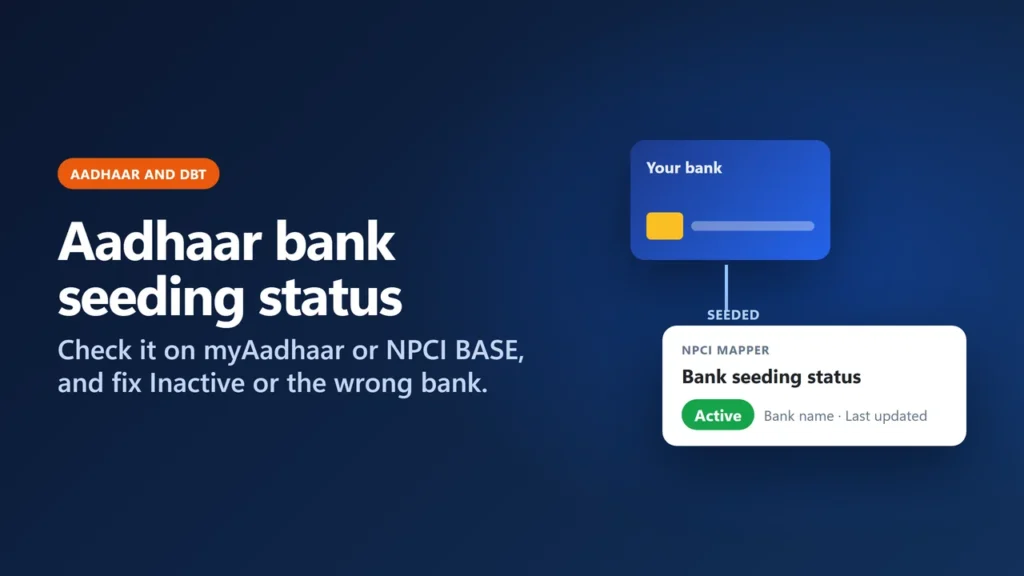
To check your Aadhaar bank seeding status, open myaadhaar.uidai.gov.in, choose Check Bank Seeding Status, log in with your Aadhaar number and the OTP sent to your Aadhaar-registered mobile, and read the result: the bank name, Active or Inactive, and the last updated date. You can also check on NPCI’s Bharat Aadhaar Seeding Enabler (BASE) under Aadhaar Mapped Status. If it says Inactive or shows the wrong bank, submit the bank’s Aadhaar consent form at the bank where you want your benefits; the bank that seeded your Aadhaar last receives your Aadhaar-based government payments.
This matters because Aadhaar-based Direct Benefit Transfer (DBT) payments, such as PM-KISAN instalments and LPG subsidy, are routed through NPCI’s Aadhaar mapper, not through every account your Aadhaar is linked to. (Some schemes still pay to an account number you give them; this guide covers the Aadhaar-based route.) This guide uses the current myAadhaar and BASE pages and their page code (checked on 6 November 2026 and re-checked on 18 November; we did not log in with a real Aadhaar), NPCI’s own FAQs and UIDAI’s DBT FAQ, and explains what each status means and how to fix it.
Key takeaways
- Two places show your status: myAadhaar (Check Bank Seeding Status) and NPCI BASE (Aadhaar Mapped Status). Both need an OTP on your Aadhaar-registered mobile.
- The result shows the bank’s name, not your account number. The data comes from NPCI; UIDAI says it is not responsible for its correctness.
- Linking (your bank records Aadhaar in its own system) is not the same as seeding (the bank updates NPCI’s mapper). Only seeding routes Aadhaar-based DBT payments.
- Only one bank is active in the mapper at a time. The bank that seeded your Aadhaar last receives the payments, and the old bank does not need to remove it first.
- To fix Inactive or the wrong bank, give the consent form at the bank you want. NPCI says this should be done within a couple of working days. BASE also takes online requests for 195 listed banks.
- Old routes no longer work: resident.uidai.gov.in/bank-mapper does not load, and the old mAadhaar Android app is no longer listed.
Before you start
- Your Aadhaar number (or keep your Aadhaar letter or e-Aadhaar handy).
- The mobile number registered with Aadhaar, switched on, because both myAadhaar and BASE send an OTP to it (BASE asks for a 6-digit OTP). If no mobile is registered, you must first add one at an Aadhaar Seva Kendra or enrolment centre (you can book an Aadhaar Seva Kendra appointment); UIDAI says a first-time mobile registration cannot be done online.
- Five minutes on a phone or computer. BASE shows a session timer of about eight minutes.
Method 1: check on myAadhaar (UIDAI)
- Open myaadhaar.uidai.gov.in. UIDAI switches between two layouts at this address: on 6 November 2026 it opened the new (beta) layout, and on 18 November the classic one, with a link to the new portal. In the beta layout, close the beta-interface banner first; while it was open, the service cards did not respond to clicks in our check.
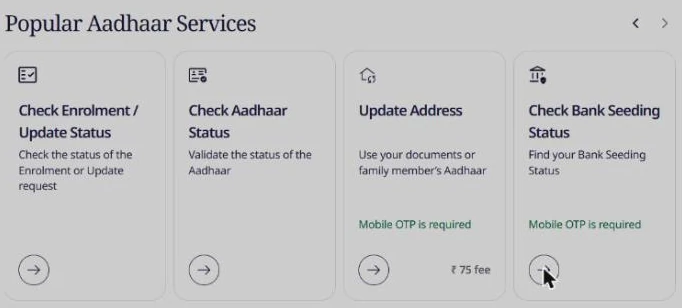
- Choose the bank seeding card. In the beta layout it is Check Bank Seeding Status under Popular Aadhaar Services or Check status (marked “Mobile OTP is required”). In the classic layout it is Bank seeding status (“Click here to find your Bank Seeding Status”), listed among the services that need a mobile number registered with Aadhaar.
- You are taken to UIDAI’s login page, Login to Aadhaar via OTP. Enter your Aadhaar number and the captcha, press Login With OTP and enter the OTP. There is no separate no-login check for this service.
- Read the Bank Seeding Status card that opens.
What the myAadhaar result shows
myAadhaar’s result screen (in its current page code) describes the service as showing “whether your Aadhaar number is linked with your bank account for receiving Aadhaar-based services and benefits”. We did not log in with a real Aadhaar, so the wording on your screen may differ slightly, but the code shows a result with four rows:
- Aadhaar number, masked except for the last four digits.
- Bank name: the bank that has seeded your Aadhaar in NPCI’s mapper. No account number, IFSC or branch is shown, because NPCI’s mapper does not store them.
- Bank seeding status: Active or Inactive.
- Last updated date.
Every result carries UIDAI’s note that the information “is fetched from the server of National Payment Corporation of India (NPCI). UIDAI is not responsible for its correctness.” So if the status looks wrong, the fix lies with your bank and NPCI’s records, not with UIDAI.
Method 2: check on NPCI BASE
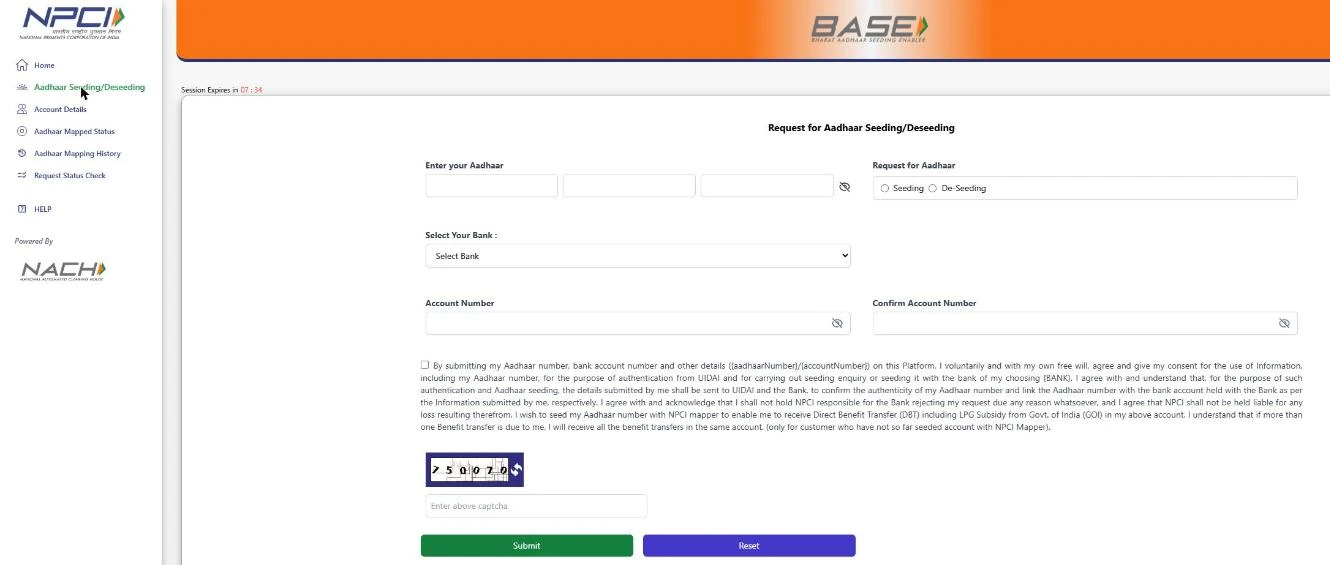
BASE (Bharat Aadhaar Seeding Enabler) is NPCI’s own portal for the mapper. NPCI describes it as a seeding platform built so that a DBT beneficiary can “be in control of the account to which the benefits shall flow”.
- Open npci.org.in, open the Customer menu and, under Get Help, choose Bharat Aadhaar Seeding Enabler (BASE). (Typing the BASE address directly did not work for us; it needs the hand-off from NPCI’s site. Some older guides call the menu “Consumer”; on 6 November 2026 it was “Customer”.)
- In the BASE menu on the left, choose Aadhaar Mapped Status.
- Enter your Aadhaar number and the captcha, press Check Status, then enter the OTP sent to your registered mobile.
- Read the status. NPCI’s page code shows three outcomes: Enabled for DBT, Not Enabled for DBT, or Not mapped with any bank in NPCI Mapper, with the bank name and last updated date when a mapping exists.
BASE has two more useful pages. Aadhaar Mapping History lists seed and de-seed changes for the last 90 days (useful if your payments suddenly moved to another bank). Request Status Check tracks a seeding request you made on BASE. The site is available in 13 languages, including Hindi, Bengali, Tamil, Telugu and Marathi.
What your status means
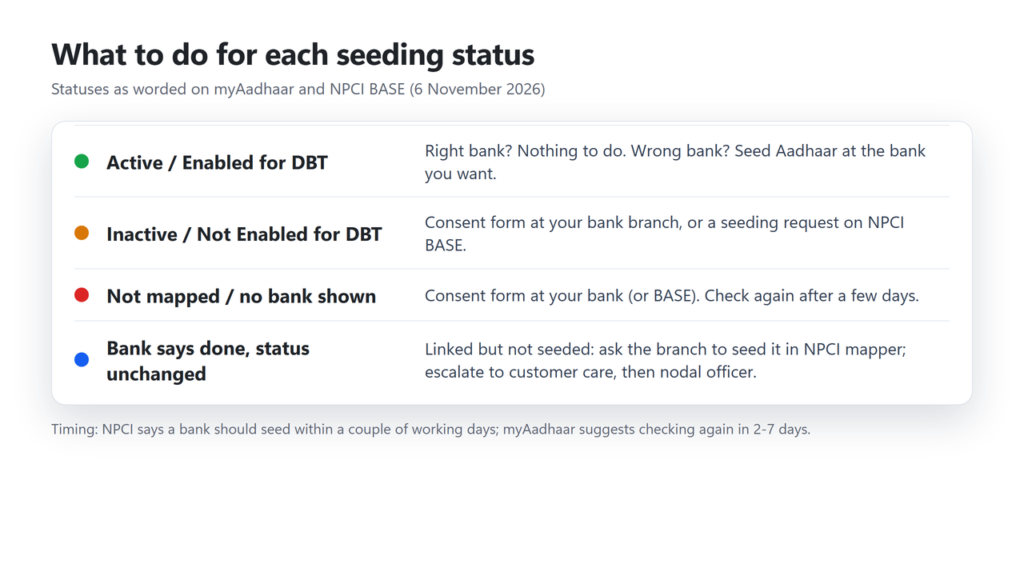
| You see | What it means | What to do |
|---|---|---|
| myAadhaar: Active with a bank name | That bank is active in NPCI’s mapper. Aadhaar-based DBT goes to it. | Nothing, if it is the bank you want. Check with that bank which of your accounts there is linked. |
| myAadhaar: Inactive with a bank name | Your Aadhaar is in the mapper for that bank but not active. | Submit the consent form at the bank you want (it can be the same bank). |
| myAadhaar: Inactive and no bank | Most likely no mapping record was found (based on the page code; we could not test a real case). | Submit the consent form at your bank, then check again after a few days. |
| BASE: Enabled for DBT | Same as Active. | Nothing, unless the bank is wrong. |
| BASE: Not Enabled for DBT | Mapped but not active. | Consent form at your bank, or a seeding request on BASE. |
| BASE: Not mapped with any bank in NPCI Mapper | No bank has seeded your Aadhaar. | Consent form at your bank, or a seeding request on BASE. |
Linking vs seeding: why the bank says done but DBT fails
This is the most common trap. NPCI uses two different words:
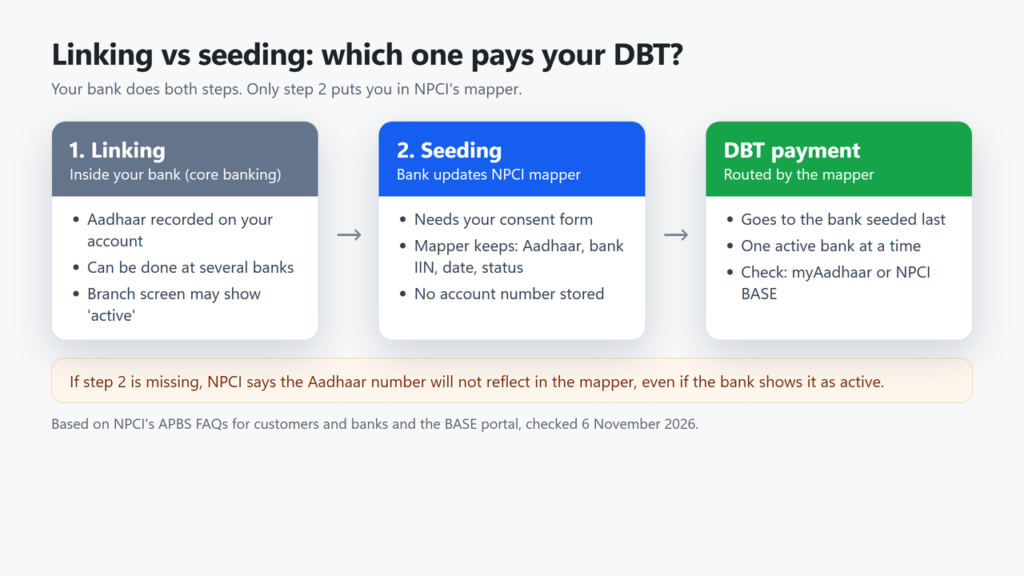
- Linking: your bank records your Aadhaar against your account in its own core banking system (CBS). NPCI notes that a customer can link Aadhaar to several bank accounts.
- Seeding: on your written or electronic consent, the bank uploads your Aadhaar number to NPCI’s mapper, the central list that tells the payment system which bank gets Aadhaar-based payments. NPCI says the mapper holds your Aadhaar number, the bank’s identification number (IIN), the date and the status.
NPCI’s FAQ says banks must do both steps, and “if step b is not completed, the Aadhaar number will not reflect in NPCI mapper.” It answers this exact situation: when a branch shows a screenshot saying Aadhaar is active but the mapper does not show it, “the bank has linked the Aadhaar number to the account in their Core Banking System (CBS) but not seeded the Aadhaar number in NPCI mapper.” NPCI also tells banks not to give customers a CBS screenshot as proof of seeding. So trust the myAadhaar or BASE result, not the branch’s own screen or screenshot.
Schemes use “seeding” for a third thing too: adding your Aadhaar to the scheme’s own beneficiary list (PM-KISAN uses the phrase this way). That is separate from bank seeding, and so is scheme e-KYC.
How to fix Inactive, Not mapped or the wrong bank
Option 1: the consent form at your bank branch
- Go to the branch of the bank where you want to receive benefits, with your Aadhaar and passbook.
- Ask for the Aadhaar seeding (mandate and consent) form. NPCI’s FAQ calls the customer consent form “Annexure I”; banks may use their own version.
- If another bank currently receives your DBT, write that bank’s name on the form. NPCI says you need to give the name of the existing bank that has seeded your Aadhaar.
- Submit it and keep the acknowledgement. NPCI says the bank should link it in CBS and seed it in the mapper “within a couple of working days”. myAadhaar’s own advice is to check again in 2 to 7 days.
- Check the status again on myAadhaar or BASE. Do not rely on the branch saying it is done.
Option 2: request seeding online on BASE
BASE’s Aadhaar Seeding/Deseeding page lets you choose Seeding or De-Seeding, pick your bank from a list (195 banks on 6 November 2026, including State Bank of India, Punjab National Bank, Bank of Baroda, HDFC Bank, ICICI Bank, Axis Bank, India Post Payments Bank and many gramin and co-operative banks), enter the account number twice, accept the consent and submit. We did not submit a request, so we have not seen the next screens; BASE’s page text mentions an Aadhaar OTP and a reference number to track the request under Request Status Check. Your bank still approves the request: the consent text says NPCI is not responsible if the bank rejects it, and BASE’s terms say a request is declined if Aadhaar authentication fails. BASE’s terms require you to be 18 or older; for a minor, a parent or guardian can apply. NPCI publishes no processing time for BASE requests.
Option 3: your bank’s net banking or app
Many banks let you add Aadhaar to your account online. Check afterwards on myAadhaar or BASE, because an online “Aadhaar linking” may update only the bank’s own records. We have not verified each bank’s menu.
Common problems and fixes
| Problem | What to do |
|---|---|
| No OTP arrives | OTPs go only to the Aadhaar-registered mobile. If that number is lost or was never added, update it at an Aadhaar centre first. |
| Bank says Aadhaar is active, scheme says not seeded | The bank has linked but not seeded it. NPCI says the branch must take it up with its own seeding team. Show the branch your myAadhaar or BASE result. |
| Form submitted, still not in the mapper | NPCI says seeding is the bank’s responsibility: go back to the branch, then the bank’s customer service cell, then its nodal officer. |
| Money went to an old or wrong bank | Seed Aadhaar at the bank you want (consent form or BASE). The last seeded bank receives the payments. |
| Account closed or de-seeded | PM-KISAN payments failed for reasons including de-seeding, non-mapping and account closure (Ministry of Agriculture, 2025). Seed Aadhaar again to an active account. |
| LPG subsidy pending | NPCI says pending subsidies are credited by the oil company to the last seeded account once the mapper is updated. Its FAQ gives the oil companies’ toll-free number 1800 2333 555. See also our guide to linking Aadhaar to a Bharatgas connection. |
| Bank rejects the BASE request | Apply at the branch with the consent form instead. |
| Status is Active at the right bank, but a scheme payment still fails | The scheme may pay to an account number it holds instead of through the mapper. Check the bank details recorded with the scheme office. |
For a BASE problem, NPCI’s terms name a grievance contact: DBT Cell – NACH Operations, npci.dbtl@npci.org.in. For a problem with myAadhaar itself, you can call UIDAI on 1947 or raise a complaint with UIDAI.
Routes that no longer work
- resident.uidai.gov.in/bank-mapper: the resident.uidai.gov.in site did not load at all on 6 November 2026 (the address does not resolve). Many guides still send readers there.
- The old mAadhaar Android app: its Google Play listing returned “not found” when we checked on 5 November 2026. UIDAI’s list of services in the new Aadhaar app does not mention bank seeding status.
- USSD codes such as *99*99*1#: we found no UIDAI or NPCI page that gives this code. NPCI’s older FAQ for banks mentions *99*99#, but we could not confirm it still works, so use myAadhaar or BASE.
Once your seeding is active, it is worth protecting the Aadhaar that receives your money: you can lock your Aadhaar biometrics and use a Virtual ID where possible. If you withdraw benefits with your fingerprint, see our guide to AePS at a banking correspondent, and for other links see what Aadhaar should be linked with. For other issues, our list of common Aadhaar problems may help.
Frequently asked questions
Does the bank seeding status show my account number?
No. myAadhaar shows the bank name, the status and the last updated date. NPCI’s mapper stores your Aadhaar number, the bank’s IIN, the date and the status, not account or branch details.
Can I receive DBT in two bank accounts?
Not through Aadhaar-based payments. Only one bank is active in the NPCI mapper at a time, and Aadhaar-based DBT credits go to the bank that seeded your Aadhaar last. UIDAI says you receive DBT in one account of your choice. Some schemes pay to an account number you give them instead; ask the scheme office which method it uses.
How long does Aadhaar seeding take after I submit the form?
NPCI says the bank should complete it within a couple of working days after checking the form. myAadhaar advises checking the status again in 2 to 7 days. NPCI gives no time for online BASE requests.
Is Aadhaar linking the same as Aadhaar seeding?
No. Linking means your bank records Aadhaar in its own system. Seeding means the bank also updates NPCI’s mapper, which is what routes Aadhaar-based DBT payments.
Can I check bank seeding status without an OTP?
Not on myAadhaar or BASE: both ask for an OTP sent to your Aadhaar-registered mobile. A branch’s own screen shows only its core-banking linking, which NPCI says is not proof of seeding, so use myAadhaar or BASE.
Do I have to remove Aadhaar from my old bank before seeding it at a new one?
No. NPCI says the existing bank does not need to deactivate it. The new bank seeds it, and the newer seeding replaces the old one.
Checked on 6 November 2026 on myaadhaar.uidai.gov.in (live service and its page code) and NPCI’s BASE portal, against UIDAI’s Direct Benefit Transfer FAQ, NPCI’s APBS FAQs for customers and banks, BASE’s terms, a PIB release of 5 August 2025 (Ministry of Agriculture and Farmers Welfare), and SBI’s BASE page.