
A parked domain is a registered domain name that isn’t connected to a real website yet. Visiting it shows a placeholder page instead: often your registrar’s default “this domain is parked” page, sometimes a page of ads or a “domain for sale” notice, and, after a domain expires, a notice saying it has expired. If your domain shows a parked page, it usually means its DNS still points to the registrar’s parking service, not to your web host. Point the nameservers or DNS records at your host to fix it. If a domain you want shows a parked page, someone else owns it, though it may be for sale. In cPanel, “parked domains” means something different: extra domain names that show the same site as your main domain, now called aliases.
This guide explains the different kinds of parked pages, why they appear, how to remove one from your own domain, what Google does with parked domains, and the security risks some parked pages carry. It is based on ICANN’s expired-domain rules and research, Google’s Search and Ads documentation, cPanel’s documentation, registrar help pages and security researchers’ published findings, checked on 13 November 2026.
Key takeaways
- A parked domain is registered but has no real website, so it shows a placeholder page.
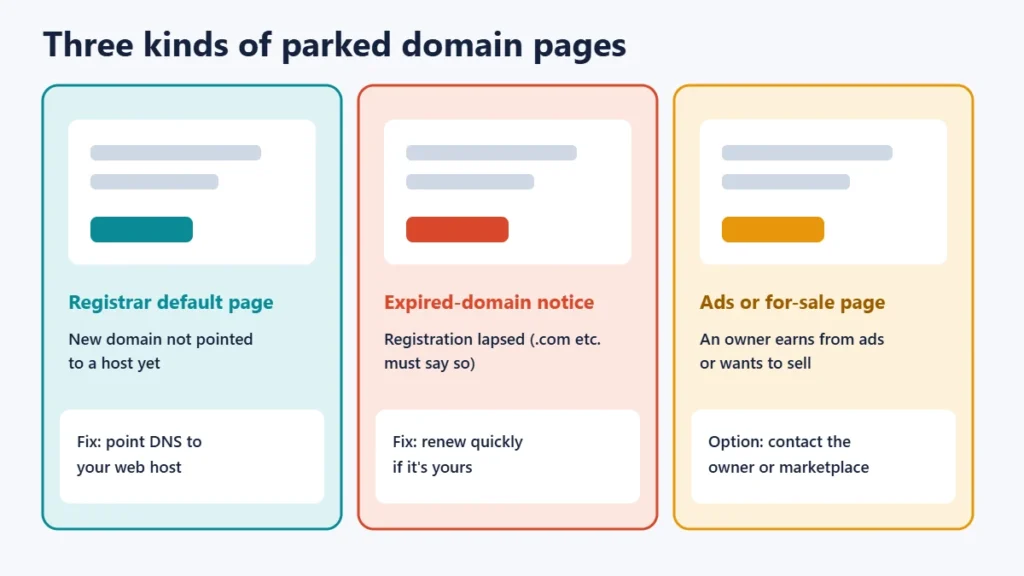
- Three common types: a registrar’s default page for a new domain, an expired-domain notice, and an investor’s ad or for-sale page.
- Fix your own: point your nameservers or A records to your web host.
- Expired generic domains (.com, .net and so on) must show that they have expired, under ICANN rules.
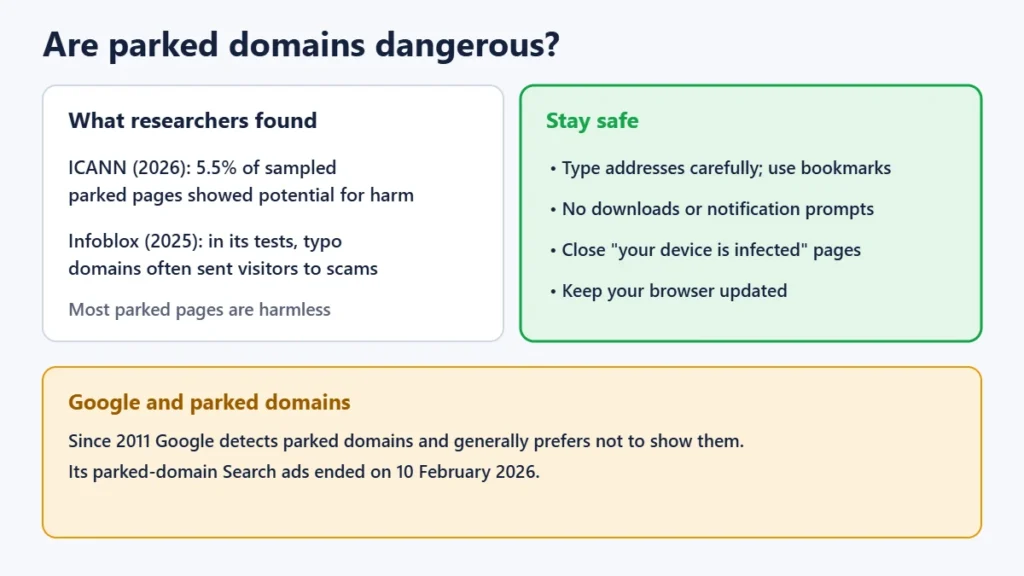
- Google generally prefers not to show parked domains in search results, and stopped running Search ads on parked domains on 10 February 2026.
- In cPanel, “parked domains” are now called aliases: extra domains showing your main site.
The three kinds of parked pages
| Type | Why it appears | What to do |
|---|---|---|
| Registrar’s default page | A newly registered domain hasn’t been pointed to a host yet | Point the domain’s DNS to your web host |
| Expired-domain notice | The registration has expired and wasn’t renewed | Renew it quickly if it’s yours |
| Investor’s ad or for-sale page | Someone owns the name and earns from ads or wants to sell it | Contact the owner or a marketplace if you want to buy it |
ICANN’s research describes parked pages in similar terms: pages of ads, pages offering the domain for sale, or suspended pages. It also notes that some parked domains silently redirect visitors elsewhere.
Why your new domain shows a parked page
Many registrars point newly registered domains at their own parking page until you connect a website. Namecheap’s help pages, for example, say new domains are mapped to its parking page by default unless other DNS settings are already in place. It’s a sign the domain hasn’t been connected to hosting yet. There’s nothing wrong with the domain.
How to remove a parking page from your domain
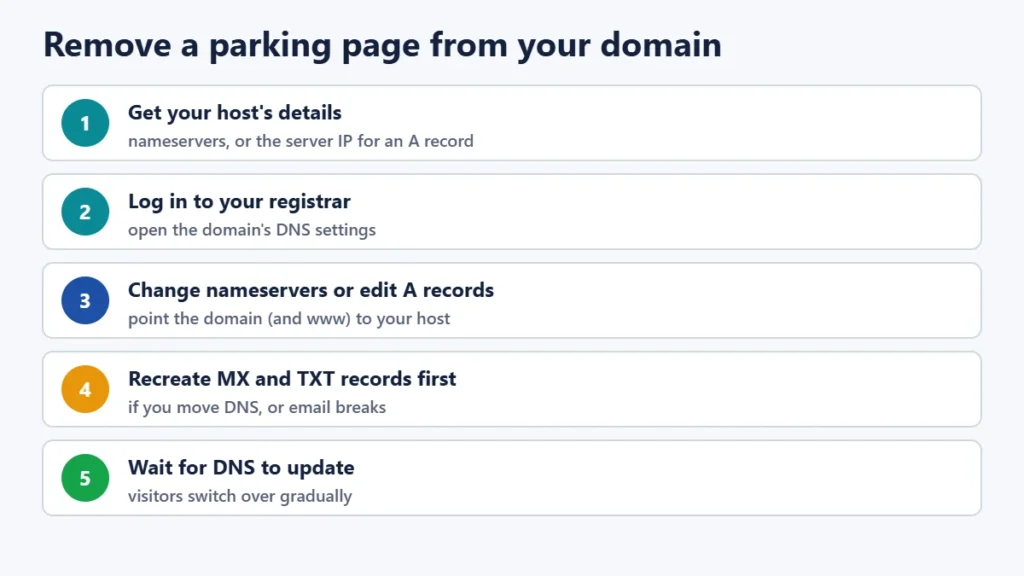
- Get your host’s details: either its nameservers (for example ns1.yourhost.com and ns2.yourhost.com) or the server IP address for an A record.
- Log in to your registrar and open the domain’s DNS or nameserver settings.
- Either change the nameservers to your host’s, or keep the registrar’s nameservers and edit the records: set the A record for the domain (and www) to your host’s IP address, and remove any parking record.
- If you change nameservers, first recreate any email (MX) and verification (TXT) records at the new DNS provider.
- Wait for DNS to update. Changes reach different visitors at different times, depending on TTL settings and resolvers.
Our guide to moving a website to a new host explains DNS changes and TTLs in more detail. If you registered a .in domain, see our guide to registering a .in domain for pointing it at your host.
Parked pages on expired domains
If a generic domain such as .com expires, ICANN’s Expired Registration Recovery Policy says any page the registrar shows on it must clearly indicate that the registration has expired and give renewal instructions. The registrar must also interrupt the domain’s normal DNS, from expiry or for at least the last eight days it can still be renewed. That takes the website and email offline as a warning. After deletion, most generic registries offer a 30-day redemption grace period. These rules don’t automatically apply to country domains such as .in or .uk, which follow their own registry’s rules. See our guide to what happens when hosting expires for the hosting side of an expiry.
Domain parking as a business
Some people register domains to resell them, or to earn from ads shown on the parked page while they wait. Security researchers at Palo Alto Networks’ Unit 42 have described how parking services pay owners from ad clicks. The money has shrunk: Google says its parked-domain ads stopped being part of its Search Partner Network on 10 February 2026. If a parked domain says it’s for sale, you can usually make an offer through the listed marketplace or the registrar.
Do parked domains appear in Google?
Rarely. In December 2011 Google introduced a classifier to detect parked domains, saying they are “placeholder sites with little unique content” that are “often filled only with ads”, and that “in most cases, we prefer not to show them.” A parked page won’t help your site rank. Once your domain points to a real website, it can be crawled and indexed like any other.
Are parked domains dangerous?
Most parked pages are harmless placeholders, but some aren’t. ICANN’s 2026 research found that 5.5% of its sample of parked pages showed some potential for harm. In 2025, the security company Infoblox reported that in its own experiments, visitors to certain parked domains, especially typo-squatting and look-alike names, were sent to scams, scareware or malware more than 90% of the time. That figure is Infoblox’s, from its experiments on specific domain portfolios, not a measure of all parked domains. To stay safe:
- Type addresses carefully and use bookmarks for sites you visit often.
- Don’t download anything or allow notifications on a page you reached by accident.
- Close pages that claim your device is infected or that you’ve won something.
- Keep your browser updated, as browsers block many known bad sites.
“Parked domains” in cPanel are different
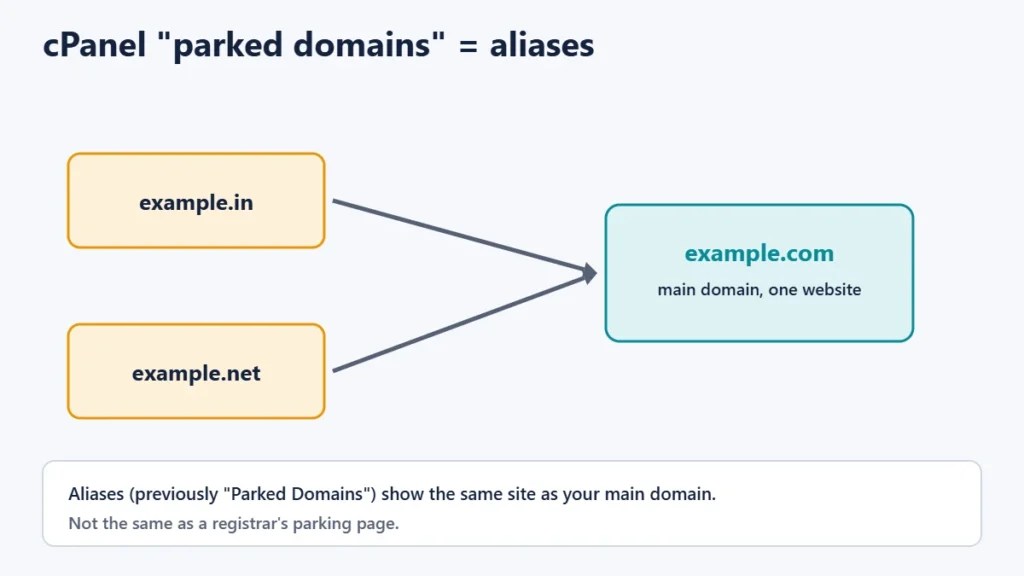
In cPanel, the old “Parked Domains” tool is now called Aliases. An alias is an extra domain that shows the same website as your main domain, for example if you own both example.com and example.in and want both to open the same site. cPanel’s server documentation describes parked domains (aliases) as secondary domains that point to the user’s primary domain. This has nothing to do with registrar parking pages. Our guide to web hosting limits covers other cPanel settings.
Frequently asked questions
What does “this domain is parked” mean?
The domain is registered but isn’t connected to a website. If it’s yours, point it at your web host. If not, it belongs to someone else.
Why does my domain show a parked page after I bought hosting?
The domain’s DNS still points to the registrar’s parking service. Change the nameservers or A records to your host’s, then wait for DNS to update.
Can I buy a parked domain?
Often, yes, if it’s listed for sale. Use the marketplace or contact method shown on the page, and be cautious of unsolicited offers.
Is a parked domain bad for SEO?
A parked page itself won’t rank, because Google generally prefers not to show parked domains. Once you connect a real site, it can be indexed normally.
What is a parked domain in cPanel?
It’s an older name for an alias: an additional domain that shows the same website as your main domain.
The short version
A parked domain is registered but not connected to a website, so it shows a placeholder page. Fix your own by pointing its DNS at your host and keeping your email records. Treat unfamiliar parked pages with care, and remember that cPanel’s “parked domains” are simply aliases. To protect a domain you own, see our guide to transferring a domain if you want to move it to a registrar you prefer.