To register a .in domain, search for the name at any registrar accredited by the .IN Registry, pick the extension you want (.in, .co.in, .org.in and others), choose a term of 1 to 10 years, and complete the registrar’s KYC (identity check) before paying. You can’t register directly with the registry. It is run by the National Internet Exchange of India (NIXI) and sells only through accredited registrars. NIXI charges registrars ₹500 a year for a name like example.in and ₹400 for names like example.co.in. Registrars set their own retail prices on top, plus GST, so the price you pay varies.
This guide covers which extension to choose, who can register, the name rules, the step-by-step process, the KYC checks that registrars now apply, renewal and expiry deadlines, and what to do in a dispute. We checked the .IN Registry’s policies, tariff and advisories on 13 November 2026. Rules for .in changed in 2025 and 2026, so older guides may be out of date.
Key takeaways
- Buy through an accredited registrar. NIXI runs the .IN Registry but doesn’t sell to the public.
- Open extensions such as .in, .co.in, .org.in and .net.in are available to anyone. Restricted ones such as .ac.in, .edu.in and .gov.in are only for eligible institutions.
- Expect KYC: the registry says KYC is mandatory, and registrars ask for ID such as Aadhaar, PAN or a passport.
- No WHOIS privacy: the registrant terms don’t allow privacy or proxy services for .in.
- Registry fee: ₹500 a year (example.in) or ₹400 (example.co.in). Retail prices and GST come on top.
- An expired name has a 45-day renewal grace period. After deletion there are 30 days to restore it (for a fee) and 5 more days before it is released.
Which .in extension should you choose?
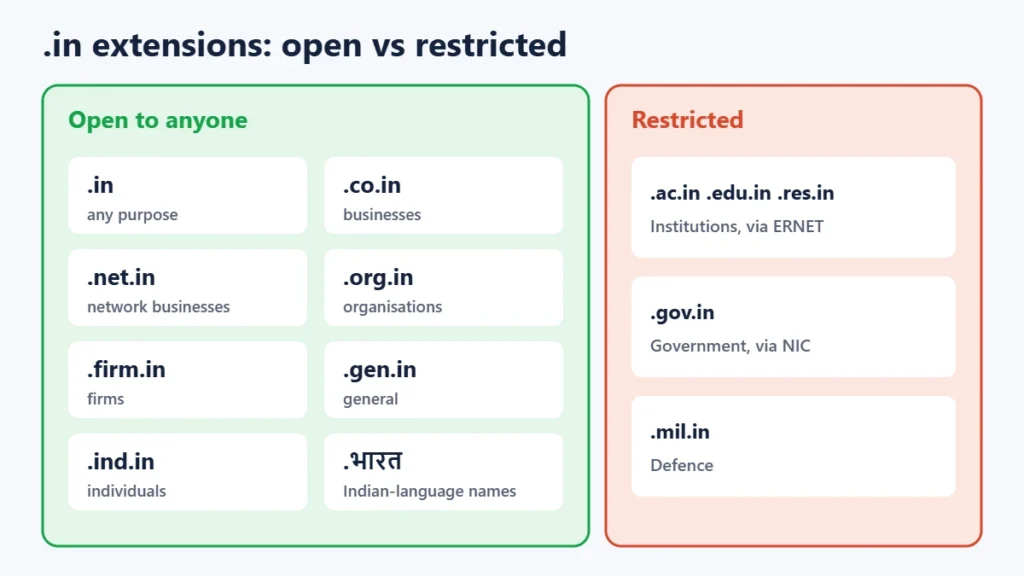
The .IN Registry runs several “zones”. Most people want plain .in, which is the shortest and most recognisable. The others suit particular uses or let you get a name that’s already taken as .in.
| Extension | Intended for | Who can register |
|---|---|---|
| .in | Anyone, any purpose | Open |
| .co.in | Companies and businesses | Open |
| .net.in | Network and internet businesses | Open |
| .org.in | Organisations and non-profits | Open |
| .firm.in | Firms and partnerships | Open |
| .gen.in | General use | Open |
| .ind.in | Individuals | Open |
| .ac.in, .edu.in, .res.in | Academic, educational and research institutions | Restricted (handled by ERNET) |
| .gov.in | Government bodies | Restricted (handled by NIC) |
| .mil.in | Defence | Restricted |
| .भारत (and other Indian-language versions) | Names in Indian scripts | Open, priced like .in |
The registry has also added about 35 newer third-level zones, such as .ai.in and .biz.in. In open zones the label is a description, not a rule: nobody checks that a .co.in belongs to a company. Restricted zones do require proof of eligibility, through ERNET for educational and research bodies and through NIC for government.
Who can register a .in domain?
The registry’s policy says open .in zones are available to all parties worldwide, with no requirement to be based in India. In a July 2025 advisory, NIXI confirmed that .IN has never been limited to Indian nationals. It added that registrants living outside India may be asked to state their business connection with India, or why they want the name, and called this a procedural step. Some registrars have since chosen to accept only Indian registrants, so a foreign buyer may need to try more than one registrar.
Name rules
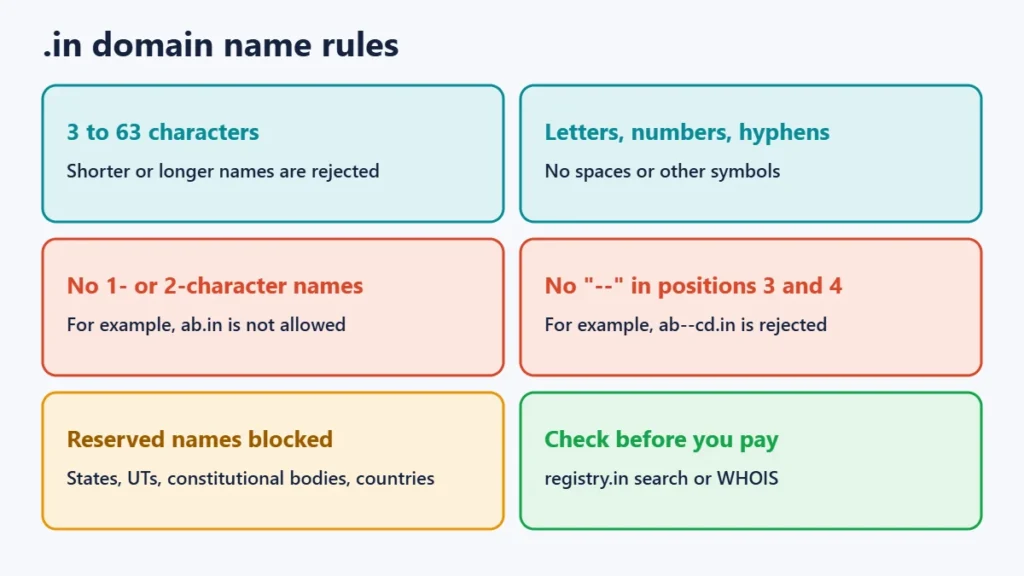
- Between 3 and 63 characters, using letters, numbers and hyphens.
- One- and two-character names aren’t allowed.
- A name can’t have hyphens in both the third and fourth positions (as in ab–cd.in).
- A reserved list blocks certain names, including states and union territories, constitutional bodies, country names and technical terms.
How to register a .in domain, step by step
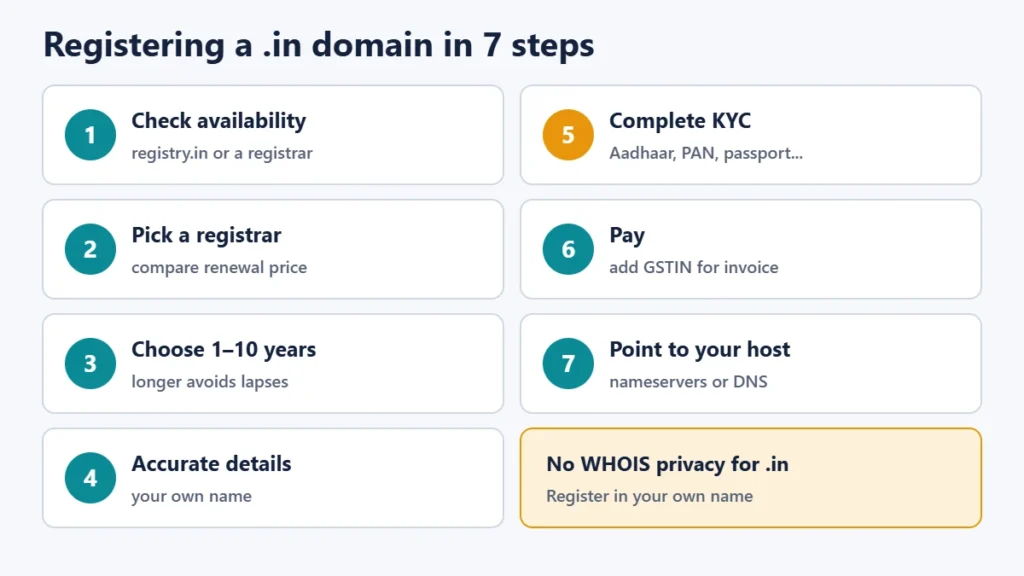
- Check availability. Use the “Find Your Domain” search on the .IN Registry’s site (registry.in), the registry’s WHOIS lookup, or any registrar’s search box.
- Choose an accredited registrar. The .IN Registry publishes its list of accredited registrars, which has about 160 entries. Compare the first-year price and the renewal price, because introductory offers often renew higher.
- Pick the term. You can register for 1 to 10 years. Longer terms protect you from forgetting to renew.
- Enter accurate contact details. Use your real name or your organisation’s legal name and an email address you check. Disposable email addresses are often rejected.
- Complete KYC. Upload or verify ID as your registrar asks (see below).
- Pay and confirm. Keep the invoice. If you need a GST invoice for your business, enter your GSTIN at checkout.
- Point the domain at your website. Set the nameservers your web host gives you, or add DNS records at your registrar. See our Verpex hosting review for one hosting option, and our hosting deals roundup to compare others.
KYC and what ID you may need
The .IN Registry’s website states that KYC is mandatory for .in domains, citing CERT-In guidelines under Section 70B of the IT Act. NIXI runs an eKYC portal that registrars use, including Aadhaar OTP verification. In practice, registrars ask Indian individuals for documents such as Aadhaar, PAN, a passport, a voter ID or a driving licence, and ask businesses for registration documents. Registrars started applying these checks at different dates in late 2025.
Registrars also report that the registry carries out random audits. If yours asks for documents after registration, reply quickly: registrars say names that fail an audit can be placed on hold, which stops them working. NIXI hasn’t published a single KYC rulebook or deadline for registrants, so follow your registrar’s instructions. Our guide to e-Aadhaar and masked Aadhaar explains how to share Aadhaar safely.
Privacy and WHOIS
Many registrars sell “privacy protection” for .com, but the .IN Registry’s registrant terms don’t allow privacy or proxy services for .in, so you register in your own name. The registry’s WHOIS (whois.nixiregistry.in) and RDAP services currently redact contact details in their public output, even though the older policy says contact data is displayed. Assume your details could become visible, and use an email address and phone number you are comfortable sharing.
Prices: what the registry charges
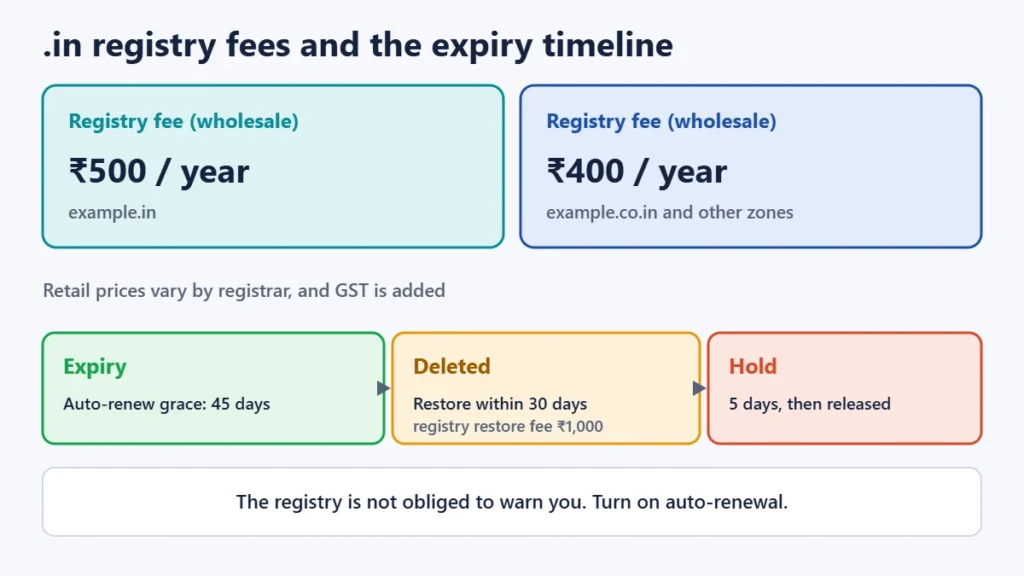
NIXI’s tariff for registrars is ₹500 a year for a second-level name (example.in) and ₹400 a year for a third-level name (example.co.in, example.org.in and so on). The same rate applies to transfers and renewals. Restoring a deleted name costs registrars ₹1,000. These are wholesale fees. Each registrar adds its own margin, and GST is charged on the retail price, so shop around and check the renewal price before you buy.
Renewal, expiry and getting a lapsed name back
- Auto-renew grace period, 45 days: at the registry level, names auto-renew on the expiry date, and your registrar has 45 days to delete the name if you don’t pay. Renewing in this window is usually at the normal price.
- Redemption grace period, 30 days: once a name is deleted, it can be restored for 30 days, at a higher cost.
- Redemption hold, 5 days: the name is then locked for 5 days before it is released for anyone to register.
The registry says it is not obliged to warn you before your domain expires. Turn on auto-renewal with your registrar and keep your contact email up to date.
Transferring a .in domain to another registrar
Registrars generally won’t move a new .in to another registrar within 60 days of registration, so plan to wait. After that, ask your current registrar for the authorisation code (6 to 16 characters), start the transfer at the new registrar, and allow up to five days for it to complete. A transfer adds one year to the registration. Our guide to transferring a domain covers the full process.
Disputes, cybersquatting and reselling
If someone registers a .in name that matches your trademark, the .IN Domain Name Dispute Resolution Policy (INDRP) provides arbitration under the Arbitration and Conciliation Act, 1996. A complainant must show three things: the name is identical or confusingly similar to their mark, the registrant has no legitimate interest in it, and it was registered or is being used in bad faith. Arbitrators can cancel the name or transfer it.
On reselling: in May 2026 NIXI issued an advisory calling auctions and speculative sales of .IN names not permitted and warning of possible holds on such names. An industry group challenged it in July 2026, and NIXI also runs its own auction portal. The position is contested. If you plan to buy or sell .in names as an investment, get legal advice rather than relying on a blog post.
Common mistakes to avoid
- Registering in an employee’s or web designer’s name. The registrant is the legal owner. Use your own or your company’s name.
- Choosing only on first-year price. Renewals matter more over the life of a domain.
- Ignoring KYC or audit emails. A name can be put on hold.
- Paying for “privacy” on a .in. It isn’t allowed, so check what you are being sold.
- Letting it lapse. After the grace and redemption periods, anyone can register the name.
Frequently asked questions
Can foreigners register a .in domain?
Yes. The registry’s policy allows registrants worldwide in open zones. Since 2025, registrants outside India may be asked to explain their connection with India, and some registrars accept only Indian customers.
How much does a .in domain cost?
The registry charges registrars ₹500 a year for .in and ₹400 for zones like .co.in. Retail prices vary by registrar and GST is added, so compare first-year and renewal prices.
What is the difference between .in and .co.in?
Both are open to anyone. .in is a second-level name and the most common choice. .co.in is a third-level name intended for businesses, and it costs registrars a little less.
Do I need Aadhaar to register a .in domain?
You need to pass your registrar’s KYC. Aadhaar is one accepted option for Indian individuals. Registrars also accept documents such as PAN, a passport, a voter ID or a driving licence.
Can I hide my details in WHOIS for a .in?
No. Privacy and proxy services aren’t allowed for .in. The registry’s public WHOIS output is currently redacted, but you shouldn’t count on that.
How long can I register a .in for?
From 1 to 10 years at a time.
Can I register .भारत domains?
Yes. .भारत and other Indian-language versions are available and priced like .in at the registry level.
The short version
Search the name, pick an accredited registrar with a fair renewal price, choose 1 to 10 years, complete KYC with your own ID, and pay. Expect no WHOIS privacy, keep your email current, and turn on auto-renewal. If you are setting up a business site, our SEOPress review and Perfmatters review cover the next steps.