Public Wi-Fi is safer than it used to be, but it is not risk-free. Most websites and apps now encrypt their traffic with HTTPS, so another person on the same café or airport network usually can’t read your passwords or messages. Google says around 95–99% of Chrome page loads use HTTPS. The real risks today are fake networks set up to look like the real one, fake sign-in pages, the few sites that still don’t use HTTPS, and your device connecting to networks automatically. For banking and payments, India’s RBI advises avoiding public, open or free Wi-Fi altogether. Mobile data or your own phone’s hotspot is the safer choice. A VPN helps on networks you don’t trust, but it doesn’t make you anonymous or protect you from scam sites.
This guide explains what HTTPS does and doesn’t protect, the risks that remain, practical settings for Android and iPhone, and when a VPN is worth turning on. It is based on guidance from India’s CERT-In and RBI, the US Federal Trade Commission, Google, the Wi-Fi Alliance, Apple and Android, checked on 13 November 2026.
Key takeaways
- HTTPS protects the content of what you send to a site, even on open Wi-Fi. It doesn’t prove the site is genuine.
- Main risks: fake (“evil twin”) networks, fake login or captive-portal pages, plain-HTTP sites, and automatic connections.
- Banking and UPI: follow RBI’s advice and use mobile data, not public Wi-Fi.
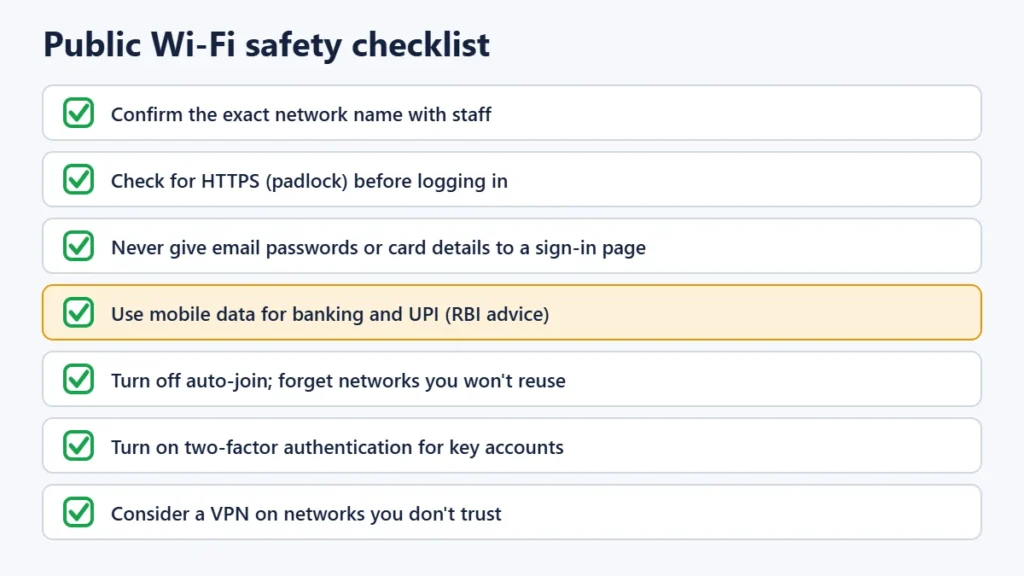
- Ask staff for the exact network name, and turn off auto-join for public networks.
- A VPN encrypts everything between you and the VPN server. That’s useful on untrusted networks, but it moves your trust to the VPN company.
- Use two-factor authentication, so a stolen password alone isn’t enough.
What HTTPS protects, and what it doesn’t
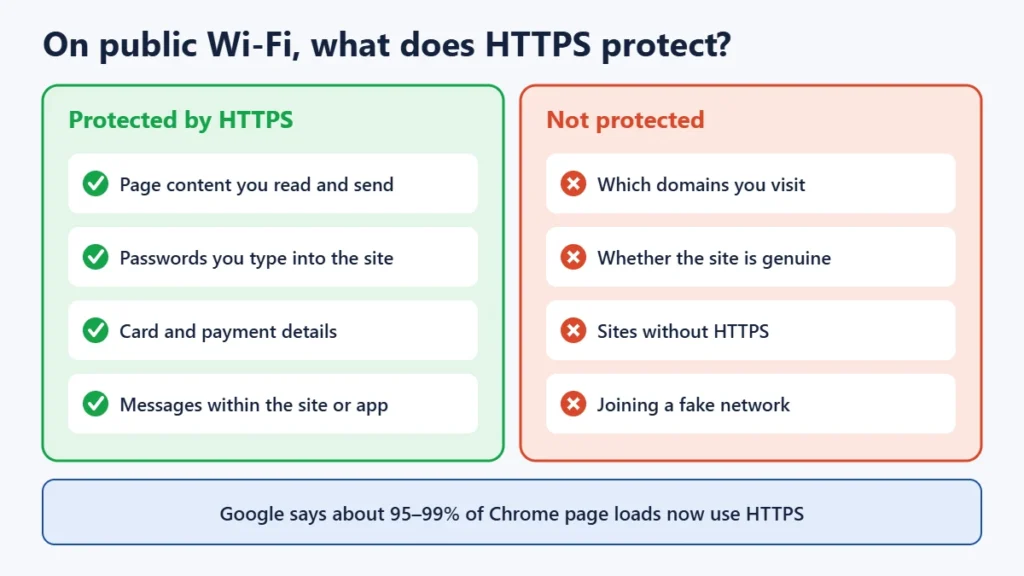
When a site uses HTTPS (shown by the padlock or a secure-connection icon in the address bar), the connection between your browser and the site is encrypted. Someone else on the same Wi-Fi can’t read the pages, passwords or card details you exchange with that site. The US FTC now describes public Wi-Fi as “usually safe” for this reason, as long as you check that sites use HTTPS.
HTTPS has limits:
- It doesn’t make a site trustworthy. Scam sites can use HTTPS too. The padlock means the connection is private, not that the company is real.
- It doesn’t hide which sites you visit. The network operator can usually still see the domains you connect to, even though it can’t see the pages.
- It doesn’t help on sites without HTTPS. Without it, Google warns, an attacker on the network can tamper with or redirect what you load.
- The first visit can be a weak point. Many sites tell browsers to always use HTTPS in future (a feature called HSTS). Browsers also ship with a preload list of sites that always use HTTPS.
Browsers are closing that last gap. Google has announced that Chrome will turn on “Always use secure connections” by default for public sites. It said this would roll out to Enhanced Safe Browsing users in April 2026 and to everyone in October 2026. With it on, Chrome warns you before loading a site that doesn’t use HTTPS. You can switch it on yourself in Chrome’s privacy and security settings.
The risks that remain on public Wi-Fi
1. Fake networks (“evil twins”)
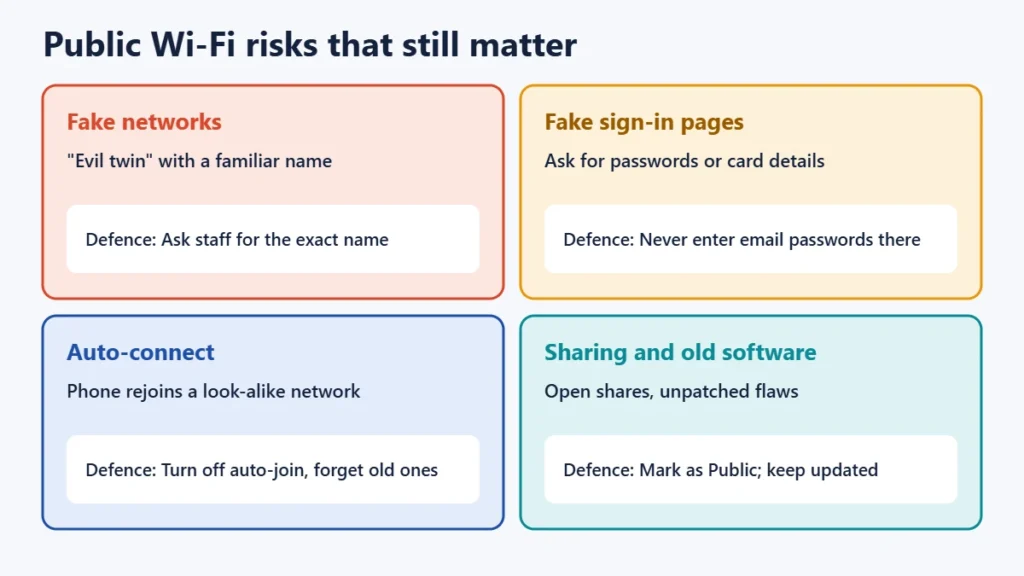
Anyone can set up a hotspot called “Airport_Free_WiFi” or the name of your café. If you join it, the person running it controls your connection, and can point you to fake pages or interfere with sites that don’t use HTTPS. CERT-In’s advice is to ask the hotspot owner for the correct network name and password. That’s the simplest defence.
2. Fake sign-in pages
Many public networks show a sign-in page (a “captive portal”) before you can browse, asking for a phone number, room number or OTP. A fake network can show a fake version that asks for far more: email passwords, card numbers or social media logins. A genuine hotspot sign-in shouldn’t need your email password or card details unless you are paying for access from a known provider.
3. Automatic connections
Phones remember networks and rejoin them. If a fake network uses the same name as one you joined before, your phone may connect without asking. CERT-In advises choosing networks manually, forgetting old ones and turning Wi-Fi off when you don’t need it.
4. Sharing settings and old software
On laptops, file and printer sharing should be off on public networks. Windows asks whether a network is public or private, and choosing “public” limits sharing. Keep your operating system and browser updated, because updates fix the security flaws that attackers on a network would use.
Banking and UPI on public Wi-Fi
The Reserve Bank of India’s advice to customers is to “avoid undertaking banking or other financial transactions through public, open or free wifi-networks”. Banking apps and UPI apps encrypt their connections, but there is no reason to take the risk when mobile data is almost always available. If you must make a payment while out, switch Wi-Fi off and use mobile data, or your own phone’s hotspot from another device. Be wary of anyone near you asking to “help” with a payment, and never share an OTP or UPI PIN.
Settings to change on your phone and laptop
iPhone
- Turn off Auto-Join for public networks: Settings → Wi-Fi → tap ⓘ next to the network → turn off Auto-Join. Use “Forget This Network” for places you won’t return to.
- Private Wi-Fi Address (iOS 14 and later) gives each network a different device address, which limits tracking across locations. From iOS 18 you can choose Off, Fixed or Rotating. It’s a privacy feature, not protection against hackers.
Android
- Turn off auto-connect for a saved public network in its network details, or tap “Forget”.
- Randomised MAC address is on by default from Android 10. From Android 12, some networks get a new address each time you connect. Again, this is about privacy rather than security.
Laptop and browser
- Mark public networks as Public so sharing is limited.
- Turn on “Always use secure connections” (Chrome) or HTTPS-Only Mode (Firefox).
- Log out of accounts when you finish on a shared or public device.
When does a VPN help?
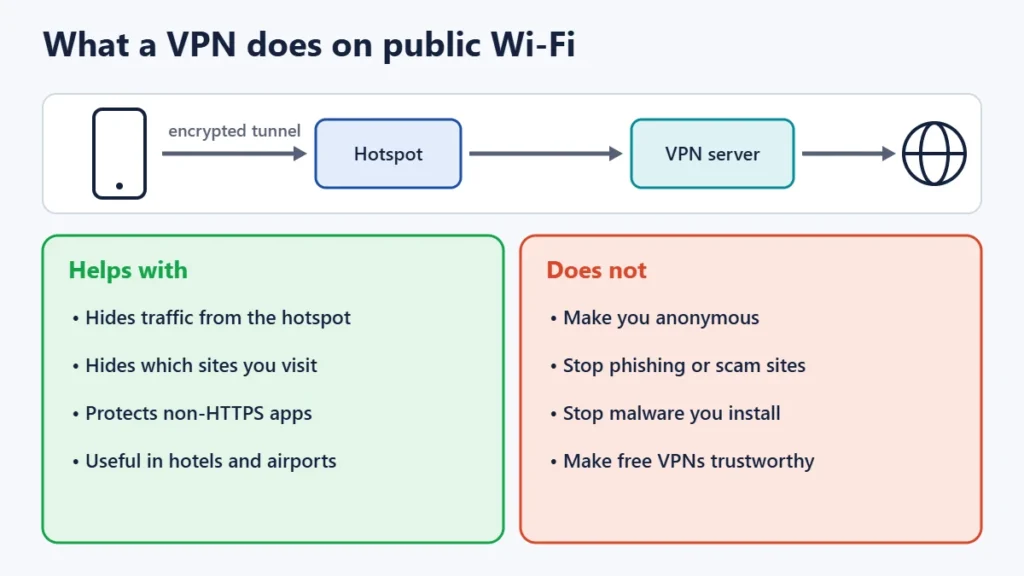
A VPN (virtual private network) encrypts all traffic between your device and the VPN provider’s server, including the domains you visit, so the public network sees only a connection to the VPN. CERT-In’s hotspot advisory suggests considering one. A VPN is most useful when:
- you regularly use networks you don’t control, such as hotels, airports and stations
- you use apps or sites that may not use HTTPS
- you don’t want the network operator to see which sites you visit
What a VPN doesn’t do:
- It doesn’t make you anonymous. Your traffic now passes through the VPN company, so you are trusting it instead of the café.
- It doesn’t stop phishing, scam sites or malware. You can still be tricked into entering a password on a fake page.
- Free VPNs may make money from ads or from your data, so read their privacy policy.
If you use a VPN in India, the provider’s own policies matter: since 2022, CERT-In’s directions have required VPN service providers to keep certain customer records. For individual VPN services, see reviews such as our Proton VPN review and Surfshark review.
Newer Wi-Fi security: WPA3 and Enhanced Open
The Wi-Fi Alliance requires WPA3 security for new Wi-Fi CERTIFIED devices. It also offers Wi-Fi CERTIFIED Enhanced Open, which encrypts traffic on open networks without a password, aimed at cafés, airports and hotels. This stops other people on the network passively eavesdropping. But Enhanced Open doesn’t confirm that a network is the genuine one, so it doesn’t stop evil-twin networks. Not all hotspots support it yet.
A note on PM-WANI hotspots
India’s PM-WANI scheme, approved by the Union Cabinet in December 2020, lets shops and local businesses offer public Wi-Fi through registered providers without a licence fee. Shops and others run the hotspots, aggregators connect them, apps handle sign-in, and C-DoT maintains a central registry. A Rajya Sabha reply reported in 2026 put the number of registered hotspots at about 4 lakh. The same safety habits apply to these networks as to any public Wi-Fi.
Frequently asked questions
Can someone hack my phone through public Wi-Fi?
It’s uncommon if your phone is up to date and you use HTTPS sites and official apps. The bigger risks are being tricked into joining a fake network or entering details on a fake page. Keep software updated and don’t install anything a hotspot page asks you to.
Is it safe to use UPI on public Wi-Fi?
RBI advises avoiding banking and financial transactions on public, open or free Wi-Fi. Use mobile data for UPI and banking instead.
Does the padlock mean a website is safe?
It means your connection to the site is encrypted. Scam sites can have a padlock too, so check the web address and be wary of unexpected links.
Is public Wi-Fi safe with a VPN?
Safer, because the hotspot can’t see or tamper with your traffic. But a VPN doesn’t protect you from fake websites, phishing or malware, and you are trusting the VPN provider with your traffic.
Is a password-protected café Wi-Fi safer than an open one?
Somewhat, because traffic is encrypted between you and the router. But everyone who knows the password is on the same network, so the same precautions apply.
Should I use my phone’s hotspot instead?
For sensitive tasks, yes. Your own hotspot with a strong password is under your control, and mobile data avoids the risks of shared public networks.
The short version
Ask for the exact network name, make sure sites use HTTPS, never type email passwords or card details into a hotspot sign-in page, turn off auto-join, use two-factor authentication, and switch to mobile data for banking and UPI. Add a VPN if you often rely on networks you don’t trust. For protecting your devices more generally, see our guide on whether free antivirus is good enough.