Disclosure: this review contains affiliate links (the “Get SEOPress” buttons). If you buy through one, eDefines may earn a commission at no extra cost to you. It does not change what we say about SEOPress, including where the free version is enough.
SEOPress is a WordPress SEO plugin with a capable free version and a paid PRO version. The free plugin handles the essentials most sites need: titles and meta descriptions, social sharing tags, XML and HTML sitemaps, content analysis and basic redirects. It has more than 300,000 active installs and a 4.8 out of 5 rating on WordPress.org. SEOPress PRO costs $49 a year for one site, $59 for five and $149 for unlimited sites. It adds full schema markup, local SEO, WooCommerce options, a redirect manager with 404 monitoring, broken link checks, Search Console data and AI writing help. For a small blog, the free version is often enough. PRO is worth it when you need rich schema, WooCommerce or local business markup, or many sites under one licence. Whichever you use, keep it updated: several security issues were fixed in 2026 releases.
We have not installed SEOPress or measured any ranking effect. This review is based on SEOPress’s own pricing, feature, documentation, terms and refund pages and its WordPress.org listing, all read on 12 November 2026, plus public vulnerability databases. Prices are in US dollars, excluding VAT.
SEOPress in brief
- Free version: titles, meta, social tags, sitemaps, content analysis, basic redirects and importers. 300,000+ installs, rated 4.8/5.
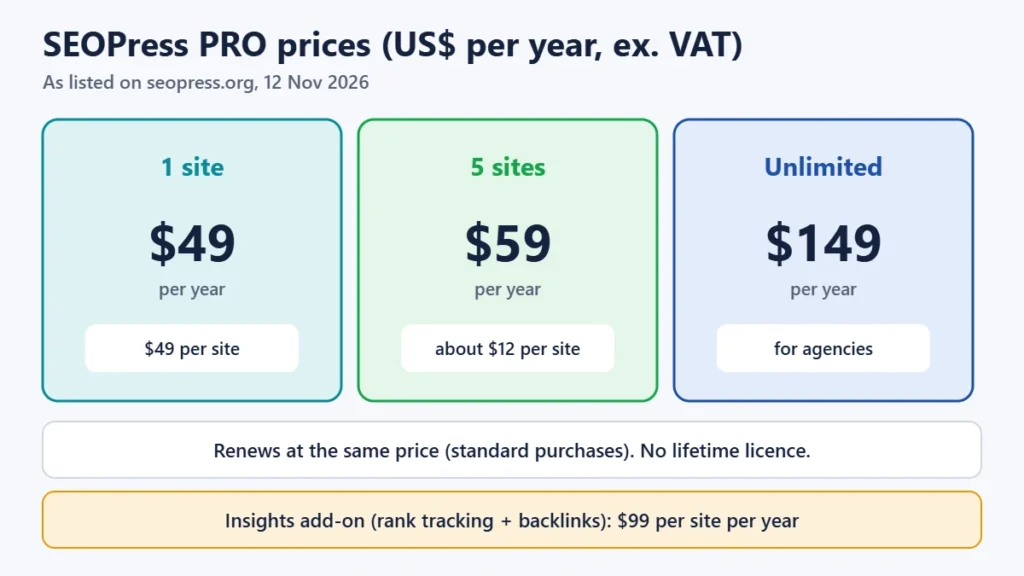
- PRO: $49 (1 site), $59 (5 sites) or $149 (unlimited) a year. Standard renewals cost the same as the first year. There is no lifetime licence.
- Refund: 14 days, which SEOPress describes as “no question asked”.
- If PRO expires: your installed PRO keeps working, but you lose updates, security fixes and support.
- Switching is easy: one-click import from Yoast, Rank Math, All in One SEO and others.
- Security: update to version 10.4 or later. Several 2026 vulnerabilities were fixed by then.
Get SEOPress PRO (check current plans)
How we reviewed SEOPress
We compared SEOPress’s free and PRO feature lists, read its pricing page, terms of sale, refund policy and support pages, and checked the free plugin’s WordPress.org listing for version, installs, rating and requirements. We also read the changelog for 2026 and checked a public vulnerability database for advisories. We did not install SEOPress, so we make no claims about its interface speed or its effect on rankings.
What SEOPress is, and who makes it
SEOPress is made by a small French company of the same name, based in south-west France. It was founded by Benjamin Denis, with Rémi Corson as CTO. The plugin launched in 2017, and the company was set up in 2018. As of 12 November 2026 the free plugin was at version 10.4, updated on 29 October 2026. It needs WordPress 6.5 or later and PHP 7.4 or later.
An SEO plugin doesn’t make a site rank by itself. It gives you control over what search engines see: the title and description that appear in results, which pages go into your sitemap, how pages look when shared, structured data (schema) that can make results richer, and redirects when URLs change. Good content and a healthy site still do most of the work.
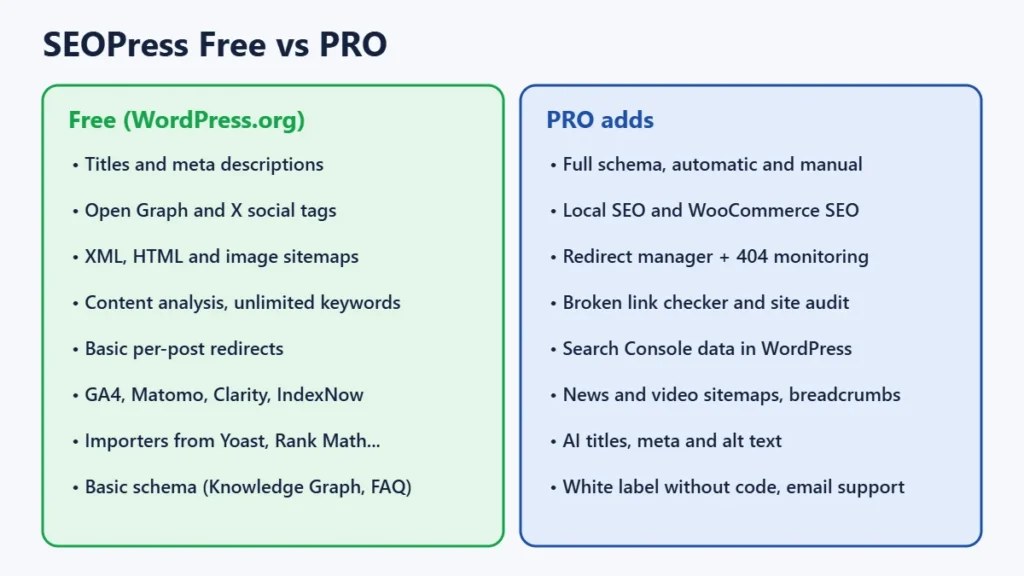
What the free version includes
- Titles and meta descriptions for every post, page, category and archive, with templates for site-wide defaults.
- Social tags (Open Graph and X cards) to control how links look when shared.
- XML, HTML and image sitemaps.
- Content analysis for as many target keywords as you like.
- Basic redirects set per post or page.
- Analytics connections for Google Analytics 4, Matomo and Microsoft Clarity, plus IndexNow and Google’s Indexing API.
- Importers from Yoast SEO, Rank Math, All in One SEO, The SEO Framework, Slim SEO, SmartCrawl, Squirrly and others.
- Basic schema: Knowledge Graph (organisation or person), plus FAQ and HTML sitemap blocks.
SEOPress says the free version has no ads, no tracking and no upsells in the admin area. That is the company’s own claim, which we haven’t checked. For a typical blog or small business site, the free version covers the technical basics.
What SEOPress PRO adds, and what it costs
| Plan | Websites | Price per year (ex. VAT) | Cost per site |
|---|---|---|---|
| PRO, 1 site | 1 | $49 | $49 |
| PRO, 5 sites | 5 | $59 | about $12 |
| PRO, unlimited | Unlimited | $149 | depends on use |
The 5-site plan costs only $10 more than the single-site plan. If you run two or more sites, or expect to, it is the obvious choice. SEOPress’s pricing page says licences “renew at same price” as long as auto-renewal stays on. Promotional purchases are the exception. SEOPress says plainly that it does not offer lifetime licences. Prices exclude VAT, and if you pay from India your bank may add a foreign-currency fee.
PRO adds:
- Full schema markup, with automatic schemas and a manual schema editor per post.
- Local SEO markup and settings for businesses with a physical location.
- WooCommerce SEO options.
- A redirect manager with 404 monitoring, so broken URLs can be found and redirected in one place.
- A broken link checker and a site audit.
- Google Search Console data inside WordPress.
- News and video sitemaps and custom breadcrumbs.
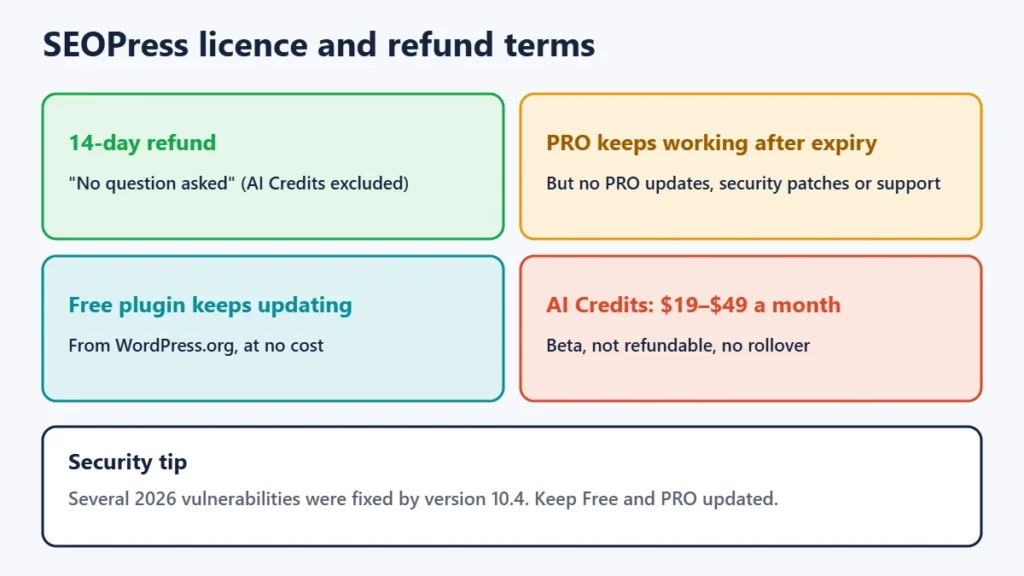
- AI generation of titles, meta descriptions and image alt text, plus an AI assistant. You connect your own API key from OpenAI, Anthropic’s Claude, Google Gemini, Mistral or DeepSeek, or buy SEOPress’s optional AI Credits ($19, $29 or $49 a month). The terms describe AI Credits as a beta. They are not refundable and don’t roll over.
- White label without code, and email support.
SEOPress Insights is separate
Insights is a separate add-on at $99 a year per site. It tracks the Google rankings of up to 50 keywords daily and analyses up to 1,000 backlinks using Majestic data updated weekly, with competitor tracking and email or Slack alerts. SEOPress notes that Insights is not a Search Console integration. It is an independent rank tracker. A small site can usually get enough ranking data free from Search Console. Insights makes more sense if you want daily positions for specific keywords inside WordPress.
Licence, renewal and refunds
- 14-day refund. SEOPress offers a 14-day money-back guarantee, which it describes as “no question asked”. AI Credits are excluded.
- If you stop paying, the PRO version you have keeps working, but you no longer get PRO updates, PRO security patches, downloads or support. Because 2026 releases included security fixes, running an old PRO version for long is a risk. Renew, or switch back to the free plugin, which keeps getting updates.
- Support for PRO and Insights is by email ticket, Monday to Friday 9:00–18:00 Paris time, in English and French. Free users get the WordPress.org forum, guides, an FAQ, videos and a Facebook group.
Security: keep it updated
Every popular plugin gets security reports, and what matters is how quickly they are fixed and whether you update. A public vulnerability database lists several SEOPress issues disclosed in 2026. They include cross-site scripting flaws, one of which could be exploited without logging in, and a server-side request forgery flaw. All are reported as fixed by version 10.4. A broken access control issue in older PRO versions was fixed in PRO 9.2. If you use SEOPress, turn on automatic updates or check for them weekly, and make sure PRO is on a current version too. This is general advice that applies to any SEO plugin.
Switching from Yoast or Rank Math
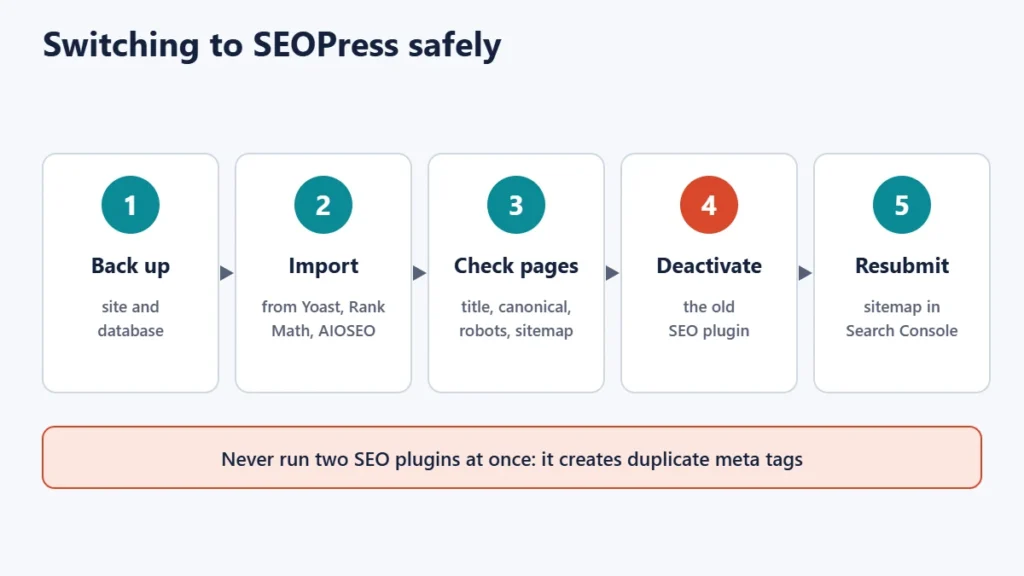
SEOPress’s importers copy titles, meta descriptions and other SEO settings from Yoast SEO, Rank Math, All in One SEO and several other plugins. SEOPress says the original plugin’s data is kept, so you can switch back. Before switching on a live site:
- Back up the site and database.
- Install SEOPress and run the importer for your current plugin.
- Check a few key pages: title, description, canonical URL, robots setting and whether they appear in the sitemap.
- Deactivate the old SEO plugin. Two SEO plugins outputting tags at once causes duplicate meta tags.
- Resubmit the new sitemap in Google Search Console and watch your pages for a few weeks.
Pros and cons
| Pros | Cons |
|---|---|
| Generous free version with sitemaps, social tags and basic redirects | Full schema, redirect manager and 404 monitoring need PRO |
| Low PRO price, with 5 sites for $59 a year | No lifetime licence; AI Credits cost extra and aren’t refundable |
| Standard renewals at the same price | Insights rank tracking is a separate $99 per site |
| Easy import from Yoast, Rank Math and others | Several 2026 security fixes, so updates matter |
| 14-day “no question asked” refund | Email support only on weekdays, Paris hours |
Is SEOPress worth it?
- Start with the free version if you run a blog or small business site and mainly need titles, descriptions, sitemaps and social tags.
- Buy PRO if you need full schema markup, local business SEO, WooCommerce SEO, a redirect manager with 404 monitoring, or AI help with titles and alt text. The 5-site plan is the best value if you run more than one site.
- Skip Insights at first. Search Console’s free data is enough for most small sites.
An SEO plugin is one part of the job. Our Semrush review covers keyword research tools. For speed, see our Perfmatters review and FlyingPress review. Our guide to marketing a small business online covers the rest.
Frequently asked questions
Is SEOPress free?
Yes. The core SEOPress plugin is free on WordPress.org and covers titles, meta descriptions, sitemaps, social tags, content analysis and basic redirects. SEOPress PRO is a paid add-on.
How much does SEOPress PRO cost?
$49 a year for one site, $59 for five and $149 for unlimited sites, excluding VAT, as listed on 12 November 2026. Standard renewals are at the same price.
Does SEOPress have a lifetime deal?
No. SEOPress states that it does not offer lifetime licences.
What happens if my SEOPress PRO licence expires?
Your installed PRO version keeps working, but you stop getting PRO updates, security patches and support. The free plugin keeps receiving updates.
Can I switch from Yoast or Rank Math to SEOPress?
Yes. SEOPress includes importers for Yoast SEO, Rank Math, All in One SEO and others, and says the original data is kept. Back up first and deactivate the old plugin afterwards.
Is SEOPress safe to use?
Several vulnerabilities were reported and fixed in 2026, all patched by version 10.4. As with any plugin, keep both the free and PRO parts updated.
Does SEOPress Insights use Google Search Console?
No. Insights is a separate rank tracker and backlink tool at $99 a year per site. Search Console data in WordPress is a PRO feature.
Our verdict
SEOPress is a strong, reasonably priced SEO plugin with one of the more generous free versions, and a PRO tier that is unusually cheap for five sites. It is a sensible choice if you want schema, local or WooCommerce SEO without paying a premium. Start free, upgrade only for the features you need, and keep it updated.