As long as choosing RAW editors for your photos are concerned, there is plethora of options. Just as you take time to find your comfortable pair of shoes, finding the best photo editing software also takes time.
ON1 Photo RAW 2020 Reviews
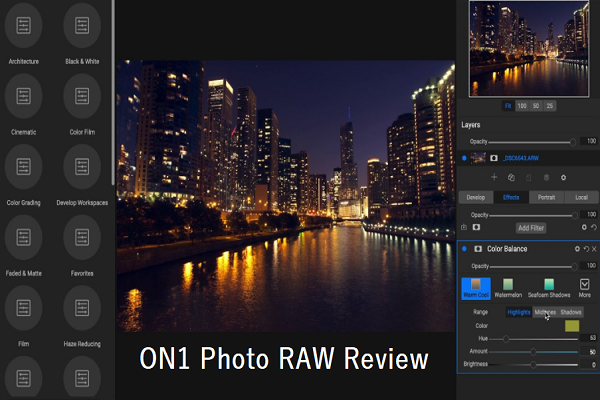
Some people wish to invest in a one-stop destination where they can get all sorts of image editing tools at one place. There are some others who watch out for the perfect combination of editing plugins and apps to create best edited images.
On1 has all the one stop shoppers and the combo folds covered with their latest offering. If you’re someone who is already using RAW editing software like Adobe Camera RAW, Capture One or Lightroom, you might think that this review isn’t for you. But you’re most likely wrong. Read on to know why.
ON1 Photo RAW 2020 – What is it?
ON1 Photo RAW is an image editing tool that blends editing, photo organizing effects all through a single program. It comprises of three of ON1’s most famous standalone products: Effects and Resize, HDR and Layers, Pano, Focus Stacking, Print and several other features. You are supposed to install on up to 5 computers (Windows and Mac) and they also offer a 90-day money-back guarantee.
Just as Skylum Luminar, this is touted to be a serious alternative to Lightroom and it offers features that question your requirement for Photoshop. This software is designed for photographers of all levels and is full of tools that majority of the photographers need during their workflow.
This means that the software has everything from organizing photograph to a develop module and the effects like printing and sharing.
Like Luminar, ON1 Photo Raw comes as a standalone program and also a plugin. Read on this review to know on the standalone version and why it is considered as a viable alternative to Lightroom.
ON1 Photo RAW 2020 – What’s new?
With their latest update that was brought about in 2020, there were many new features that came free of cost for the ON1 users. Here are some of them.
- Professional Grade Speed Updates.
- Color and Tone Perfection Using Artificial Intelligence.
- A new ON1 Mobile Ecosystem with ON1 Sync.
- Go Back in Time.
- Trending Styles and Looks.
- Get to see the photos on the back of your camera through AI.
- Portfolios and prints.
- Golden Hour Power.
- Control the weather and make it snowy, rainy or foggy.
- Get Natural color with custom profiles.
- Shift total color ranges.
- Have the sharpest Eye.
- Enhanced print options.
It is great to notice that ON1 is always striving hard to live up to the competition and the expectations of its users. In fact, in some ways, ON1 is actually surpassing the competitors with its solid updates that improve the quality and performance of this already impressive editing software.
User Interface
At times, it takes little bit of time for a program to mature fully. Until the last update, the interface of ON1 was pretty moderate as it lacked that pro feel. Thanks to Photo Raw that the user interface has got a major overhaul and looks, performs and feels more like an expert tool for editing photos.
Previously, the user interface of ON1 Photo RAW worked similar to that of Lightroom with various modules for various purposes. For instance, the Effects, Develop and Layers features were kept in separate modules. The app wasted enough time in saving files anytime you tried switching between them.
Now there are just two modules – Develop and Browse. All sorts of effects and image adjustments can be found in one place and you can navigate between them more easily. This is one of the biggest changes brought about to ON1 Photo RAW.
The layout of this editing tool is similar to that of Lightroom with columns lying both left and right and there is also an optional film strip that lies at the bottom. In the Browse mode, albums, files and filters, you get file info, metadata and keywords to the right. Much unlike Luminar, ON1 focuses a lot on metadata data and keywording is also easier.
You are also allowed to create metadata presets, display EXIF data and more. As per the latest update, a keyword master list is created and it allows you to erase or correct misspelled keywords. This makes the entire process simple and upfront. The browse mode allows for several right-click options for trackpad/mouse scrolling.
Features
One thing that you can say about ON1’s RAW photo editor is that it is blessed with several nifty features that are not often found in the other software products.
Panorama/HDR/ Focus Stacking
On1 Photo RAW comes with the ability of photo merging in several ways, far more than its competitors. Neither Capture One nor Luminar have Panorama or HDR capabilities and Lightroom also doesn’t have Focus Stacking.
Portrait Mode
One of the prized effects of ON1 is its portrait filter which is now totally integrated into Develop module. It can find faces automatically where it creates a different mask and adjustment panel for each face. From there you’re allowed to adjust the specific elements of the eyes, skin and mouth.
Layers
ON1 has the quest of being an all-in one editing program and hence they allow for editing with layers. This software saves resulting files as Photoshop files. Before this latest update, Layers were a different panel and were not a part of the non-destructive workflow. Now Layers is a part of their Develop module.
Text
One more super-cool feature of ON1 Photo RAW is its ability to add text to the images. It works similar to Photoshop by creating a different layer for anything that you wish to write. Various other paint or design programs have this and it is certainly not the first time that you’re seeing it Nevertheless, this is a great addition.
Other Features
- Clone & Stamp.
- Healing Brush and Erase.
- Masking.
- Refine Edge.
- Local Adjustment Panel.
- Transform (with Keystone adjustments).
If you don’t do too much work with layers or you don’t require selections that have high degree of finesse, you can opt for ON1. Take into account all the features before choosing the software.