Quick answer: Cloud technology can save a business money in three main ways: it replaces up-front spending on servers and software with a subscription you can scale, cloud point-of-sale (POS) systems cut the cost of moving sales and stock data between outlets and head office, and shared real-time data helps managers use staff, stock and time better. The savings are not automatic, though. Unused subscriptions and poorly managed cloud resources can make the cloud cost more than the systems it replaced.

Information technology now runs through most business operations, and cloud services are part of that for large companies and small shops alike. The US National Institute of Standards and Technology (NIST) defines cloud computing as on-demand network access to a shared pool of computing resources that can be set up and released quickly with little management effort. In practice, that means renting software, storage or computing power over the internet instead of buying and running it yourself.
The benefits mostly come down to operational efficiency and cost. Here are the three ways the original version of this article described, with the conditions under which each one actually saves money.
1. Lower up-front costs for hardware and software
Traditional IT means buying servers, software licences and backup equipment before you can use them, then paying someone to maintain them. With cloud services, you pay a monthly or yearly fee and the provider runs the hardware. That has several cost advantages:
- Little or no up-front capital. Spending moves from large one-off purchases to predictable operating costs.
- Pay for what you use. Most services let you add or remove users, storage or computing capacity as the business changes, so you are not paying for spare capacity “just in case”.
- Less maintenance. The provider handles hardware repairs, many security updates and backups of its own systems.
- Remote access. Staff can reach files and applications from any connected device, which reduces the need to link every office computer to an on-site server.
An earlier version of this article said a cloud subscription is the only expense involved. That is not quite right. You still need reliable internet connections, devices for staff, time to move data and train people, and someone to manage accounts and security settings. Budget for those as well.
2. Cloud point-of-sale (POS) systems
Businesses that sell goods or services, from restaurants to retail shops, depend on a database of sales, prices and stock. Modern POS systems store that data in the cloud, so information from every till reaches head office as it happens.
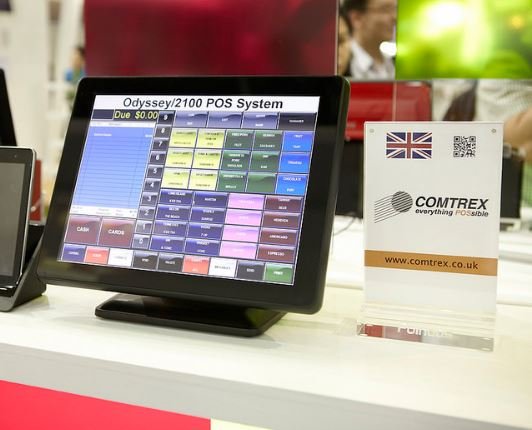
Connecting POS systems to the cloud saves the time and money that would otherwise go into collecting reports from each outlet and passing them to managers or owners. It also speeds up decisions. A restaurant manager working remotely can see from a cloud POS dashboard that an ingredient is running low and reorder it before it runs out.
Any authorised person, including managers and owners, can track the business’s performance while on the move. Before you choose a system, check its monthly fees, payment-processing charges, what happens to your data if you leave, and whether it keeps working offline if the internet connection drops.
3. Better resource management
Resource management is central to profitability. Cloud file sharing and collaboration tools let teams work on the same documents and data without emailing copies back and forth, which saves time and reduces mistakes.
- Faster communication between locations. Sharing information between branches, warehouses and head office costs less when everyone works from the same system.
- Easier management of related businesses. An owner running several outlets or companies can compare their performance in one place.
- Better-informed decisions. Cloud reporting and analytics tools let managers see near-real-time figures on sales, staffing and stock, so they can act sooner.
Our guides to file sharing software for business and accounting software for small businesses compare some of the tools available.
When the cloud does not save money
Cloud costs need managing. In Flexera’s 2025 State of the Cloud Report, a survey of more than 750 technical and executive respondents, 84% said managing cloud spend was the top cloud challenge for their organisation. Common causes of overspending include:
- subscriptions for staff who have left or tools nobody uses;
- servers or storage left running after a project ends;
- choosing a larger plan or instance than the workload needs;
- fees for moving large amounts of data out of a provider’s network.
Review your bills every month, switch off what you do not use, and set budget alerts if your provider offers them. Security matters too: a data breach can wipe out years of savings. See how a growing business can improve its cybersecurity.
Frequently asked questions
Is cloud computing always cheaper than on-site servers?
No. It is usually cheaper to start with and easier to scale, but large, steady workloads can sometimes cost less on owned hardware. Compare the total cost over several years, including staff time, power and maintenance.
What is a cloud POS system?
It is a point-of-sale system that stores sales, stock and customer data online rather than on a single computer in the shop, so owners and managers can see it from anywhere.
What are SaaS, PaaS and IaaS?
They are the three service models NIST describes. Software as a Service (SaaS) is ready-to-use software such as email or accounting apps. Platform as a Service (PaaS) gives developers a platform to build applications. Infrastructure as a Service (IaaS) rents raw computing, storage and networking.
How can a small business control cloud costs?
Keep a list of every subscription, remove unused accounts, choose plans that match actual use, and review bills monthly. Many providers offer budget alerts and cost reports.
Checked in October 2026 against NIST Special Publication 800-145 (the NIST definition of cloud computing) and Flexera’s 2025 State of the Cloud Report press release.