


Adobe Photoshop Elements 2020 is the new sister concern of the blue-blooded Photoshop CC, the program that has become the new yardstick of measuring the standard of image editing tools.
The main benefit of Elements is that you don’t require paying a subscription fee and you can purchase the software straightaway. Buying it along with its cousin Adobe Premiere Elements 2020, the film-editing program will give you a good value for money.
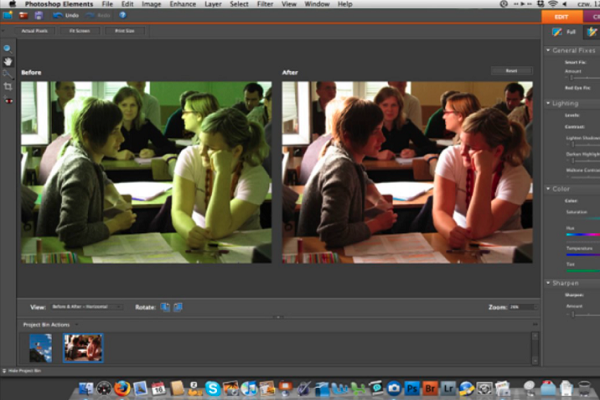
Of late, Adobe has focused on making Elements extremely easy so that it can be used by beginners as seamlessly as possible.
The Home Screen was introduced by Adobe with Photoshop Elements 2019. It is designed to give you access to the main features and also let you see the features that has been made possible by the software.
Our Verdict on the Pros and Cons of Adobe Photoshop Elements
Before you jump on to invest in Adobe Photoshop Elements, take a quick look at the pros and cons of this image editing software.
THE PROS
- Multiple tools for manipulation of image.
- Sturdy geo and face-tagging capabilities.
- Great output options.
- Useful guidance for advanced techniques.
- Powerful search options and auto-tagging options.
THE CONS
- Large disk footprint.
- Lacks social sharing outputs.
- No chromatic aberration correction or geometry profiles.
- No system of local help.
- Can’t integrate with documents of Photoshop cloud.
Image sensei
Adobe Photoshop Elements 2020 marks the sixteenth Mac release of the yearly consumer-focused edition, eliminating majority of the complexities in favor of the hand-held approach towards image manipulation. If you’ve been disturbed trying to perform simple jobs in Photoshop, then Adobe Photoshop Elements is certainly for you.
In 2020, Adobe introduced PE2020 with all the features baked into its elder sister Photoshop – namely Adobe Sensei.
This is the company’s machine learning and artificial intelligence technology. Sensei offers some incredible features that would have required too much of time, effort and skill even few years ago.
One such feature lets users to choose subjects of an image automatically. This feature is handy for replacing the backgrounds and extracting objects from one photo to another.
The task that needed tedious drawing through the edge of the object or constantly mashing Magic Wand tools or Quick Selection is now reduced to a single click of the mouse, thanks to the Select > Subject menu option.
If you think that the results will be perfect, you’re wrong as the result is actually entirely dependent on the background, the lighting and several other factors.
With the help of PE2020, it reduces the total amount of time that you may need for making adjustments. Through Auto selection, two of the four auto creation tools can add false depth of field or change backgrounds into black and white.
Getting Photoshop Elements and setting up
You may either buy Photoshop Elements with its video-editing companion, Premiere Elements for $149.99 or you can buy it standalone for $99.99.
Elements offers you a 30-day trial version that is there for download as well. As long as downloading is concerned, the installer of this app isn’t small. It has space of 2.4GB and this program consumes up to 2.5GB. Hence, you have to ensure that your PC had abundance of free disk space.
This software will run on Windows 10 and 8.1 and it will also run on Apple macOS versions 10.11 till 10.13. You may also keep in mind that Elements doesn’t need Apple QuickTime. In order to get started with using the software, you have to enter the login details of Adobe.
Rundown of the key new features of the 2020 Elements version
Here’s a quick rundown of the major features that have been added to the 2020 version of this image editing software.
- Select Subject: This is a feature that saves a lot of your time and this feature has also been made available to Photoshop for iPad. The Artificial Intelligence of the tool uncannily determines the subject of the photo.
- More Auto Creations: These are the options that appear in the Welcome window. They currently include B&W Selection, Pattern Brush, Depth of Field and Painterly effects.
- Automatic Colorization: With this feature, you don’t just transform a B&W photo into a colored one but you can also play with improving or discolouring any photo that you choose.
- Object Removal: This capability has been offered by several other image editing tools and now it has also been added to Elements. You are allowed to approximate the effect of this tool with Content-Aware fill, but the Guided Edit makes it easy to work.
- Pattern Objects: This comes straight from the Corel PaintBrush Pro playbook. It lets you add hearts, stars and other doodads to the digital photos. Doesn’t this sound cheesy? But it is also fun!
- Smooth Skin: This is a single-click tool that lets you cure wrinkles, acne and eliminate freckles in a single swoop.
- Printing: Just as with Google Photos and Flickr, you can now order photo gifts and photo prints directly from Photoshop Elements.
- HEIF Support: The efficient image file format has long been used by the iPhone users for more than two years and now Elements will also support it on Windows.
RAW Files
As soon as you go to open a RAW file in Photoshop Elements, it will open Camera RAW automatically. Although the range of controls is limited than Lightroom and Photoshop, yet the most necessary controls are there.
With them, you can adjust the white balance, exposure, highlights, contrast, whites, shadows, blacks, vibrancy, clarity and saturation. You can also convert a photo to black and white but without getting any type of control on the color channels. You can also choose a wide range of presets and toggle the degree of effect that has been applied.
The other competitors in the industry can never match the plethora of organization tools, photo effects and output and sharing options.
Having the best-in-class tools for creating the best digital images, Adobe Photoshop Elements is undoubtedly the most enthusiastic photo editing software as per Editor’s Choice. Choose this software regardless of being an experienced or a beginner photographer.
