Quick answer: Fotor is an easy, template-driven photo editor, collage maker and design tool that runs in a web browser and as apps for Windows, Mac, iPhone and Android. It now leans heavily on AI tools such as background removal, AI image generation and one-tap enhancement. There is a free Basic plan with limits; paid Pro, Pro+ and Max plans add AI credits and features. As of October 2026, Fotor’s pricing page listed Pro at ₹3,499 a year for India.
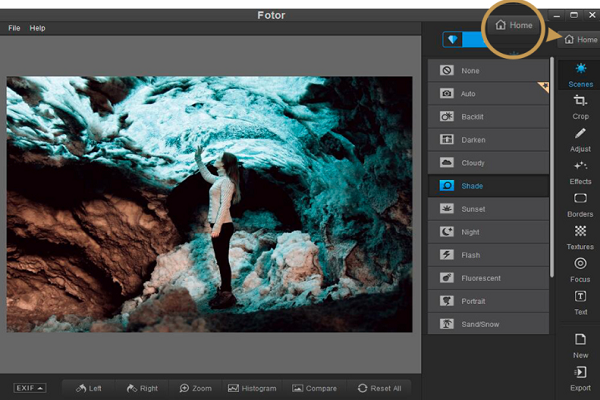
What Fotor is
Fotor is an online photo editor, collage maker and graphic design tool made by Everimaging (listed on Apple’s App Store as Chengdu Everimaging Science and Technology Co., Ltd). It is aimed at casual photographers, students, small businesses and social media users who want quick results without learning a professional editor such as Adobe Photoshop.
When we first reviewed Fotor in 2020, it was mainly a light photo editor and collage maker with a separate desktop app. In October 2026, Fotor’s website describes a much broader set of tools:
- Photo editing: enhancement, retouching, cropping, resizing, colour correction, background removal, object removal and batch editing.
- AI image tools: an AI image generator, AI photo editor, image extender, and avatar and headshot generators, including access to third-party AI image models.
- AI video tools: a video generator and tools for enhancing video or removing backgrounds and objects.
- Design: templates for collages, logos, flyers, cards, wallpapers and passport photos.
- Marketing visuals: product photos, listing images and ad creatives.
Fotor runs in the browser and also offers apps for Windows, Mac, iOS and Android, according to its website.
Edit, collage and design
Fotor has always been organised around three jobs, and they are still the core of the product:
- Edit: adjust exposure, colour and sharpness, crop and resize, retouch portraits, and apply filters and effects. One-click enhancement tools fix dark or washed-out photos.
- Collage: drop several photos into a ready-made layout, then change spacing, borders and backgrounds.
- Design: start from a template for a social media post, poster, card or invitation and replace the text and images.
This makes Fotor useful for school projects, home projects such as cards and invitations, and quick social media graphics, which is how our original review described it, and that still holds.
Fotor pricing
Fotor uses a freemium model with a free plan and paid subscriptions. According to Fotor’s pricing page in October 2026:
- Basic (free): limited free AI credits, 512 MB of cloud storage and normal-quality JPG, PNG and PDF export.
- Pro: ₹3,499 billed yearly for India (shown as about ₹291.58 a month), with 100 AI credits a month, 2 GB of cloud storage, AI batch background removal and replacement, and brand kits.
- Pro+ and Max: higher tiers with more monthly credits, more cloud storage (100 GB and 500 GB) and more concurrent AI generations. Both were shown with a promotional discount at the time we checked.
Paid plans can be billed monthly or yearly, and Fotor says unused credits roll over for up to five months while you stay subscribed. Prices are shown in your local currency and promotions change often, so check Fotor’s pricing page before you buy.
An earlier version of this article quoted US$8.99 a month or US$39.99 a year for the web Pro version, and US$4.99 a month or US$19.99 a year for the desktop version. Those prices and that plan structure are no longer what Fotor’s pricing page shows.
Pros and cons
| Pros | Cons |
|---|---|
| Very easy to learn; templates and one-click tools give quick results | Not a replacement for a professional editor for detailed retouching |
| Works in the browser and on Windows, Mac, iOS and Android | Many AI features depend on paid credits |
| Combines photo editing, collages and graphic design in one tool | The free plan limits export quality and storage |
| Wide range of AI tools, from background removal to image generation | Credit-based pricing can be hard to compare with flat-rate rivals |
Our original review also noted ads in the free web and mobile apps, JPEG noise in the web editor, a 15 MB upload limit and occasional freezes when applying effects. Those were observations of the 2020 version; we have not re-tested Fotor and cannot say whether they still apply.
Is Fotor a Lightroom alternative?
Not really. Fotor is built for quick edits and design, while Adobe Lightroom is built for organising and editing large raw photo libraries. The original version of this review reached the same conclusion: Fotor does not have enough depth to replace Lightroom for serious photographers.
Fotor competes more directly with design-first tools. If you mainly make social media graphics, compare it with Canva and Snappa. If you want a free editor with layers and masks, see our Pixlr review.
Frequently asked questions
Is Fotor free?
Yes, Fotor has a free Basic plan. It includes limited AI credits, 512 MB of cloud storage and normal-quality exports. Paid plans add more credits, storage and features.
Does Fotor have a desktop app?
Yes. Fotor’s website lists apps for Windows and Mac as well as iOS and Android, alongside the web editor.
Who makes Fotor?
Fotor is made by Everimaging. Its iPhone app is published on Apple’s App Store under the name Chengdu Everimaging Science and Technology Co., Ltd.
What are Fotor credits used for?
Credits pay for AI generations, such as creating images or videos with AI models. Fotor’s pricing page shows roughly how many images or videos each plan’s monthly credits cover, and different models use different amounts.
Checked in October 2026 against Fotor’s website and pricing page (India pricing) and Fotor’s App Store listing. We have not tested Fotor ourselves; prices and features change often, so confirm on Fotor’s website before you subscribe.