


HDR is a specialized form of photography that has been designed to expose the details of a scene in both shadows and highlights by merging multiple versions of the same image that has been shot at different exposures. It is indeed tough to do HDR properly without overdoing it, particularly when your goal is to have a photorealistic image.
Aurora HDR – Best HDR Photo Editor Software
The brain is able to see what the camera sensor is not able to capture and the HDR techniques let you create the image which your mind sees.
The 2019 version of Skylum Aurora HDR has a brand new Quantum HDR engine with mapping technology that is based on artificial intelligence. This facilitates the process of photo merging to produce natural results that don’t look concocted.
A new Smart HDR Structure feature delivers precise details and sharpness without any artifacts, halos or noise. This software runs as a standalone app or as a plug-in to Adobe Photoshop and Lightroom.
Conventional HDR photography merges several images but Aurora even lets you change a single raw image to HDR through its AI-based neural network. This rectifies colors, enhances contrast, reduces noise and prevents unnatural ghosting and lighting.
There is a batch processing feature that lets you import numerous folders of images for export as single images. It works with different photo formats, even the raw ones.
Interesting New Features
Like other apps from Skylum, Aurora HDR is also easy-to-use and also has an interface that is user-friendly and that masks around all of its technical complexities.
The new version of Aurora HDR, introduces a new feature that is called presets, with added aesthetic choices as well as refined toning. The app’s sliders and controls will give you a total visual power over a specific picture.
Aurora has 8 Looks collections: Landscape, Essential, Dramatic, Architecture and Artistic. HDR photographers Serge Ramelli, Trey Ratcliff and Randy Van Duinen contribute their personal signature Looks packs that speak about their individual styles.
Applying one-click Looks is just a beginning point as you are allowed to build in added edits with masking and layering features. This photo editing software is non-destructive and hence you can undo any edit and get back to the original image to start off again.
With the new LUT (Lookup Table) mapping feature, you can mouse over the 11 in-built LUTs to get their dynamic previews of the different color grading styles that can be applied to your photos. These LUTs, additional looks and textures are all available for free and at reasonable prices.
With the new Adjustable Gradient filter, that sports shadow sliders and additional highlights, you can apply definite adjustments to the bottom and top of the image or anywhere where you wish to apply the gradient.
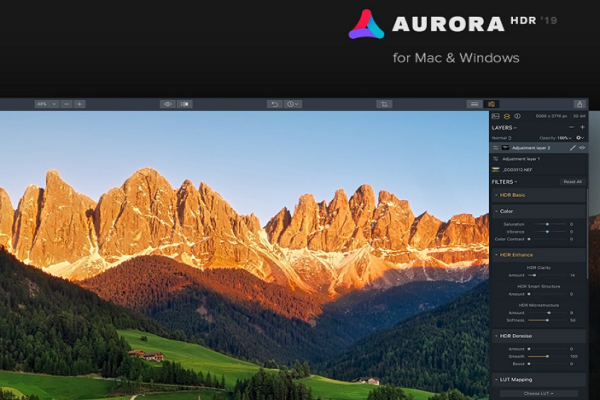
Aurora HDR – The User Interface
The first thing that both experienced and novice photo editors who work in Lightroom will spot is that the extremely user-friendly interface that looks similar to Lightroom, even much sleeker.
The adjustment panels run through the left-hand side and many of the sliders are exactly similar to that of Lightroom. You will also find a histogram at the top.
But that is where all similarities between the two end. Unlike a Lightroom, Aurora HDR lets you work with masks, layers and blending modes like Photoshop. In case you’re a beginner, this won’t make any difference to you but if you’re an experienced user, this is a serious benefit.
Just as in Lightroom, all the alterations that you make to an image are non-destructive. The program will save to its own file format where it will preserve all the history of edit and adjustments. You can always go back and change things whenever you want.
Regardless of whether you’re someone who has no idea about what an HDR is or you’ve been doing it for several years, you will find the User interface easy and sleek.
Everything will be given in front of you and you won’t even have to experiment in order to figure out things. You are also allowed to use other Photoshop plugins alongside Aurora.
Another thing that users simply love about both Luminar and Aurora is that the filters are extremely simple and they all have on-off toggle buttons.
You can always see what the changes are doing to the image without turning off the total layer. While this is not something unique, it is indeed one of those things that you use most frequently.
Aurora HDR – Filters and Features
As long as the various filters are concerned, you can’t be fooled by the simplicity of the user-interface. In fact, it is powerful and also pretty unique. There are many who use artificial intelligence and some of them are downright novel. Skylum’s sister software, Luminar also has all of these.
If you consider the latest version of Aurora HDR 2019, the sliders are exceptionally sensitive. As you’ll be looking for a natural-looking image, you will rarely require making any havoc adjustments beyond 10-20, particularly while working with filters like Smart Structure, HDR Clarity and so on. These filters are like salt, they enhance the quality of the image and if you overuse them, the image loses its quality.
One of the more flexible filters, one of the more useful ones is Adjustable Gradient. It lets you adjust the top of the image from the bottom. In landscapes, the sky is brighter than the foreground, even while using the HDR effect.
When you’re able to easily and quickly change the sky without impacting the foreground, this will save you enough time. There are other proprietary filters like color contrast slider, image radiance filter and HDR enhance panel. If you use all of these wisely, this can really improve the quality of your images.
Aurora HDR is capable of giving you incredible results, produces images with an artistic flair but with natural color and tonal gradation.
With a one-off payment, you can get a feature-rich, sophisticated package that is undoubtedly one of the best HDR applications that has been created. If you’re low on budget but you’re trying for a worthy software, Aurora HDR can be your choice.
