Quick answer: Skylum Aurora HDR is no longer a current product. Skylum’s own website now describes Aurora HDR as “an older product now replaced by Luminar” that “no longer receives updates or upgrades”, and the old Aurora HDR web address leads to a page comparing it with Luminar. If you want to merge bracketed exposures into an HDR image today, Skylum points buyers to Luminar, which includes an HDR Merge tool. Existing Aurora HDR owners should be able to keep using their copies, but they will not get support for new cameras or operating systems.
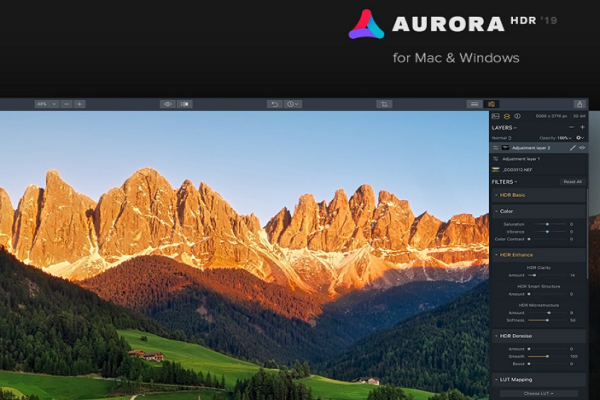
We first published this page as a review of Aurora HDR 2019. We have kept it so that readers searching for Aurora HDR learn what happened to it, and the original description of the 2019 version is preserved below as history. We have not tested the software ourselves. An earlier version of this article called Aurora HDR “undoubtedly one of the best HDR applications that has been created”; we have removed that unsourced claim.
What happened to Aurora HDR?
- The product: Aurora HDR was Skylum’s standalone high dynamic range (HDR) editor for Windows and macOS, sold as a one-time purchase and usable as a plug-in for Photoshop and Lightroom. This article reviewed the 2019 version.
- Status in 2026: Skylum’s comparison page says Aurora HDR, “as an older product now replaced by Luminar, no longer receives updates or upgrades, meaning it won’t benefit from the latest features and performance improvements”. It also says Aurora’s interface “can feel a bit outdated”.
- The replacement: Skylum’s Luminar photo editor now includes HDR Merge for combining exposure brackets, along with panorama stitching and focus stacking. In 2026 Skylum dropped the “Neo” name, so its current editor is simply called Luminar; see our Skylum Luminar review for details.
We could not find an official end-of-sale date for Aurora HDR, and Skylum’s comparison page does not say whether new licences can still be bought. Check with Skylum before paying for it.
If you still use Aurora HDR
- It should keep working on the systems it already supports, but new camera raw formats and future versions of Windows or macOS may not be supported.
- Keep your licence details and installer somewhere safe, because older products can be removed from download pages.
- Before upgrading your operating system or buying a new camera, test whether Aurora HDR still opens your files, or try Luminar’s free trial.
What HDR photography is
As the original article explained, HDR is a technique for showing detail in both the shadows and the highlights of a scene. You take several shots of the same scene at different exposures and merge them into one image. The camera sensor cannot capture what your eyes see in a single high-contrast scene, and HDR merging gets closer to it. The hard part is doing it without an overdone, artificial look, especially if you want a realistic result.
What Aurora HDR 2019 offered (as described in our original review)
- Quantum HDR engine: AI-based tone mapping intended to give natural-looking merges without artefacts, halos or noise.
- Smart HDR Structure: added detail and sharpness.
- Single-image HDR: created an HDR-style result from one raw file, as well as merging brackets.
- Batch processing: merged many bracketed sets from several folders in one go.
- Looks: one-click presets in collections such as Landscape, Essential, Dramatic, Architecture and Artistic, including signature packs by HDR photographers Serge Ramelli, Trey Ratcliff and Randy Van Duinen.
- Layers, masks and blending modes: Photoshop-style tools that Lightroom did not have, with non-destructive editing and full edit history.
- LUT mapping: 11 built-in lookup tables for colour grading, with live previews.
- Adjustable Gradient: separate adjustments to the top and bottom of an image, useful for bright skies over darker foregrounds.
- Interface: a Lightroom-like layout with adjustment panels and a histogram, and on/off toggles for each filter.
The original review advised keeping sliders such as Smart Structure and HDR Clarity at low values for a natural look, because they are easy to overdo. That advice applies to any HDR tool.
Alternatives for HDR today
- Skylum Luminar: Skylum’s own replacement, with HDR Merge built in and sold with a lifetime licence option.
- ON1 Photo RAW: merges photos into HDR images and panoramas; see our ON1 Photo RAW review.
- For a wider comparison, see our list of photo editing software.
Frequently asked questions
Is Aurora HDR discontinued?
Skylum describes it as an older product replaced by Luminar that no longer receives updates or upgrades.
What replaced Aurora HDR?
Skylum Luminar, which includes an HDR Merge tool for combining exposure brackets.
Can I still use my copy of Aurora HDR?
It should keep working where it already runs, but it will not get new camera support or fixes for future operating systems.
Was Aurora HDR a subscription?
No. Our 2019 review described it as a one-off purchase.
Updated in October 2026 using Skylum’s Aurora HDR and Luminar comparison page and our October 2026 review of Skylum Luminar. Skylum’s site did not state whether Aurora HDR can still be bought, so check with Skylum before paying.