Quick answer: Skylum Luminar is an AI-focused photo editor for Windows and macOS, with a companion mobile app. The Luminar 4 we reviewed in 2020 has been replaced: Skylum followed it with Luminar AI and then Luminar Neo, and in 2026 dropped the “Neo” name so the current product is simply called Luminar (version 1.28.1 on the Mac App Store in September 2026). It is sold as a lifetime licence, with an optional subscription for future upgrades and extra content.
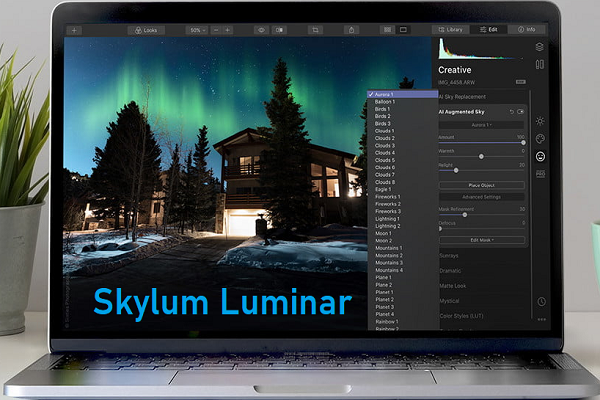
What happened to Luminar 4?
This article originally reviewed Luminar 4, which was in the news in 2020 for its streamlined interface and its AI Sky Replacement tool. Skylum has since replaced it twice:
- Luminar AI succeeded Luminar 4.
- Luminar Neo then replaced Luminar AI.
- Luminar is the current name. In August 2026, Skylum announced it was dropping “Neo” and selling the product only as Luminar, across desktop, mobile and web, as reported by the German magazine PC-WELT. Skylum’s Mac App Store listing is now titled “Luminar: AI Photo Editor”.
Luminar 4 is no longer sold or developed as a current product. If you still use it, it may not support newer cameras or operating systems, so test any upgrade with the free trial first.
Platforms and requirements
- Windows: Skylum’s support site lists 64-bit Windows 10 version 1909 or later, an Intel Core i5 (8th generation) or AMD Ryzen 5 or better, and 8 GB of RAM (16 GB recommended).
- macOS: macOS 12 or later for current versions, with an Intel Core i5 (8th generation) or Apple silicon Mac and 8 GB of RAM.
- Mobile and web: Skylum offers a Luminar mobile app on Apple’s App Store and has announced a web editor as part of its 2026 upgrade.
An earlier version of this article said Luminar was in the Mac App Store but not the Windows store. Today, Skylum sells Luminar for both platforms directly, and its support site says Windows on ARM devices get the installer from the Microsoft Store.
Pricing and licences
Our original review quoted $69 for Luminar 4 as a one-time purchase with a 30-day trial. That price is out of date.
We could not read Skylum’s pricing page during this check (it blocked automated access), so we describe the model rather than quote prices. According to Skylum’s Mac App Store listing in October 2026, full access needs one of two purchases: a Lifetime License (desktop) or a Cross-device Lifetime License (desktop plus mobile). PC-WELT reported in August 2026 that Skylum also offers an optional subscription called Prime, which includes future major upgrades and a library of presets, LUTs and sky templates, and that lifetime licence holders can keep using Luminar without it. Check Skylum’s website for current prices and offers in your country.
AI and editing tools
Skylum’s App Store listing for Luminar documents these tools as of October 2026:
- Generative tools: GenErase (remove distractions and fill the gap), GenExpand (extend the frame) and GenSwap (replace elements).
- Landscape tools: Sky AI for automatic sky replacement, the successor to the AI Sky Replacement we described in 2020, plus Atmosphere AI (fog, mist and haze), Sunrays, Twilight Enhancer AI and Water Enhancer AI.
- Portrait tools: Skin AI, Face AI, Body AI, Studio Light and Bokeh AI.
- Other tools: Enhance AI (one slider that adjusts many settings), Noiseless AI, Supersharp AI, Upscale (up to 6x), Restoration for old photos, Background Removal AI, Supercontrast and Light Depth.
- Merging: Panorama Stitching, Focus Stacking and HDR Merge.
- Workflow: layers, presets, non-destructive editing, copy-and-paste of adjustments, and RAW support for more than 1,000 camera models.
The Luminar 4 review, kept for reference
The points below describe Luminar 4 as we reviewed it in 2020. They help readers who still use it, but they do not describe the current Luminar.
Pros and cons in 2020
| Pros (Luminar 4) | Cons (Luminar 4) |
|---|---|
| Integrated image catalogue | Interface changed dramatically from version 3 |
| AI Sky Replacement | No virtual copies |
| Non-destructive editing | Some one-click “Looks” lacked subtlety |
| Could run as a plug-in for Lightroom Classic and Photoshop | Limited keywording and search |
Interface
Luminar 4 had a dark grey interface with flat icons and a customisable adjustment panel on the right. An eye icon toggled the unedited original, and a split view showed before and after side by side. Mouse-wheel zoom and an always-visible Reset Adjustment button made it easy to navigate.
Import and organising
A plus (+) button added images, and photos appeared as tiles in the centre. You could colour-code, rate, favourite, pick and reject photos, and Skylum had added a search feature in Library mode. It could not assign keywords or filter by colour labels, and its search was far less capable than Adobe Lightroom Classic, which can search by attributes such as lens and focal length.
Develop and Looks
For raw files, Luminar 4 offered its own Luminar Default profile, Adobe Standard and camera-matching profiles. Edit mode grouped tools into sets such as Essentials and Creative, including Dramatic HDR, Sky Replacement and Texture Overlay, with masks that could be brushed, radial, gradient or luminosity-based. More than 70 built-in Looks ranged from black and white to Golden Hour and Soft Portrait, and more could be bought from Skylum’s marketplace.
Who Luminar suits today
- Good fit: photographers who want fast, AI-driven results, especially for landscapes and portraits, and who prefer a lifetime licence over a monthly subscription.
- Consider alternatives: if you need deep cataloguing and keywording, Lightroom Classic remains stronger. ON1 Photo RAW is another raw editor sold with a one-time licence, Current Luminar includes HDR Merge; for background on Skylum’s earlier standalone HDR app, see our Aurora HDR review. Our list of photo editing software compares more options.
Frequently asked questions
Is Luminar Neo the same as Luminar?
Yes. In 2026 Skylum dropped the “Neo” suffix, and the product is now sold as Luminar. Version numbers continued from Luminar Neo (1.28 in 2026).
Can I still buy Luminar 4?
No. Luminar 4 was replaced by Luminar AI and then Luminar Neo, now called Luminar. Buy the current version from Skylum.
Is Luminar a subscription?
Not necessarily. Skylum sells lifetime licences, and an optional subscription adds future upgrades and extra content, according to Skylum’s App Store listing and PC-WELT’s report.
Does Luminar replace skies automatically?
Yes. Skylum describes Sky AI as automatic sky replacement, and it is one of Luminar’s best-known tools.
Checked in October 2026 against Skylum’s Mac App Store listing for Luminar, Skylum’s support site (system requirements) and PC-WELT’s August 2026 report on the Luminar rename. Skylum’s own pricing page could not be read, so confirm current prices on Skylum’s website before you buy.