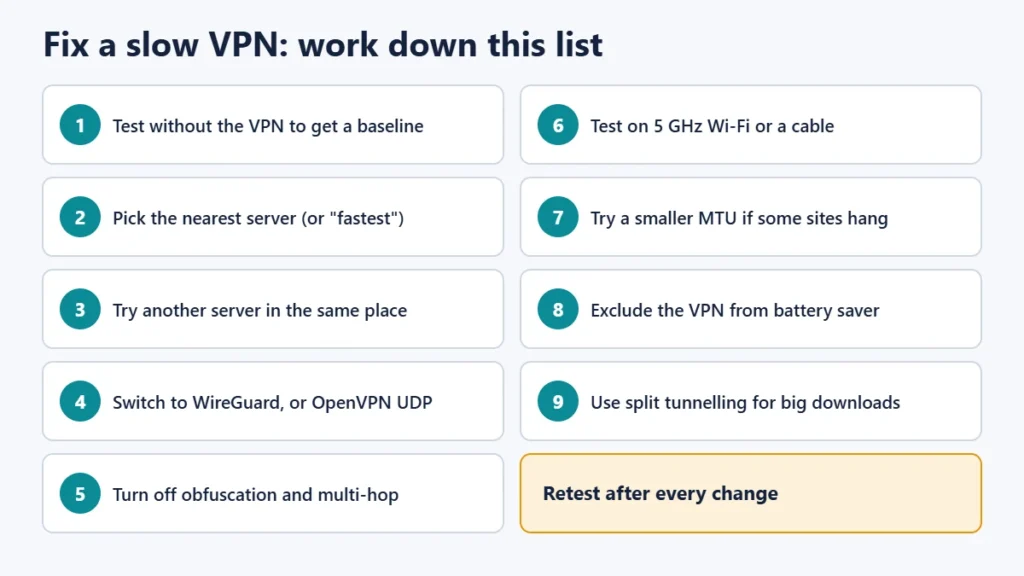
A VPN is usually slow for one of a few reasons: the server is far away, the server is busy, the protocol isn’t the fastest one your app offers, your own internet connection or Wi-Fi is the real bottleneck, or a setting such as obfuscation, multi-hop or battery saver is adding work. A VPN can never be faster than the connection underneath it, because every byte still travels over your normal internet line, plus a detour through the VPN server and a little extra data for encryption. The quickest fixes are to test your speed without the VPN first, connect to a nearby, less busy server, and switch to WireGuard (or your provider’s WireGuard-based protocol) if you’re using OpenVPN over TCP.
This guide explains each cause and how to fix it, in the order most likely to help, plus how to test properly so you know whether a change made a difference. It is based on documentation from VPN providers including Proton VPN and Mullvad, WireGuard’s and OpenVPN’s technical documents, internet standards on packet sizes, and Android, Apple and Windows power-saving documentation, checked on 13 November 2026.
Key takeaways
- Test without the VPN first. If your base speed is low, the VPN can’t fix it.
- Distance adds delay: light in fibre covers about 1,000 km in roughly 5 ms one way, so far-off servers add latency before any other cause.
- Try several nearby servers, because busy servers share their capacity.
- Protocol matters: WireGuard is designed to be leaner than OpenVPN, and OpenVPN over TCP is usually slower than over UDP.
- Extra privacy features cost speed: obfuscation, multi-hop and similar modes add delay.
- Change one thing at a time and retest, so you know what helped.
First, test properly
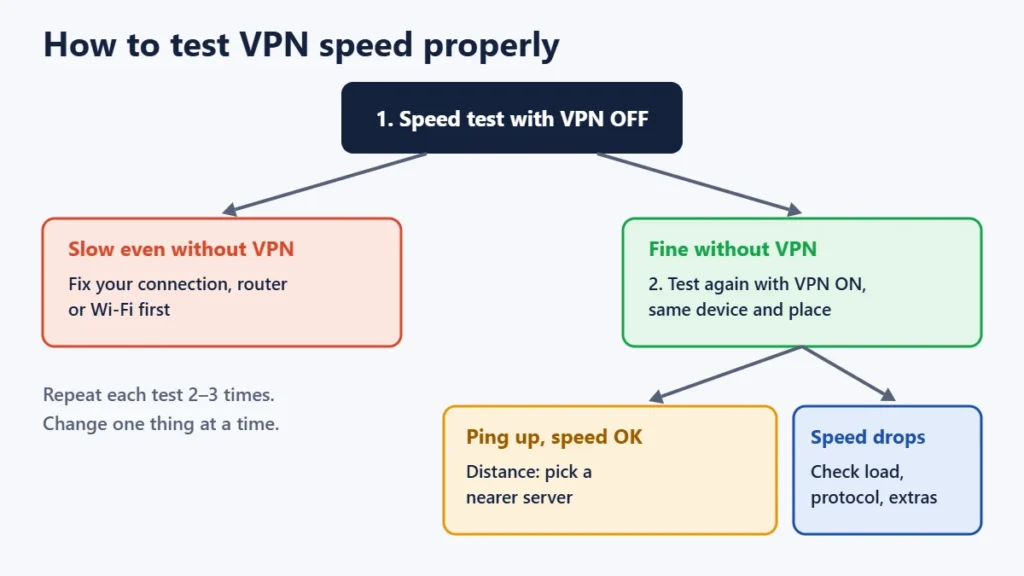
Before changing anything, measure. Run a speed test with the VPN off, then with it on, using the same device in the same place. Repeat each test two or three times, because single results vary. Note download speed, upload speed and ping (latency).
- If speed is low even without the VPN, the problem is your connection, router or Wi-Fi.
- If speed drops sharply only with the VPN, work through the causes below.
- If ping jumps but download speed holds up, distance is the main cause.
Some loss is normal. Encryption adds a small amount of data to every packet, and your traffic takes a longer route. Providers publish very different estimates of a “normal” drop, so there is no single right number. Compare against your own baseline.
The common causes and how to fix them
1. The server is too far away
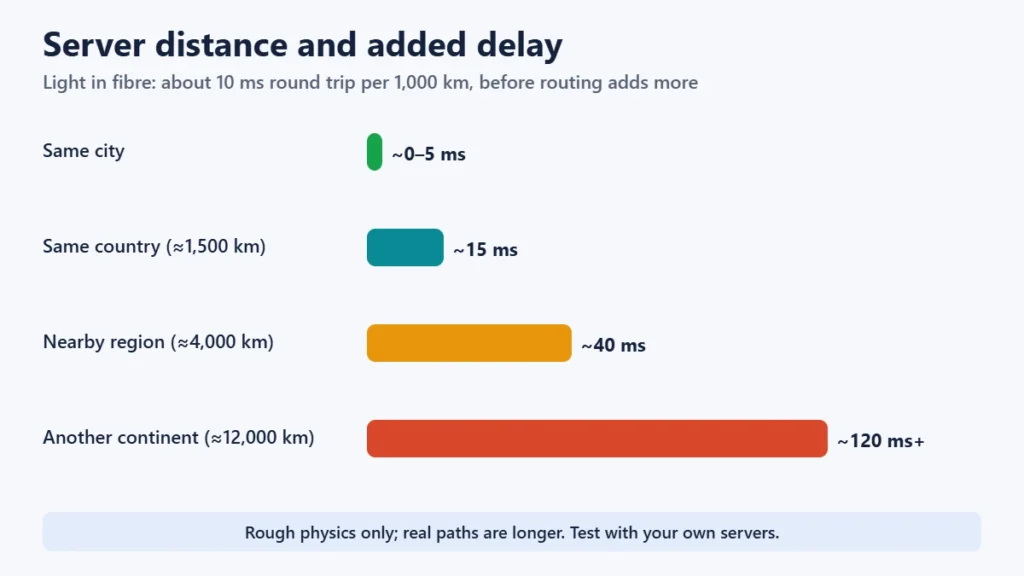
Data can’t travel faster than light in fibre, roughly 200,000 km per second. That works out to about 10 ms of round-trip delay for every 1,000 km, before routing and processing add more. Connecting from India to a server in the US or Europe adds a lot of latency compared with a server in India or a nearby country. Proton’s support documentation says the same: a more distant server usually means higher latency and lower speed.
Fix: choose the nearest server, or the nearest one in the country you need. Most apps have a “fastest” or “recommended” option that does this for you.
2. The server is busy
A VPN server’s capacity is shared by everyone connected to it, so peak hours can be slower. Proton, Surfshark and ExpressVPN all advise trying a few different servers.
Fix: switch to another server in the same city or country. Some apps show each server’s current load, so pick a lighter one.
3. You’re on a slower protocol
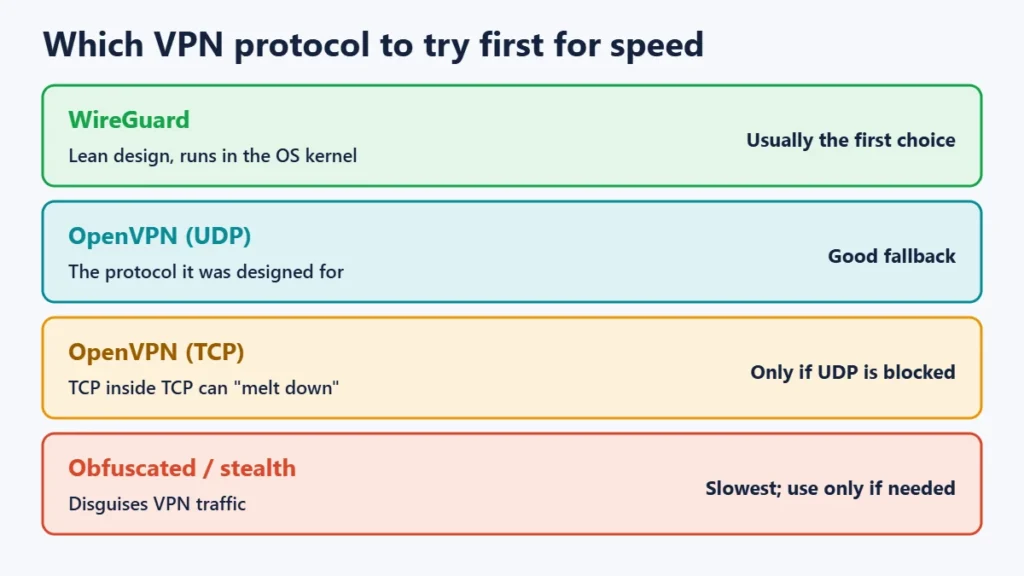
The protocol is the method your VPN uses to build its encrypted tunnel. WireGuard was designed to be simpler and faster than older protocols. Its developers say it aims to be “considerably more performant than OpenVPN”, partly because it runs inside the operating system’s kernel, while OpenVPN runs as a normal program and copies every packet back and forth. OpenVPN is designed to run over UDP. Its own manual says TCP mode is less efficient, and running TCP traffic inside a TCP tunnel can suffer what OpenVPN calls “TCP meltdown” on poor connections.
Fix: in your VPN app’s settings, choose WireGuard (or the provider’s WireGuard-based protocol, if it uses a different name). If you need OpenVPN, choose UDP rather than TCP unless your network blocks UDP. Providers disagree on which protocol is fastest for everyone, so test two and keep the faster one.
4. Privacy extras are switched on
Features that hide VPN traffic or route it through two servers do extra work. Mullvad says obfuscation “can significantly increase the latency and slow down the speed”, and that multi-hop routing and its traffic-masking feature reduce speed too. Proton says its Secure Core multi-hop servers add latency.
Fix: turn these features off unless you need them, for example on a network that blocks normal VPN connections.
5. Your Wi-Fi is the bottleneck
Weak Wi-Fi, a crowded band or an old router can limit speed with or without a VPN. Mullvad suggests testing over a wired Ethernet connection to rule this out.
Fix: move closer to the router, use the 5 GHz band if available, restart the router, or test with a cable. If you run the VPN on your router, its processor may be the limit. Try the VPN app on your device instead to compare.
6. Packet size (MTU) problems
The VPN wraps your data in extra headers, so each packet gets slightly larger. If a packet becomes too big for part of the network path, and the “packet too big” messages that should fix this get blocked, connections can stall, especially when pages or downloads start. Internet standards describe this as a known problem with tunnels. WireGuard sets a smaller default packet size (MTU) to allow for its own overhead.
Fix: if some sites hang while others work, look for an MTU or “small packets” option in your VPN app. Mullvad suggests trying an MTU of 1280. Change it back if it doesn’t help, because lowering MTU isn’t a general speed boost.
7. Battery saver or background limits
On phones, power-saving modes restrict apps running in the background. Android’s Doze mode suspends network access for background apps, and Apple’s Low Power Mode and Windows’ energy saver also limit background activity. A VPN app that gets restricted can reconnect slowly or drop.
Fix: exclude your VPN app from battery optimisation (on many Android phones, Settings → Apps → your VPN → Battery → Unrestricted; menu names vary by brand), or turn off battery saver while you need full speed.
8. Everything goes through the VPN
If all your traffic goes through the tunnel, large downloads, game updates and video calls compete for the same VPN connection.
Fix: use split tunnelling, if your app offers it, to send only the apps that need the VPN through it. Not every platform supports it.
9. Your internet provider limits VPN traffic
Some providers say certain ISPs slow down VPN traffic or particular ports. This can’t be confirmed from a single speed test. In India, TRAI’s 2017 net neutrality recommendations prohibit internet providers from “blocking, degrading, slowing down” content based on what it is.
Fix: try a different protocol or port in your VPN app, and compare at different times of day. If speed is consistently poor only with a VPN and only on one provider’s network, raise it with that provider, citing your test results.
10. Another app is interfering
Some antivirus or firewall software inspects VPN traffic and slows it down.
Fix: to test, pause the security software briefly. If speed improves, add the VPN app as an exception rather than leaving protection off.
What is a “normal” speed drop?
There is no single number. Providers publish estimates that disagree. The overhead per packet is small, but distance and server load can matter much more. On a fast connection to a nearby, quiet server with WireGuard, the difference may be hard to notice in everyday browsing. On a distant, busy server with obfuscation turned on, it can be large. Judge by your own before-and-after tests, not by a percentage from someone else’s connection.
Frequently asked questions
Why is my VPN slow on Wi-Fi but fine on mobile data?
Your Wi-Fi or router is the likely bottleneck, or the network may be limiting certain kinds of traffic. Test without the VPN on the same Wi-Fi to check.
Which VPN protocol is fastest?
WireGuard is designed to be faster and leaner than OpenVPN, and OpenVPN over UDP is generally faster than over TCP. Results depend on your network, so test two protocols and keep the faster one.
Does a VPN slow down gaming?
It can raise ping because traffic takes a longer route. Use a server close to the game server, or exclude the game with split tunnelling.
Can a VPN make my internet faster?
Usually not. Your VPN speed can’t exceed your base connection. In rare cases where a provider limits a particular kind of traffic, a VPN may change that, but you can’t count on it.
Is a slow VPN unsafe?
Not necessarily. Speed and security are separate. But if your VPN keeps disconnecting, check that its kill switch is on so traffic doesn’t leak during drops.
The short version
Test without the VPN, pick a nearby and less busy server, use WireGuard or OpenVPN over UDP, turn off obfuscation and multi-hop unless you need them, check your Wi-Fi, and exclude the VPN from battery saver. Change one thing at a time. For more on when a VPN is worth using, see our guides on public Wi-Fi safety and whether VPNs are legal in India, and our Proton VPN review.