


Of late, online photo editors have been gaining momentum over the last few years. This took place especially when Adobe, the photo editing giant moved to a subscription based model few months back.
Although professional photographers never threw any kind of tantrums for subscribing with a small amount of money every month, yet it is the newbies and the casual photographers who are feeling the pinch in their pockets.
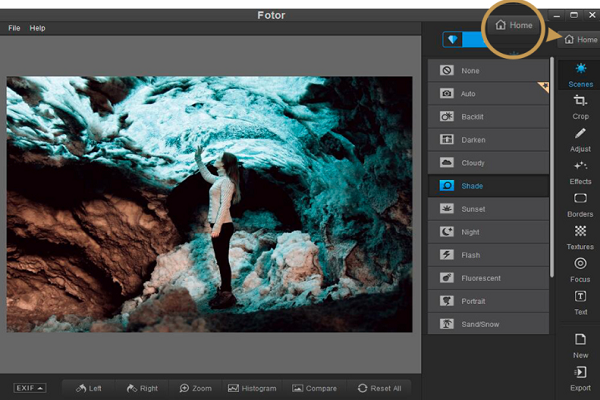
Such online image editing tools are not just perfect for the amateur shooters but they can also be used in school projects too. They also seem to be perfect for designing home projects like cards, invitations and so on. Among the several names that you’ve come across in so many years, Fotor is one of them.
Here in this post, we’re going to give you a detailed review of this photo editing tool.
Fotor – What it is
Fotor is both a collage maker and an online photo editor that has a proper desktop application for editing photos with RAW conversion support. There are several versions of this software and you can go for any of the online versions or even download a copy of the desktop version to install it in your computer.
Your choice should be based on the functionality that you need. If you wish to go for RAW conversion, the desktop version is going to ideal for you.
On the other hand, for light editing tasks of JPEG files, the online version tends to be better. However, in any case, you have to upgrade to the Pro version as without this, the usability of the apps will remain unused.
Our Verdict on the Pros and Cons of FOTOR
Fotor is touted to be a chain of programs for editing photos. This was a company that was started as a web-based software for Flash Player. Currently, they have 3 different web-based programs on Android, iOS and HTML5. They also offer a pro photo editing software on Mac and Windows.
Fotor has got functions for creating collages, editing photos, HDR, graphic design and basic retouching of images. Here are the few pros and cons.
The PROS
- Gives you a chance to edit images online, mobile and through the desktop.
- Effects and filters are smart and intelligent.
- Has RAW file converter.
- Is a convenient collage maker.
- Is compatible with social networking sites.
The CONS
- Too many ads in the web and mobile apps.
- Few possibilities for deep retouching of images.
- Not enough functions to replace Lightroom.
- Isn’t good enough for creating an image from scratch.
So, can Fotor be called one of the most famous editors in the market that could probably be said to be a Lightroom alternative? Read on the review to decide that.
Fotor – Free Windows Photo Editor
Fotor is a free Windows photo editor and is an incredible tool if you have few photos stacked in your desktop and you would like to hang them on your wall.
Fotor has abundance of image-improvement tools and filters that will give a new look to your photos. Not only that, Fotor also support majority of the image file formats and also offers RAW file processing.
Unlike the open-source image editor GIMP, Fotor can’t rival the range of tools, brushes and plugins of Photoshop. But the only benefit is that it is simpler to use.
Fotor is replete with several one-click filters that are created to improve your pictures based on the light conditions that they’re clicked in and also the subject. Instances include portrait, artificial lighting, sunset, theater and landscape.
User experience of Fotor
In lieu of the not-too-irritating ads, Fotor provides you with wide array of tools for editing images. You are allowed to apply frames and other special effects as well as borders to enhance the appearance of the photos and also get tilt-shift blurry effects that you usually get in high-end cameras.
The main emphasis here is on the rapid results and hence Fotor has 13 different single-tap scenes that you can use to alter the appearance of the images.
The dark scenes can be brightened, the over-exposed images can be dimmed and colors can be punched. Fotor is free of cost as the developers want you to purchase Fotor Pro that eliminates all ads and adds brand new features that include HDR support and more editing features.
Edit, Collage and Design
When you open Fotor for the first time, you’ll be given three different options to choose from, Edit, Collage and Design.
‘Edit’ includes retouching and editing of images, ‘Collage’ is used for designing the best collages by including your best images and ‘Design’ is everything that you do with making designs and school projects. With this feature, you can do various other things in terms of project and designing.
Reducing JPEG Noise – Fotor Web
If you open an image in its JPEG format, you’ll be surprised by how much the image differs from the version that the photo editor will show you. The entire photo acquired too much noise but whenever you change the browser, this didn’t fix the issue.
The most interesting is that while you save a photo and get an image without noise, making any change to the photo to save them is nothing but impossible. You are not supposed to upload a photo that is larger than 15MB.
Color Effects – Fotor Web
If you open the Effect tab, you’ll find 38 different sets of effects which are incredibly amazing as they don’t contain any over-saturated and sharp versions. Majority of them are classic that only changes your photo lightly.
Nevertheless, there are a couple of pitfalls too. Once you apply few of the effects, the program can freeze totally while loading. Henceforth, you can no longer many further changes.
Fotor Prices
While Fotor Classical is used free of cost online, you can also upgrade to the Pro full web version. This will cost you either $8.99/month or $39.99/year depending on the kind of payment that you choose. For the desktop version of the program, you have to pay either $4.99/month or $19.99/year.
Therefore, if you’re trying your best to choose a photo editing software that is well within your budget, you can certainly choose Fotor to reap all the above mentioned benefits.
