
Quick answer: Five accessories make the biggest difference for most PC and console players: a gaming mouse with an accurate optical sensor and adjustable sensitivity, a comfortable wired headset with a detachable microphone, a mechanical keyboard, a wired Ethernet connection, and a good wireless controller. Prices change constantly, so compare current listings rather than relying on old figures; this guide explains what each accessory does and what to look for.
About this guide
This article was first published several years ago as a list of gaming accessories “under $35”, with prices and Amazon offers. Those prices are long out of date, and several of the products described cost well over $35 even when new, so we have removed the price claims. We have kept the five accessory types, corrected the details, and named the specific products the original descriptions were based on, so you know what was being described. Details were checked in October 2026.
1. A gaming mouse with an optical sensor
A good gaming mouse tracks movement accurately, lets you change sensitivity (measured in DPI, dots per inch) on the fly, and can store settings for different games. Many also have programmable buttons and adjustable weights.
The original version of this article described the Logitech G502 Proteus Spectrum. According to Logitech’s product listing, it uses a PMW3366 optical sensor with a range of 200 to 12,000 DPI, lets you switch between five DPI settings, comes with five 3.6 g weights (up to 18 g extra in total), and has RGB lighting you can customise. Some DPI settings need Logitech’s software. The Proteus Spectrum has been listed as discontinued by retailers, and Logitech has since released newer G502 models.
What to look for:
- an optical sensor with a DPI range that covers both low (precise aiming) and high (fast turning) settings;
- a shape that fits your grip and hand size;
- on-board memory for profiles, if you play on more than one computer;
- a weight you can adjust, if you like a heavier or lighter mouse.
2. A gaming headset with a detachable microphone
A headset lets you hear footsteps and other positional sound clearly and talk to your team. Comfort matters as much as sound, because gaming sessions are long.
The headset in the original article was the HyperX Cloud Alpha. HyperX describes it as having dual-chamber drivers, with one chamber for bass and a separate one for mids and highs to reduce distortion; an expanded aluminium frame; memory-foam ear cushions; a detachable braided cable with in-line volume and microphone controls; and a detachable noise-cancelling microphone certified by Discord and TeamSpeak. It works with PC, PlayStation 4, Xbox One and other devices with a 3.5 mm port. HyperX, formerly part of Kingston Technology, has been owned by HP since June 2021.
What to look for:
- comfortable ear cushions and an adjustable headband;
- a microphone you can detach or mute easily;
- the right connection for your device: a 3.5 mm jack works almost everywhere, while USB or wireless headsets may only work with certain consoles.
3. A mechanical keyboard with backlighting

Mechanical keyboards use a separate switch under every key. Gamers like them for consistent key feel, faster and more reliable key presses, and durability. Backlighting helps when you play in a dark room.
The original article described a keyboard with an aluminium top plate, plate-mounted keys, double-shot moulded keycaps, red LED backlighting and “clicky” switches that give medium resistance with an audible click. It did not name the model, so we cannot confirm its specifications.
What to look for:
- Switch type: clicky switches give a tactile bump and a click; linear switches are smooth and quieter. Try both if you can.
- Size: compact layouts without a number pad leave more room for your mouse.
- Anti-ghosting and key rollover: so several keys pressed together all register.
- Build: a metal plate and double-shot keycaps tend to last longer, because the letters do not wear off.
4. A wired Ethernet adapter
A wired connection is usually more stable than Wi-Fi, with lower and steadier latency, which matters in online games. If your laptop or console has no Ethernet port, a USB Ethernet adapter adds one.
The adapter in the original article was a USB 2.0 model rated at 10/100 Mbps, compatible with Windows, macOS, Linux and the Nintendo Switch, with link and activity lights. Nintendo’s own support pages confirm that the original Switch dock needs a wired LAN adapter (sold separately) in one of its USB ports, while the dock supplied with the Switch OLED model has a built-in LAN port. The console must be docked, in TV mode, to use a wired connection.
What to look for: a 10/100 Mbps adapter caps your connection at 100 Mbps. If your internet plan is faster than that, choose a gigabit adapter, which needs a USB 3.0 or faster port to reach full speed. Check that the adapter supports your operating system or console before you buy.
5. A wireless gaming controller
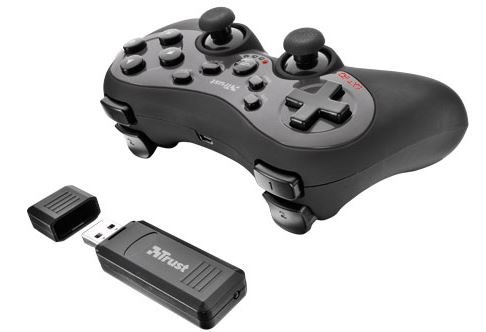
Many PC games and mobile games support controllers, and a wireless one is more comfortable for games designed around a gamepad, such as racing and sports titles.
The controller described in the original article matches the SteelSeries Nimbus, launched in 2015 for the Apple TV. It was a full-size wireless controller certified under Apple’s Made for iPhone/iPad (MFi) programme, rated by SteelSeries for more than 40 hours of play, charged through a Lightning port, and had pressure-sensitive buttons and a menu button. It worked with Apple TV, iPhone, iPad and Mac. (The original article said it worked with “other PC, laptops”; MFi controllers are made for Apple devices.)
What to look for: check which platforms a controller officially supports, how it connects (Bluetooth, a USB receiver or a cable), how it charges, and how long the battery lasts. Many recent Apple devices and PCs also work with standard Xbox and PlayStation wireless controllers, so you may not need a specialist model.
Before you buy
- Compare prices across shops on the day you buy; gaming accessories are discounted often, and old price lists quickly become wrong.
- Check compatibility with your exact PC, console or phone on the manufacturer’s site.
- Read the warranty terms, especially for headsets and controllers, which take the most wear.
The original version of this article also suggested using an Amazon coupon from a coupon website. That website is no longer active, so we have removed the reference.
If you are choosing a new console or handheld to go with these accessories, see our guide to new gaming devices in India. For games, see the best video games available on Amazon and our look at whether GTA 5 is the best game ever made.
Frequently asked questions
Is a wired connection better than Wi-Fi for gaming?
Usually, yes. A wired Ethernet connection tends to give lower and more consistent latency than Wi-Fi, which helps in fast online games. A good, close Wi-Fi signal can still work well.
Can I connect a Nintendo Switch to the internet with a cable?
Yes. According to Nintendo, the original Switch dock needs a USB wired LAN adapter, while the Switch OLED model’s dock has a LAN port built in. The console must be in the dock to use a wired connection.
What does DPI mean on a gaming mouse?
DPI (dots per inch) measures how far the pointer moves for each inch you move the mouse. A higher DPI moves the pointer further; many players use a lower setting for precise aiming.
Do I need a special controller for Apple TV or iPhone?
Not necessarily. MFi controllers such as the SteelSeries Nimbus were designed for Apple devices, but many recent Apple devices also support standard Xbox and PlayStation wireless controllers.
Product details checked in October 2026 against the manufacturers’ published specifications (Logitech, HyperX, SteelSeries), HP’s announcement of the HyperX acquisition and Nintendo’s support pages. No prices are given because they change frequently.



2 comments
Yes. I want that too.
How can I get in contact with the editor of this website?
how can I get in contact with the editor of this website?